
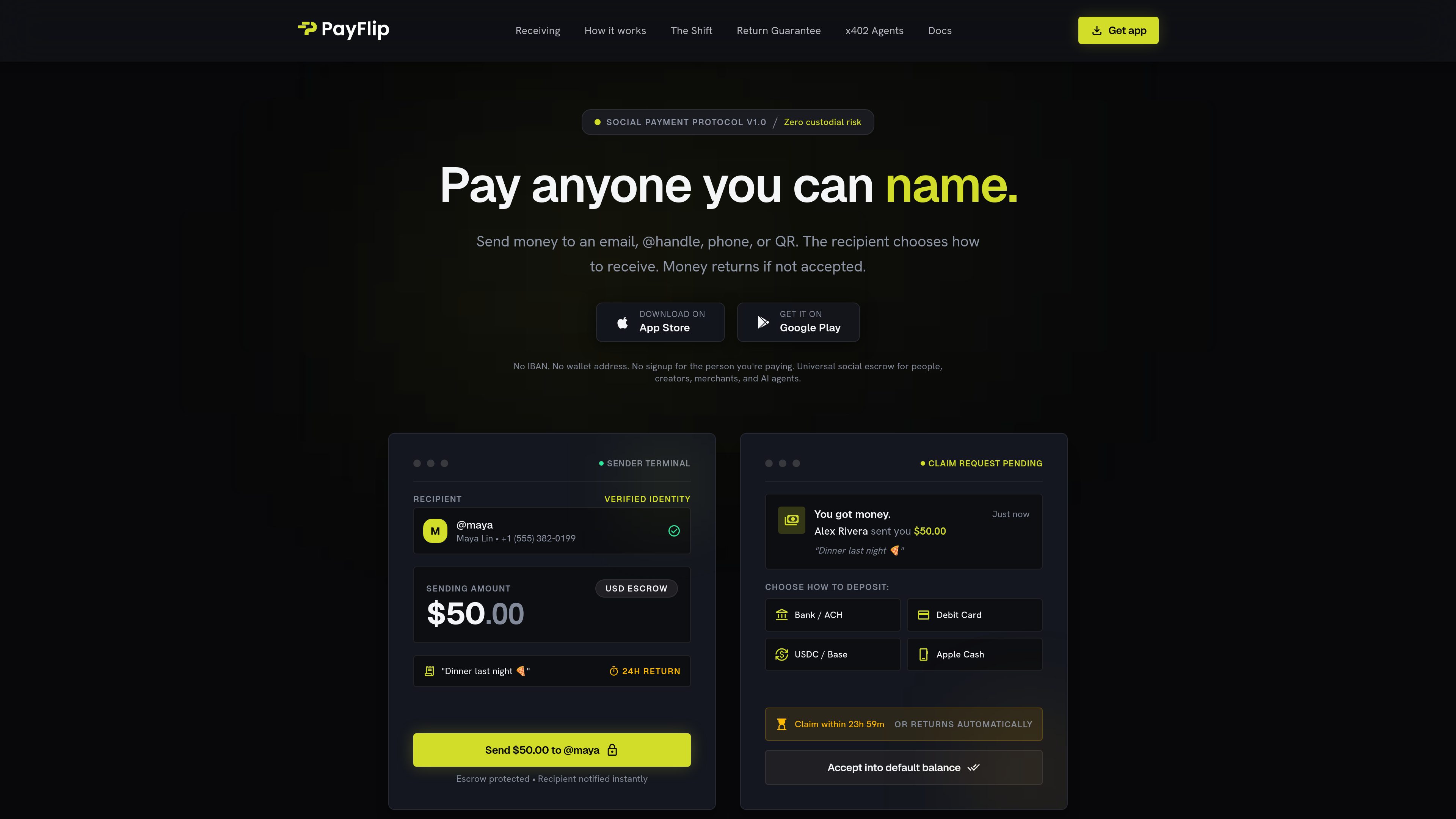
Identity-based payment addressing
Send to an email address, phone number, @username, QR code, merchant, agent, or link, so the sender does not need the recipient’s IBAN, bank account number, or wallet address upfront.

Payflip is a payment app and claim-link protocol for sending money to a person by email, phone number, @username, QR code, or link. Recipients can choose an available way to receive the payment, while unclaimed transfers are designed to return automatically after the sender’s selected time limit.
Payflip is a payment app and claim-link protocol that lets people send money using an email address, phone number, @username, QR code, or link instead of entering bank details or a wallet address. The sender specifies the amount, can add a note, and sets an automatic return period for an unclaimed payment.
The recipient receives a notification or claim link and chooses an available receiving method. Payflip presents this as an escrow lifecycle: a payment is pending until claimed, settles after acceptance, or returns to the sender when its time-to-live expires. This workflow is designed for payments where the sender can identify the recipient but does not have their account information.
Payflip can be used through its iOS and Android apps, browser claim links, chats and direct messages, and QR codes. The site references bank or ACH deposits, debit cards, USDC, and Apple Cash in its receiving flow. Separately, the company describes non-custodial stablecoin payments using USDC and USDT across Ethereum, Polygon, BNB Chain, and Solana.
Send to an email address, phone number, @username, QR code, merchant, agent, or link, so the sender does not need the recipient’s IBAN, bank account number, or wallet address upfront.
The recipient chooses how to receive an available payment. The site’s examples include Bank/ACH, debit card, USDC on Base, and Apple Cash, while the company overview describes stablecoin transfers in USDC and USDT.
Payments move through pending, claimed, or returned states. When the configured time-to-live expires without acceptance, the site says the funds return to the sender automatically.
Payflip supports an app-based flow alongside browser claim links, chat and direct-message notifications, QR codes, and receiving links that can open without a separate app download.
The company says accounts use embedded smart wallets created through Privy, with Payflip coordinating routing and sponsoring eligible network fees without taking custody of wallet keys or user funds.
The mobile app supports iOS 16+ and Android 12+. Account protections described by the company include email one-time codes, optional passkeys, and biometric app lock.
Send a friend money for a shared expense or informal payment using a phone number, email, or handle. The recipient can claim it without first sharing bank or wallet details.
Creators, online communities, and chat-based groups can distribute money through claim links or messages, allowing recipients to receive funds from the channel where they are already communicating.
Businesses or organizers can send payouts, rewards, bounties, or prizes to named recipients. The return mechanism is intended to handle payments that are not claimed within the defined time window.
Organizations distributing money to a list of people can use identity-based claim flows instead of collecting account information in advance. Unclaimed amounts are described as returning to the sender rather than remaining outstanding.
The site presents AI-agent payments and x402 support as a coming-soon direction, with human-readable handles, spending allowances, per-call limits, and fiat-out options described as part of the planned machine-payment flow.
The homepage says the recipient does not need an account, app, wallet, or IBAN to claim a payment. A browser claim link can be opened without downloading an app. The sender’s own account and available payment method requirements may differ.
Payflip describes an automatic return process. A pending payment remains available until its time-to-live expires; if it is not claimed, the funds return to the sender.
The recipient opens the notification or claim link and chooses an available receiving method. The site shows Bank/ACH, debit card, USDC on Base, and Apple Cash in its receiving example. Exact availability may depend on the payment and location.
No. Payflip states that it is financial technology software, not a bank, and does not take deposits or hold customer funds. Its company page describes the stablecoin wallet setup as non-custodial, with wallet infrastructure provided by Privy.
The homepage states that Payflip is compatible with iOS 16 or later and Android 12 or later. Browser-based claim links are also described as an access option.
Traffic data is for reference only.

dofott.com
Automatically adds Google Maps travel-time blocks before and after Google Calendar events with a location, helping people traveling to meetings reserve realistic journey time in calendars, scheduling pages, and planning apps.

blancbrowser.com
Blanc is a minimal desktop browser for macOS, Windows, and Linux with built-in ad and tracker blocking, private tabs, and keyboard-first navigation. It is designed for people who want a smaller browser surface while keeping tools for tab organization, profiles, reference viewing, and optional encrypted sync.

relic.space
Relic is a clipboard manager that saves what you copy, makes it searchable, and syncs your history across computers and phones. It is designed for people who need to recover text, files, images, links, and other copied material without sending it to themselves manually.

linkflick.com
LinkFlick is a macOS menu bar utility that transfers supported Apple Magic accessories between trusted Macs on the same local network. It is designed for people who use one Magic Keyboard, Mouse, or Trackpad with multiple Macs and want to avoid manual re-pairing.

callfifi.app
Fifi is an iPhone alarm that rings like an incoming call, then has a selected character read a customizable morning briefing. It is designed for people who want their alarm to lead into the day’s information rather than end with a dismissible tone.

www.bzgapps.com
Coherence X turns websites into standalone macOS apps powered by Chrome and other supported Chromium-based browsers. It is designed for Mac users who want separate Dock-accessible apps, browser profiles, extensions, and link behavior for web services.