
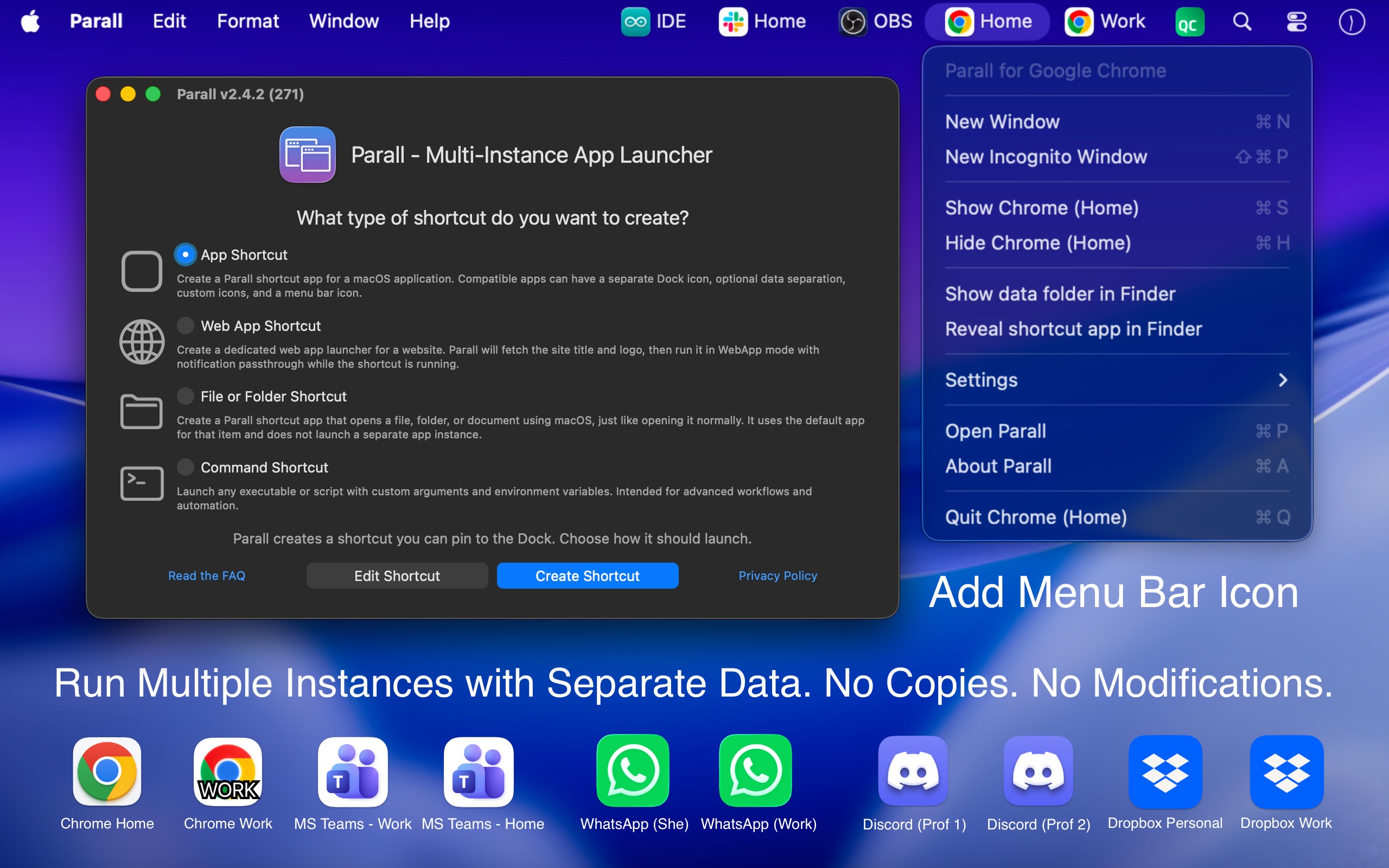
Separate app instances
Run multiple supported instances of the same macOS app side by side, with distinct shortcut names and Dock identities instead of repeatedly switching one app between accounts or profiles.

Parall is a native macOS launcher for creating separate instances of supported apps, websites, files, folders, and command-line tools. It helps users maintain distinct app identities, data paths, profiles, and launch settings where macOS and the target app support them.
Parall is a native macOS launcher for running separate instances of supported applications. It creates lightweight shortcuts that can give each instance its own name, Dock icon, launch settings, and—when supported by the target app—separate accounts, profiles, settings, and data paths.
The original application bundle is not copied, repackaged, re-signed, or modified. Shortcuts continue to launch the installed app, so its normal updater and code signature remain in use. Parall also creates Web App Shortcuts from any website URL, plus file, folder, and command-line shortcuts with configurable arguments and environment variables.
Its operation is local and offline for shortcut creation and launching. Compatibility is app-specific: supported Chrome-, Firefox-, Electron-, Eclipse-, and ToDesktop-based applications can receive automatic data separation, while other compatible apps may use features such as HOME redirection or custom launch variables.
Run multiple supported instances of the same macOS app side by side, with distinct shortcut names and Dock identities instead of repeatedly switching one app between accounts or profiles.
Assign separate data folders, storage paths, accounts, profiles, or settings where the target app supports independent data. Parall can automatically configure separation for supported app families, including sandboxed applications.
Convert any website URL into a native WebKit-based shortcut with its own Dock identity and configurable website storage path.
Create command, file, and folder shortcuts with custom command-line arguments, environment variables, HOME overrides, and selected advanced Info.plist values.
Customize shortcut labels and icons, apply Light or Dark appearance overrides, configure optional menu bar icons, and use supported Dock effects or animation.
Parall works without a background daemon, bundled browser engine, or external helper download. It launches the original installed app through standard macOS mechanisms rather than modifying app bundles or system files.
Create independent shortcuts for supported communication, browser, productivity, or other apps so different accounts and profiles can remain available at the same time where the app permits separate data.
Use separate app data paths, HOME overrides, and environment variables for tools such as supported IDEs or Arduino IDE setups, keeping project configurations, toolchains, boards, or libraries apart.
Turn frequently used web services into individual Dock shortcuts with distinct names, icons, and storage, allowing website-based workflows to be separated from one another.
For compatible educational workflows, configure redirected shortcut data to be erased when the shortcut quits so each experiment or student session can begin without manually clearing previous data.
Run separate supported instances of Philips Hue Sync with independent data so different instances can be associated with different LED assignments for separate displays.
No. Parall launches the original installed app through a separate shortcut. It does not copy, repackage, re-sign, inject into, or patch the target app, and the original app's updater can continue to work.
No. Behavior depends on the target app and its data architecture. Parall has compatibility profiles for supported apps and app families; other apps may require a compatible HOME override or advanced configuration. Check the compatibility list before setup.
Yes, but launch order can matter. When using a shortcut with the original app, start the original app first. To avoid that dependency, create two Parall shortcuts and use those instead; they can then be started in either order.
For browser-based authorization, close the original app and every other instance of the target app, set Safari as the default browser, and authorize only the instance being configured. After the browser returns to the target app and sign-in is confirmed, the other instances can be reopened.
Shortcut creation and launching work locally and offline. Parall has no automatic telemetry, background daemon, bundled Chrome engine, or required external helper. The site documents a separate optional network action for downloading compatibility settings.

www.stashformac.com
Stash is a macOS utility that keeps apps and system controls accessible from the screen edges and corners without leaving them visible. It includes a Hidden Dock, App Launcher, Edge Sliders, Corner Dials, App Profiles, and an iPhone companion called Stash Deck.

iconsforfree.com
Icons for free is a browser-based collection of original Line 01 outline icons for websites, apps, presentations, and side projects. Customize stroke and color, then download SVG or PNG files without an account under CC0 1.0.

www.launchie.app
Launchie is a fullscreen app launcher for macOS 26 Tahoe and macOS 27 that restores a Launchpad-style visual grid. It lets users organize apps with custom ordering, folders, Spaces, search, and layout backups.

www.greypaint.app
Greypaint is a macOS app updater that checks Sparkle appcasts, Homebrew, GitHub releases, and the Mac App Store in one list. Review available updates, choose when to apply them, and manage selected apps from one utility.

wattmateapp.com
A macOS battery diagnostic tool that shows which apps use power and what quitting them may save.

contrive.app
Contrive is a standalone desktop app for searching, getting AI answers, and taking action across Slack, Notion, Google Drive, and other supported workspace apps—all from one command bar, without switching browser tabs.