
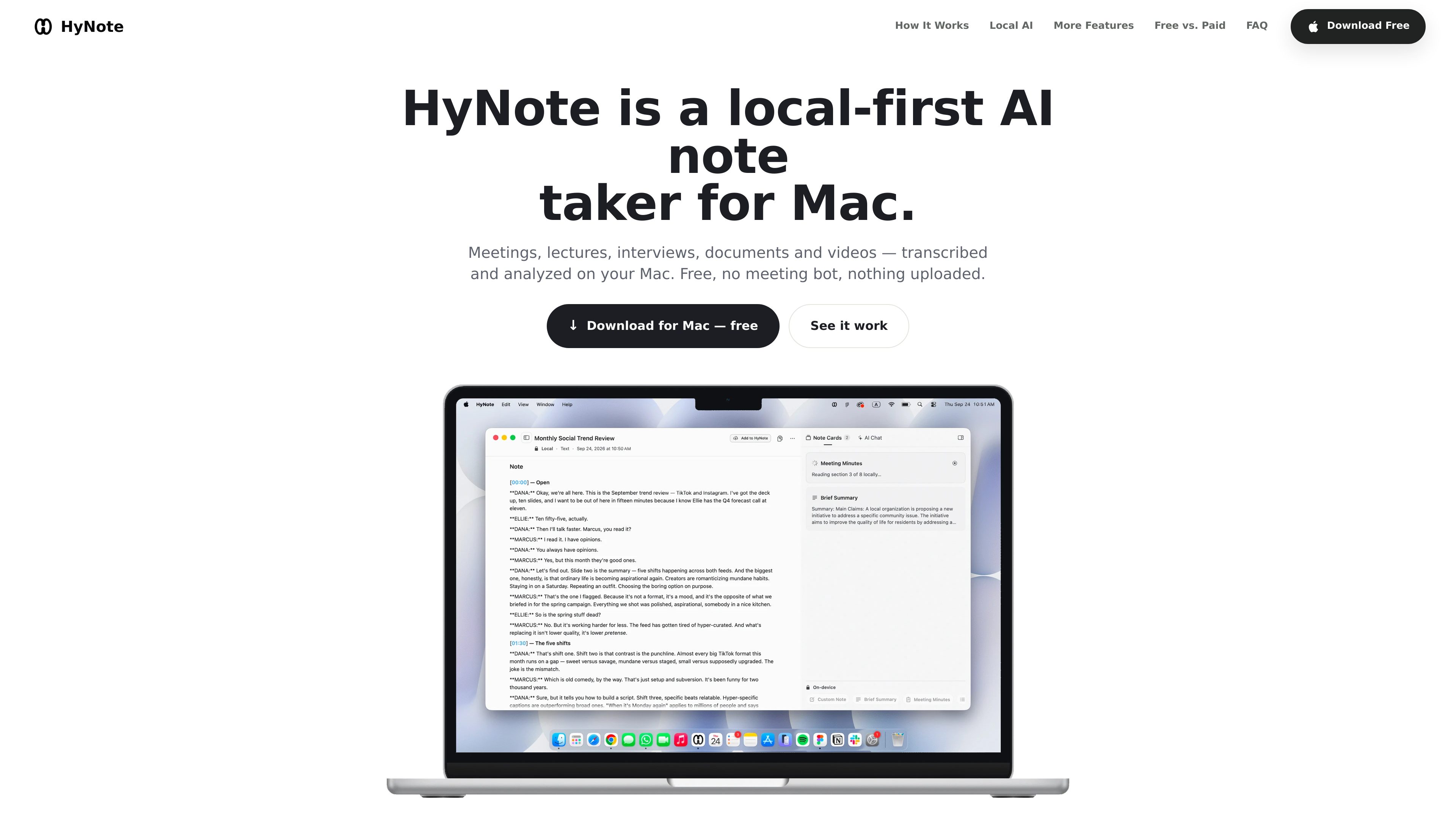
Bot-free Mac recording
Capture system audio and microphone input directly from the Mac. There is no meeting participant to invite, and the workflow can be used with calls, lectures, interviews, voice memos, and other Mac apps.

HyNote is a local-first note-taking app for Mac that records system audio and microphone input, transcribes conversations, identifies speakers, and creates notes on supported devices. It is designed for meetings, lectures, interviews, voice memos, and document-based work without requiring a meeting bot.
HyNote is a local-first AI note-taking app for Mac. It records system audio and microphone input, transcribes spoken content, labels speakers, and helps turn recordings and imported material into organized notes. Because it captures audio directly from the Mac, it does not require a bot to join Zoom, Google Meet, Microsoft Teams, or another call.
The core recording and on-device transcription workflow is free on supported configurations. Compatible Apple silicon Macs can also use Local AI for on-device summaries and questions about notes and files. Recording, transcription, and local analysis are designed to work offline, while Online AI is an optional upgrade for longer transcripts, larger files, and more complex requests.
HyNote supports live recordings as well as typed or pasted text, dictated notes, imported documents, audio files and images, and supplied YouTube, webpage, or file URLs. This makes it suitable for capturing meetings and lectures, reviewing interviews and voice memos, and organizing source material without manually writing everything down.
Capture system audio and microphone input directly from the Mac. There is no meeting participant to invite, and the workflow can be used with calls, lectures, interviews, voice memos, and other Mac apps.
Convert recordings into searchable transcripts on the device, with real-time transcription described for supported workflows. HyNote can identify speakers by voice and organize the transcript for review.
On compatible Apple silicon Macs, Local AI can summarize notes and files and help surface decisions, owners, action items, and answers from the source material.
Create notes from typed, pasted, or dictated text; imported documents, audio files, and images; and YouTube, webpage, or file URLs. The inputs can be analyzed and organized within the note workflow.
The local recording, transcription, and summary workflow is intended to keep working without Wi-Fi. On-device processing avoids sending those operations to a server.
When local processing is not enough, the optional Online AI path is positioned for longer transcripts, larger files, and more complex analysis, with additional templates and formats available through paid plans.
Record a Zoom, Google Meet, Microsoft Teams, or other Mac call without adding a guest participant. Afterward, review the transcript and extract decisions, owners, dates, and follow-up actions.
Capture spoken material in a lecture hall or interview setting, then use the transcript and summary to revisit key points without relying on handwritten notes during the session.
Record a quick memo or import an existing audio file for transcription and organization. This is useful when the information is more valuable as searchable text than as an unstructured recording.
Import a folder of documents, audio files, or images, or provide a webpage or file URL, to consolidate source material and ask questions about what it contains.
Use the local workflow when an internet connection is unavailable or unreliable. Compatible Macs can record, transcribe, and run Local AI summaries without waiting for a network signal.
The core Mac workflow is free on supported configurations, including recording and on-device transcription. Local AI is also free on compatible Apple silicon Macs. Online AI is an optional paid upgrade for longer transcripts, larger files, and more complex analysis.
No. HyNote captures system audio and the Mac microphone directly, so it does not appear as a participant in Zoom, Google Meet, or Microsoft Teams and does not require a guest invitation.
The HyNote app requires macOS 14 or later and supports Apple silicon and Intel Macs. Local AI requires macOS 26.4 or later, an M1 or newer Apple silicon Mac, and Apple Intelligence enabled and available for the user’s language and region.
You can type, paste, or dictate text into a note, import documents, audio files, and images, or provide YouTube, webpage, and file URLs for analysis. The available workflow and processing limits can vary between local and Online AI.
Online AI is intended for cases that exceed the local workflow, such as longer transcripts, larger files, or more complex analysis. The site also describes paid plans with additional templates, formats, and other advanced capabilities.
Traffic data is for reference only.

basedhardware.com
Omi is an AI note-taking and recording product that turns voice, screen activity, and conversations into searchable notes, tasks, reminders, memories, and advice. It works across devices for work and personal life, using the devices you already own.
voicecap.ai
VoiceCap is an AI meeting notetaker for in-person and online meetings. It records or imports meetings, produces speaker-separated transcripts, summaries, decisions, and action items, and makes the resulting archive searchable for teams and connected AI assistants.

shop.genspark.ai
Genspark SecondBrain Note is a card-sized AI voice recorder for capturing meetings, calls, consultations, and other conversations. It records offline, transfers audio through the Genspark App, and turns recordings into transcripts, summaries, key points, and action items.

fireflies.ai
Fireflies.ai is an AI meeting assistant that records conversations, creates transcripts and summaries, and keeps team discussions searchable while connecting notes to tasks, CRM updates, and other work tools.

biji.com
得到大脑 is an AI note-taking and personal knowledge management tool that captures voice, recordings, text, images, and links, then organizes them into searchable content for further creation.

speechtonote.com
AI voice-to-text notes for web, Mac, iOS, and Android