
Omnichannel inbox
Bring support, sales, and customer messages together in one place. The homepage and pricing page both point to a shared inbox model with email, chat, phone, WhatsApp, social apps, in-app chats, banners, and tooltips.

Intercom is an AI-first customer service platform with Fin, a natively integrated AI Agent, plus shared inbox, ticketing, automation, reporting, and agent-assist tools.
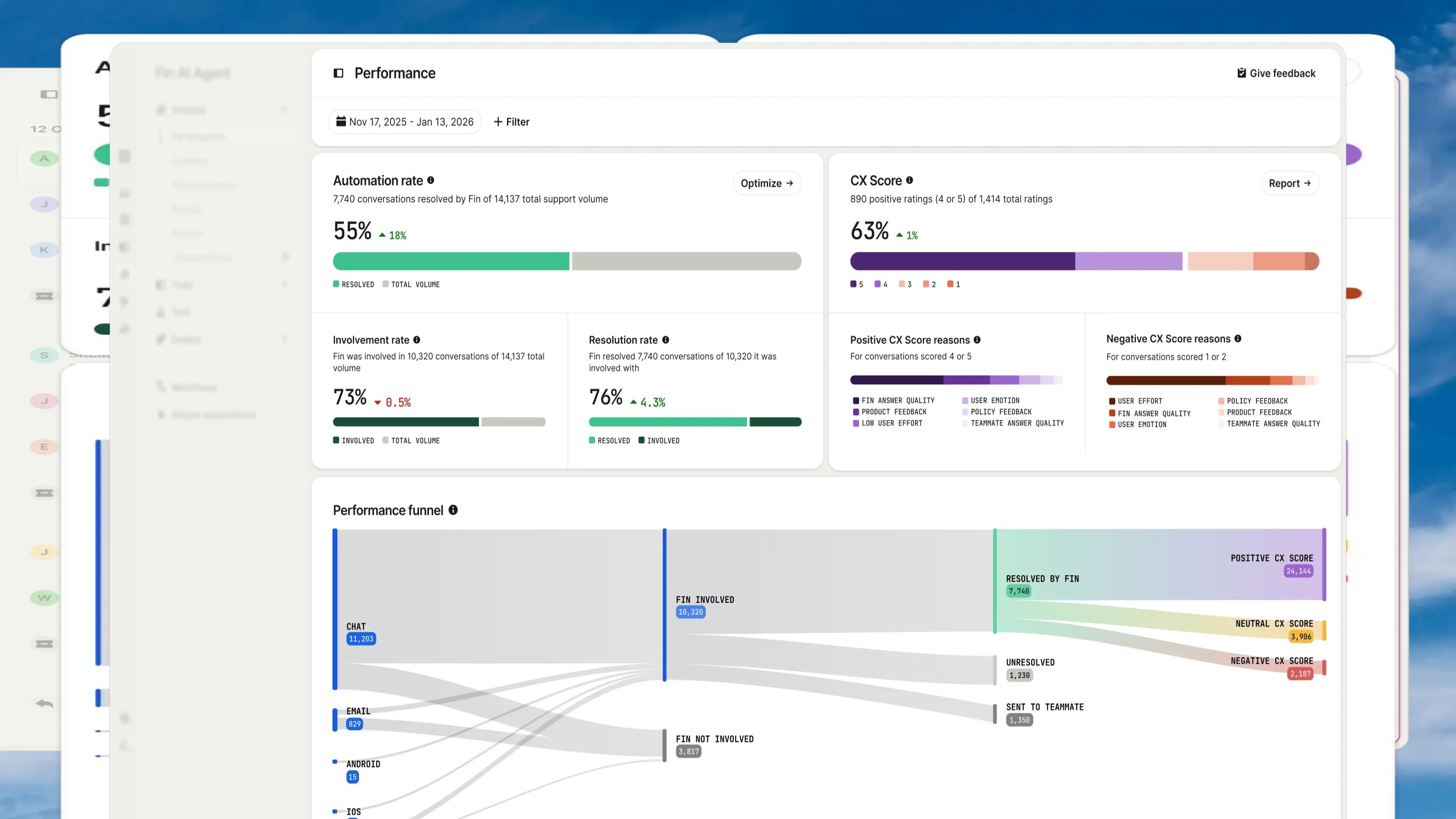
Intercom is an AI-first customer service platform built around a helpdesk with a natively integrated AI Agent, Fin. The product combines customer messaging, ticketing, automations, insights, and agent assistance so support teams can work from one system and keep conversations connected across handoffs.
The site presents Intercom as a complete helpdesk for customer support teams that want both AI and human agents in the same workspace. It supports omnichannel communication, shared inboxes, ticket workflows, real-time customer updates, and reporting, while also offering add-ons such as Copilot and proactive support tools for outbound engagement.
Bring support, sales, and customer messages together in one place. The homepage and pricing page both point to a shared inbox model with email, chat, phone, WhatsApp, social apps, in-app chats, banners, and tooltips.
Convert conversations into tickets and keep context attached as work moves between teams. The tickets page highlights customer tickets, back-office tickets, tracker tickets, ticket states, and real-time customer updates.
Give agents an in-inbox assistant that pulls context from past conversations, surfaces knowledge-base answers, and drafts replies. Intercom positions Copilot as help for resolving conversations faster.
Automate routing, SLAs, and escalations without engineering support. The homepage also describes workflows and no-code automations for support operations.
Track conversation quality, topics, and support trends with reporting and AI-powered insights. Intercom highlights CX Score, Topics Explorer, Trends, and customizable reports.
Publish proactive experiences such as product tours, checklists, in-app messages, mobile push, banners, and message sequences. These are listed on the homepage and pricing page as part of proactive support options.
Use the shared inbox, AI assistance, and customer records to handle ongoing support across channels without moving between separate tools.
Convert complex issues into tickets, route them to the right team, and keep customers updated while work continues in the background.
Use workflows, SLAs, and ticket states to standardize handoffs and reduce missed updates across support and back-office teams.
Send proactive in-app messages, tours, checklists, and campaigns to onboard users or communicate product changes before they contact support.
Review conversation quality, topics, and trends to understand what customers are asking and where support operations need attention.
Intercom uses two pricing components: seat-based plans for teammates and usage-based pricing for certain services such as Fin outcomes and messaging channels. The pricing page lists Essential, Advanced, and Expert plans, and also shows Fin AI Agent pricing for teams using their current helpdesk.
Fin is priced per outcome. The pricing page defines an outcome as a case where the customer confirms the issue is resolved, does not ask for more help after Fin responds, or Fin completes a workflow including handoffs. You are charged once per conversation.
Yes. Intercom says Fin can be used with an existing helpdesk, including Salesforce and other tools. The pricing page presents Fin as available without seats, and notes no setup, integration, or platform fees for that option.
Intercom offers three main plans: Essential, Advanced, and Expert. Higher tiers add capabilities such as multiple team inboxes, workflow automation, multilingual help center support, SSO and identity management, HIPAA support, SLAs, and multibrand support.
Copilot is available as an add-on. The pricing page describes it as a personal AI assistant in the inbox, with monthly per-agent pricing and unlimited usage on the add-on plan.