Olvy logo

Olvy

Claim

Olvy is a feedback management platform for product teams that centralizes user input from multiple channels and uses AI to organize and analyze it. It also includes changelog, widget, and integration workflows for teams that want to manage feedback and releases in one place.

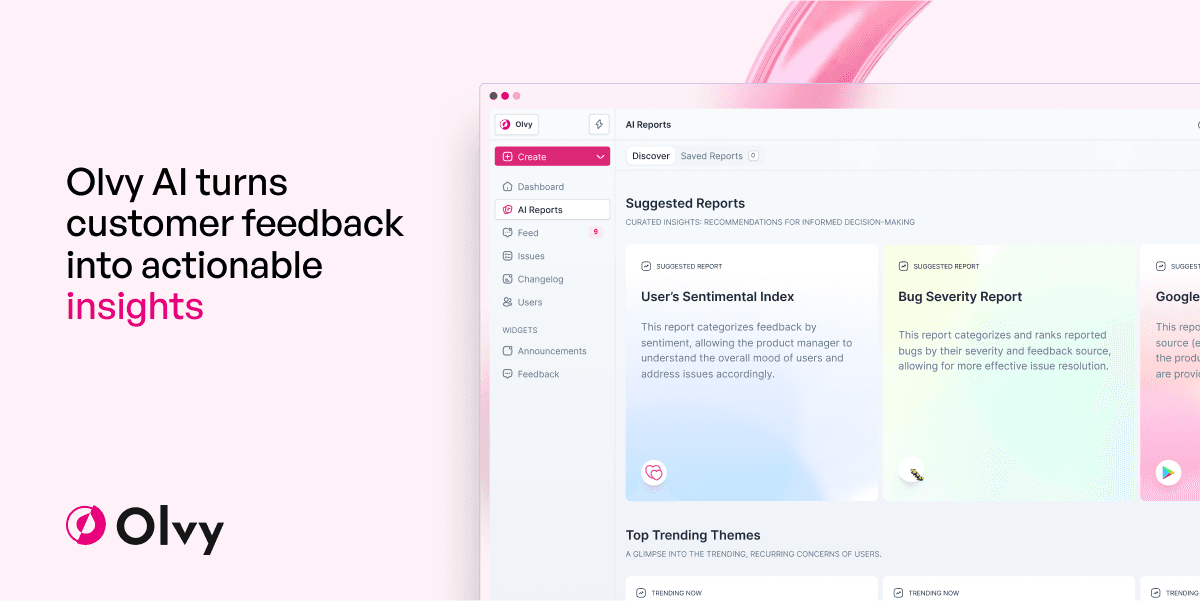
Olvy preview

What Olvy does

Olvy is a feedback management platform for product teams that want to collect user input from many channels, organize it in one workspace, and analyze it with AI. The site presents it as a way to manage feedback, ship more smoothly, and keep teams aligned around customer needs.

Its homepage, pricing page, and customer stories point to a workflow that combines a unified repository, AI analysis, widgets, and changelog tools. The product is meant to reduce manual sorting, make qualitative input easier to review, and help teams turn customer voices into decisions and releases.


Core capabilities

Unified feedback repository

Bring feedback into one place from channels such as Slack, Discord, Twitter, Telegram, Play Store, email, surveys, interviews, reviews, support tickets, and sales calls so teams do not have to review each source separately.

AI-assisted analysis

Use Olvy AI to organize raw feedback into actionable insights, including sentiment, feedback type, and summaries, so teams spend less time sorting through notes and more time deciding what to do next.

Auto-Listener filtering

The Auto-Listener is described as identifying genuine feedback and filtering out noise from integrated platforms, helping teams focus on messages that look like product feedback rather than unrelated chatter.

Research intake workflows

Upload survey responses in bulk and extract insights from user interviews in minutes, which supports teams that gather qualitative research outside of always-on support channels.

Changelog and widget tools

Publish and manage release notes, announcement widgets, and feedback widgets, with pricing details mentioning SEO settings, release scheduling, custom domains, and branding controls on widgets.

Integration and automation options

Use API keys, webhooks, CRM integrations, and a workspace API to move feedback data in and out of the platform and connect it to existing workflows.

Common use cases

  • Centralize customer feedback

    Product teams can centralize feedback from support, community, and social channels so the team reviews one queue instead of searching each tool separately.

  • Analyze qualitative research

    Researchers and product managers can review interviews or survey responses in bulk, then use Olvy's AI-oriented workflow to turn notes into clearer themes and next steps.

  • Manage launches and announcements

    Teams that publish release notes or in-app announcements can use the changelog and widget tools to communicate updates and gather reactions in the same platform.

  • Automate feedback intake

    Growth or customer-facing teams can bring in feedback from CRM-connected workflows, API-driven sources, or integrations such as Zapier to route input into their existing process.

Pros and Cons

Pros

  • Combines multiple feedback sources into a single workspace.
  • Uses AI to summarize and organize customer feedback.
  • Includes workflows for interviews, surveys, widgets, and changelog publishing.
  • Shows a pricing structure with a free plan and higher tiers for growing teams.
  • Lists API, webhooks, CRM integrations, and workspace-level automation options.

Cons

  • The public pages do not fully document setup details, connector behavior, or the limits of each integration.
  • Some capabilities are described broadly on marketing pages rather than through full product documentation, so readers may need to confirm specifics before buying.

FAQ

Who is Olvy for?

Olvy is positioned for product teams that want to collect user feedback from multiple channels, analyze it with AI, and share it across the team. The source also shows use in customer success stories and on pages focused on feedback management and changelog workflows.

What kinds of feedback can Olvy collect?

The source highlights a unified repository for bringing in feedback from sources such as Slack, Discord, Twitter, Telegram, Play Store, email, surveys, interviews, reviews, support tickets, and sales calls, with AI used to organize and analyze the inputs.

Does Olvy have a free plan?

Olvy's pricing page shows Free, Essentials, Business, and Enterprise plans. It also includes a 'Book a Demo' and 'Let's Talk' flow for larger teams, so pricing is partly self-serve and partly sales-led at the top end.

What integrations are shown on the site?

The source mentions product areas for Unified Repository, Feedback AI Analysis, Changelog Software, Feedback Widgets, Act on Feedback, and Integrations. It also lists connectors or channels including Slack, Google Play Store, Zendesk, Intercom, and Zapier.

Are there any limitations to keep in mind?

The source supports feedback collection, analysis, and changelog-related publishing, but it does not provide full documentation for setup steps, permissions, or connector behavior. Readers should verify the exact workflow for their stack before adopting it.

Quick Facts

Category
Feedback management
Primary users
Product teams
Source domain
olvy.co
Pricing model
Free, Essentials, Business, and Enterprise plans
Notable workflow
Unify feedback from multiple channels and analyze it with AI
Related product areas
Unified Repository, Feedback AI Analysis, Changelog Software, Feedback Widgets