
Camera control
Direct shot composition with camera position, lens choice, and movement controls, so users can steer generation toward a specific visual outcome rather than rely on prompt-only output.

Martini is an AI video production platform for filmmakers, studios, and agencies, with camera control, team collaboration, and XML export for Premiere or Resolve.
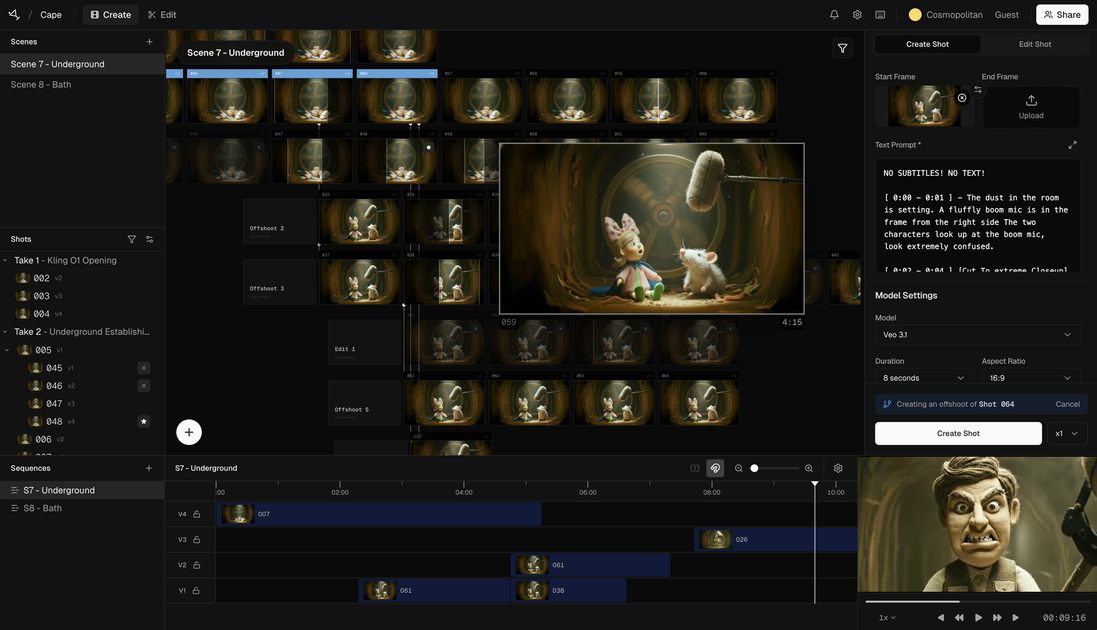
Martini is an AI video production platform designed for filmmakers, studios, and agencies. It frames the workflow around directing rather than prompting, giving users tools to shape shots, organize generative assets, and collaborate with a team in one place.
The product combines camera control, image and video generation, world models, and a built-in timeline, with export support for rough assemblies as XML for Premiere or Resolve. The pricing page shows an olive-based credit system, monthly plans for individuals and teams, and access to all supported models on every plan.
Direct shot composition with camera position, lens choice, and movement controls, so users can steer generation toward a specific visual outcome rather than rely on prompt-only output.
A built-in pipeline combines image generation, video generation, and world models in one place, with a timeline for organizing rough assemblies.
Teams can share prompts, edits, and feedback in real time, supporting collaborative review and iteration inside the same workspace.
Rough assemblies can be exported as XML for Premiere or Resolve, helping generated material move into a standard post-production workflow.
The platform offers access to multiple AI video and still models from one interface, with usage priced per second or per generation depending on the model.
Directors or creators can shape a shot by adjusting camera position, lens choice, and movement, then iterate until the generated clip matches the intended framing.
Studios can keep image generation, video generation, world-model work, and rough assembly organization inside one pipeline instead of moving between disconnected tools.
Agencies can review prompts, edits, and feedback together in real time while working toward client-ready concepts and rapid revisions.
Editors can move generated rough assemblies into Premiere or Resolve by exporting XML, then continue post-production in their usual editing environment.
Individual professionals can use the free or paid plans to access the full model set and scale usage with monthly credits or top-ups as project needs change.
Martini uses an olive-based credit system. According to the pricing page, 1 olive equals $0.10 USD, and credits are spent when generating video or still images.
Yes. The pricing page says unused monthly credits roll over to the next month.
Yes. The pricing page says you can buy additional credit top-ups at any time, regardless of plan, and top-up credits never expire.
Yes. The pricing page states that every plan, including the free Indie plan, gives access to all supported AI video and still generation models. Plan differences are based on credits and collaboration features.
The Studio plan includes project-based billing and team management, and the Enterprise plan adds bespoke credit allocation, bring your own keys, billing users, support SLAs, and custom integrations.