
Pre-built AI Colleagues
AI Colleagues are pre-built for HR, IT, and Finance, and the site says they ship pre-configured, pre-trained, and pre-integrated so teams can connect and start using them without building from scratch.

Leena AI is an enterprise agentic AI platform for HR, IT, and Finance teams that automates back-office workflows through pre-built AI Colleagues, enterprise integrations, and no-code process design. It is positioned for organizations that want governed automation connected to existing systems and knowledge sources.
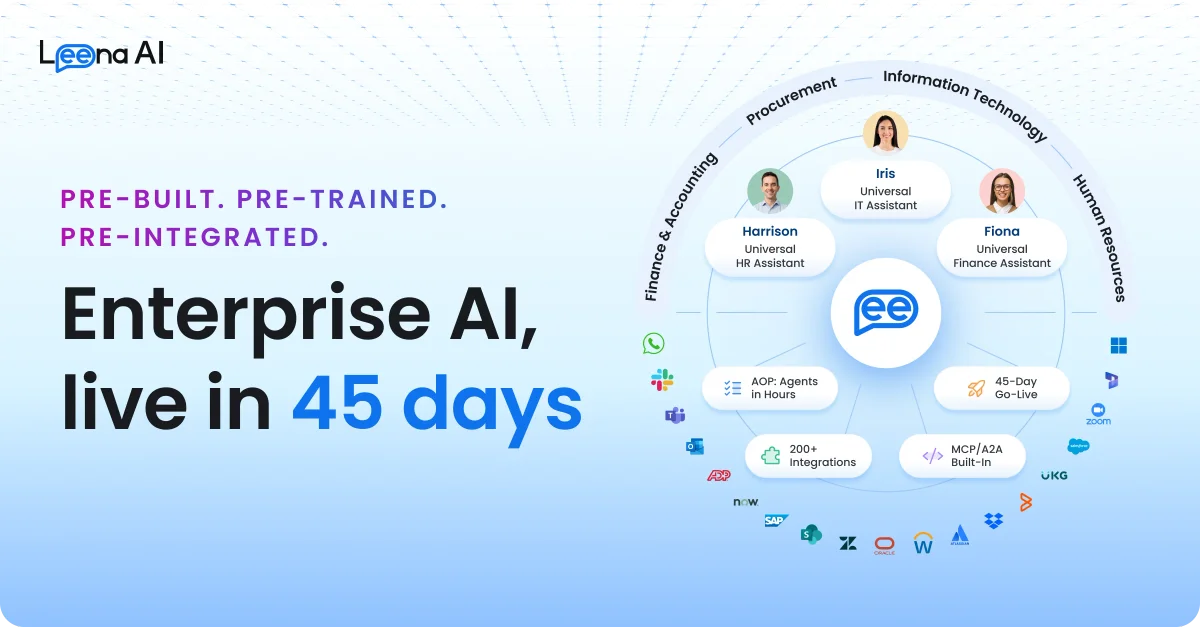
Leena AI is an enterprise agentic AI platform for back-office work in HR, IT, Finance, and related operations. It combines pre-built AI Colleagues with knowledge connections, enterprise integrations, and no-code process tools so organizations can automate common employee and service workflows.
The site positions the product around going live in 45 days, with AI Colleagues that are pre-built, pre-trained, and pre-integrated. Rather than acting like a generic chatbot, the system is designed to read requests, plan multi-step work, act across connected systems, and handle exceptions within governed business processes.
AI Colleagues are pre-built for HR, IT, and Finance, and the site says they ship pre-configured, pre-trained, and pre-integrated so teams can connect and start using them without building from scratch.
Knowledge Studio connects to sources such as SharePoint, Confluence, ServiceNow, Drive, Box, and Snowflake while inheriting source permissions, so the system can use existing knowledge without copying it into a separate repository.
The platform includes 200+ pre-built enterprise integrations and supports APIs, MCP, A2A, and browser/RPA fallback, with examples including Workday, SAP, ServiceNow, Salesforce, Oracle, and UKG.
AOP Studio lets business users describe processes in plain English, upload SOPs, or reference company rules to define how an AI Colleague should operate without a coding workflow.
The architecture page describes an Orchestrator that plans work, breaks requests into tasks, and routes them across models and agents, while the product pages emphasize persistent memory and exception handling.
Observability and governance features provide step-by-step traceability, guardrails, and audit logs, and the site says permissions remain tied to existing identity and access controls.
Use the Universal HR Assistant to answer onboarding, benefits, leave, payroll, policy, and letter questions across the HR stack, with the site calling out 24×7 availability and multiple language support.
Use the Universal IT Assistant to resolve common IT requests and reduce ticket volume by connecting it to the systems and knowledge base your service team already uses.
Use the Universal Finance Assistant to handle finance workflow questions and process guidance within the same enterprise environment as HR and IT support.
Use the platform to connect source knowledge and business systems, then create an AI Colleague that follows a company-specific Agent Operating Protocol for a defined process.
Use the architecture layer to route work across channels such as Teams, Slack, email, voice, browsers, and portals so employees can start and continue tasks where they already work.
Leena AI describes AI Colleagues as persistent digital workers that can plan, execute multi-step business processes, and escalate edge cases to humans. The architecture page says business users can create and iterate on AOPs without coding.
The source materials show AI Colleagues for HR, IT, and Finance. The homepage also says teams can build their own AI Colleagues for their exact business processes.
The product site says AI Colleagues connect to existing knowledge sources such as SharePoint, Confluence, ServiceNow, Drive, Box, and Snowflake, and integrate with enterprise systems such as Workday, SAP, ServiceNow, Salesforce, Oracle, and UKG.
The pricing URL currently returns a page-not-found view, so the source set does not provide public pricing details. A demo or sales conversation is the clearest path shown on the site.
Leena AI positions AI Colleagues as living inside tools like Teams, Slack, email, voice, browsers, and portals, so employees can interact with them where they already work.