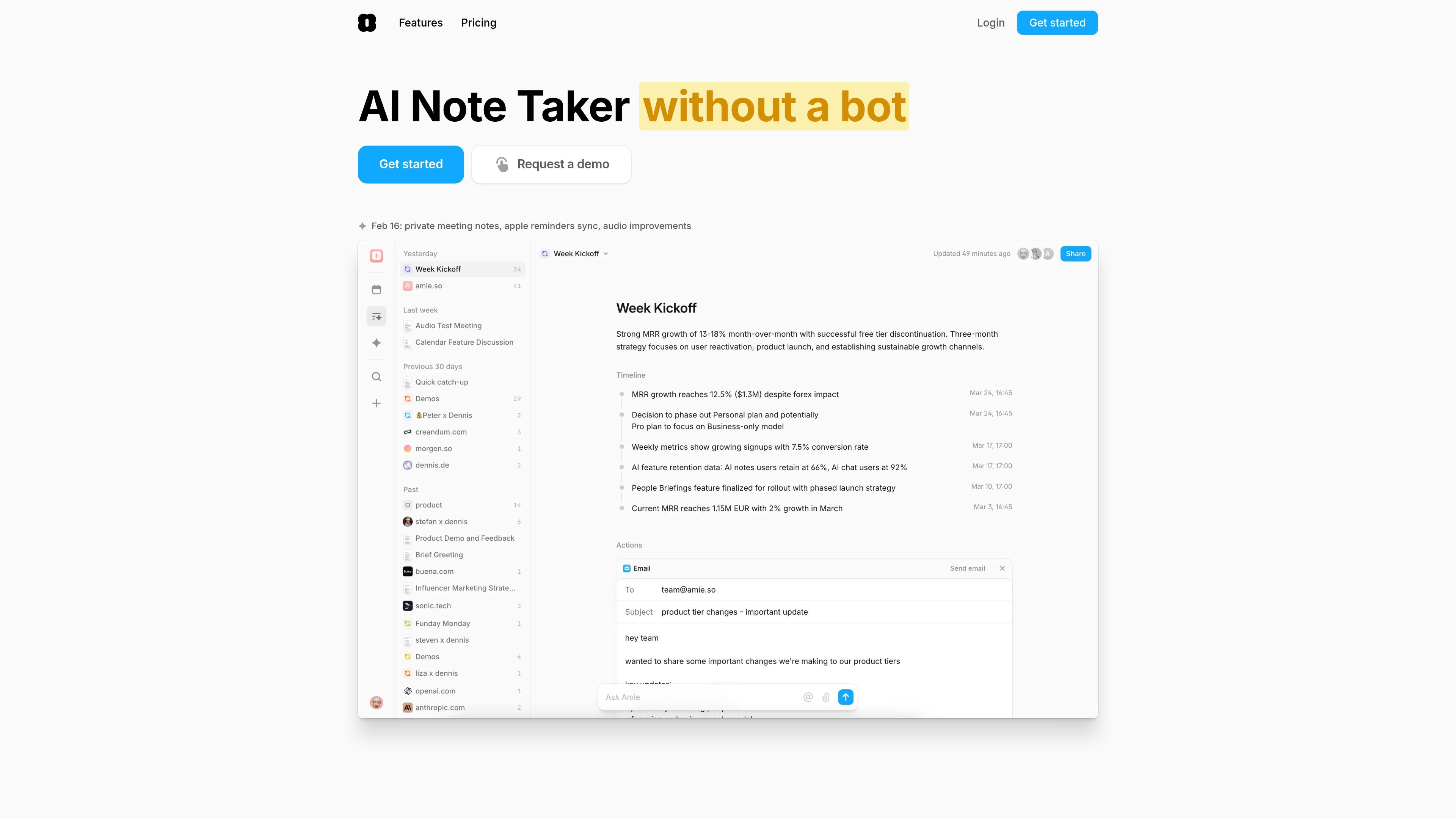
Amie is an AI note taker for meeting notes, summaries, and follow-ups, with bot-free recording, AI chat, and workflow integrations.

Amie preview

Overview

Amie is an AI note taker built around meetings, follow-up work, and calendar coordination. It records calls without a bot joining, generates summaries and action items, and lets you use AI chat and chat actions to draft emails, update meetings, and move work into the tools your team already uses.

The product is positioned for people who want meeting notes to turn into next steps rather than a static transcript. The site emphasizes private notes, context-aware summaries, shared pages, and workflow automation across calendars, email, task apps, CRMs, and collaboration tools.

Core features

Bot-free meeting recording

Record meetings without a bot joining the call. The site says Amie can record through its notch or floating UI, pause when you speak off the record, stop automatically when the microphone is unused, split recordings if you stay in the same room, and separate speakers while remembering names.

Context-aware summaries

Generate meeting summaries and action items that use private notes and meeting context. You can customize summary headings and use private notes as focus points for the recap.

Cross-platform call support

Record and work with calls across Zoom, Google Meet, Slack Huddle, and Microsoft Teams. Amie can also prompt you to start recording when you join meetings from Google Calendar and can auto-stop recordings.

AI chat and actions

Use chat actions to draft emails, create or update meetings, rewrite summaries, make mind maps from summaries, create Linear tickets, and combine actions in one request. The product also supports questions and tasks through AI chat.

Workflow integrations

Keep meeting follow-up synchronized with your existing tools. The site lists integrations and exports for Google Calendar, Apple Calendar, Gmail, Slack, Notion, HubSpot, Pipedrive, Linear, Todoist, and CRM or ATS workflows.

Shared meeting pages

Turn meetings into shareable pages that can be shared like documents and queried in context over time. The site highlights recurring-event, domain-based, and manual sharing patterns for customer and project tracking.

Practical use cases

  • Meeting capture without a bot

    Capture meetings and turn them into next steps without asking a bot to join the call. This fits teams that want a lighter call experience while still keeping a written record.

  • Guided meeting summaries

    Prepare private notes before a meeting, then use them to shape the summary afterward. This is useful when you want specific numbers, agenda points, or emphasis reflected in the recap.

  • Post-meeting follow-up

    Turn action items into follow-up work by drafting emails, creating tasks, or opening tickets from the meeting context. The site shows support for Linear tickets and email drafting as part of chat actions.

  • Shared context for teams and customers

    Share meeting pages with colleagues or customers to preserve context over time. The product positions these pages for recurring events, project tracking, and customer support workflows.

  • Connected workflow management

    Keep calendars, email, and work tools aligned while Amie updates the right system of record. The site highlights Google and Apple Calendar, Gmail, Slack, Notion, HubSpot, Pipedrive, and Todoist-style workflows.

Pros and Cons

Pros

  • Bot-free recordings avoid having a separate meeting bot join the call.
  • Summaries can be informed by private notes and custom headings, which gives users more control over the output.
  • AI chat and chat actions extend beyond note-taking into drafting, scheduling, task creation, and ticket creation.
  • The product supports several major meeting providers and connects with calendar, email, task, CRM, and knowledge tools.
  • Shared pages make it possible to reuse meeting context across colleagues or customers.

Cons

  • The site does not publish full plan details beyond the Pro and Business feature summaries shown on the pricing page.
  • Some integrations are only listed as available soon, including Attio, Personio, Ashby, and Greenhouse.

FAQ

What does Amie do?

Amie is designed to handle meeting notes, summaries, todos, and emails, with AI chat that can work from the context of your meetings and shared pages. The pricing page also shows a 7-day free trial.

Which meeting providers does Amie support?

Yes. The home page says Amie works with Zoom, Google Meet, Slack Huddle, and Microsoft Teams, and it can also record meetings joined through Google Calendar or run fully automatically in the background.

Is there a trial or paid plan?

The pricing page lists Pro and Business plans billed annually, with a 7-day free trial for both. Pro includes unlimited meeting notes, bot-free recordings, AI-drafted emails, unlimited AI chat messages, and AI scheduling; Business adds CRM integrations, custom templates, and custom branding on shared notes.

What kinds of integrations does Amie offer?

Amie can export meeting notes to tools such as Pipedrive, Notion, Slack, Hubspot, and Linear, and it also connects with Google and Apple Calendar, Gmail, Todoist, and Slack-based workflows described on the site.

How does Amie handle meeting context and notes?

Amie uses private notes as input for summaries, lets you define headings, and supports shared pages that can be shared with colleagues or customers. The site also says recordings can be bot-free and that you can pause recording or split recordings when needed.

Quick Facts

Category
AI note taker
Website
amie.so
Primary use
Meeting notes, summaries, and follow-up workflows
Supported meeting apps
Zoom, Google Meet, Slack Huddle, Microsoft Teams
Pricing
Pro and Business plans with a 7-day free trial
Plan billing
Annual billing shown on the pricing page