
Browser-based DAW
Create music in a browser-based DAW without installing desktop software. The homepage positions Amped Studio as an online workspace for beats, songs, vocals, and arrangement.

Amped Studio is a browser-based online DAW for making music, recording vocals, editing audio and MIDI, and using AI-assisted tools to start songs in the browser. It offers a free Starter plan, paid Premium plans, and a Classroom option for educators.
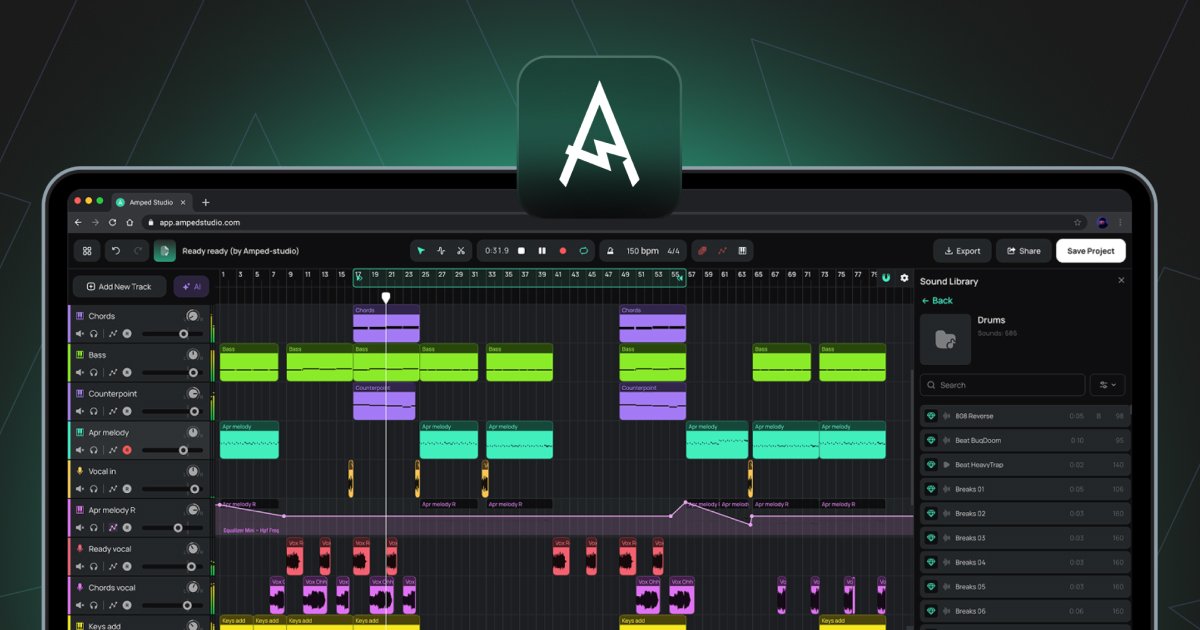
Amped Studio is a browser-based online DAW for making music, recording vocals, editing MIDI and audio, and arranging songs without installing desktop software. The homepage describes it as an online music maker that supports beat creation, song building, mixing, and AI-assisted idea generation.
It combines a standard music-production workflow with built-in tools such as virtual instruments, drum machines, audio effects, automation, sample packs, and VST 3 support. The site also presents separate pricing tiers for individual creators and a Classroom plan for educators, which suggests the product is meant for both self-directed production and structured learning or teaching.
The platform is aimed at beginners, creators, educators, and advanced users who want to work in a web interface. The current version does not support mobile mode, and the homepage notes that you can use an external MIDI controller while producing in the browser.
Create music in a browser-based DAW without installing desktop software. The homepage positions Amped Studio as an online workspace for beats, songs, vocals, and arrangement.
Generate musical ideas with built-in AI tools, including an AI assistant, style-based generation, split song stems, and an AI voice changer.
Record audio, edit MIDI, automate parameters, and work with effects inside the same project. The site highlights audio-to-MIDI conversion, pitch and gain editing, stretching, cutting, and note editing.
Use virtual instruments, original samples, and drum programming tools to build arrangements. The site lists Drumpler, virtual instruments, sample packs, and external MIDI controller support.
Expand the studio with VST 3 plugins and export finished work in MP3 or WAV depending on plan. Premium plans also include more projects, more storage, and additional instruments and effects.
Start with a free browser session, sketch a beat or chord progression, and build a track using loops, samples, drums, and MIDI editing tools.
Record vocals directly into the studio, then arrange takes, add effects, and edit the performance without moving to another app.
Use the AI assistant, stem splitter, and voice changer to generate ideas, isolate parts of an existing song, or transform recorded audio for content creation.
Create exercises, coordinate students by groups and classes, assign work, and run remote lessons in the Classroom plan.
Open the marketplace to browse sample packs, song starters, loops, and construction kits from other creators or add your own products.
Amped Studio works directly in the browser, so you do not need to install desktop software to start making music. The homepage says the current version does not support mobile mode.
Yes. The homepage says you can record vocals with a microphone directly onto a track, then add effects and edit the take inside the studio.
Amped Studio supports audio editing, MIDI editing, automation, virtual instruments, effects, and VST 3 support, so it can be used for beat-making and full song arrangement in the browser.
The pricing page shows a free Starter plan and paid Premium plans. Premium adds VST 3 support, more instruments and effects, more projects, more storage, and audio export in MP3 and WAV formats.
The homepage says you can use an external MIDI controller, and the pricing page lists a Classroom plan for educators that supports groups, classes, assignments, remote lessons, and COPPA compliance.