
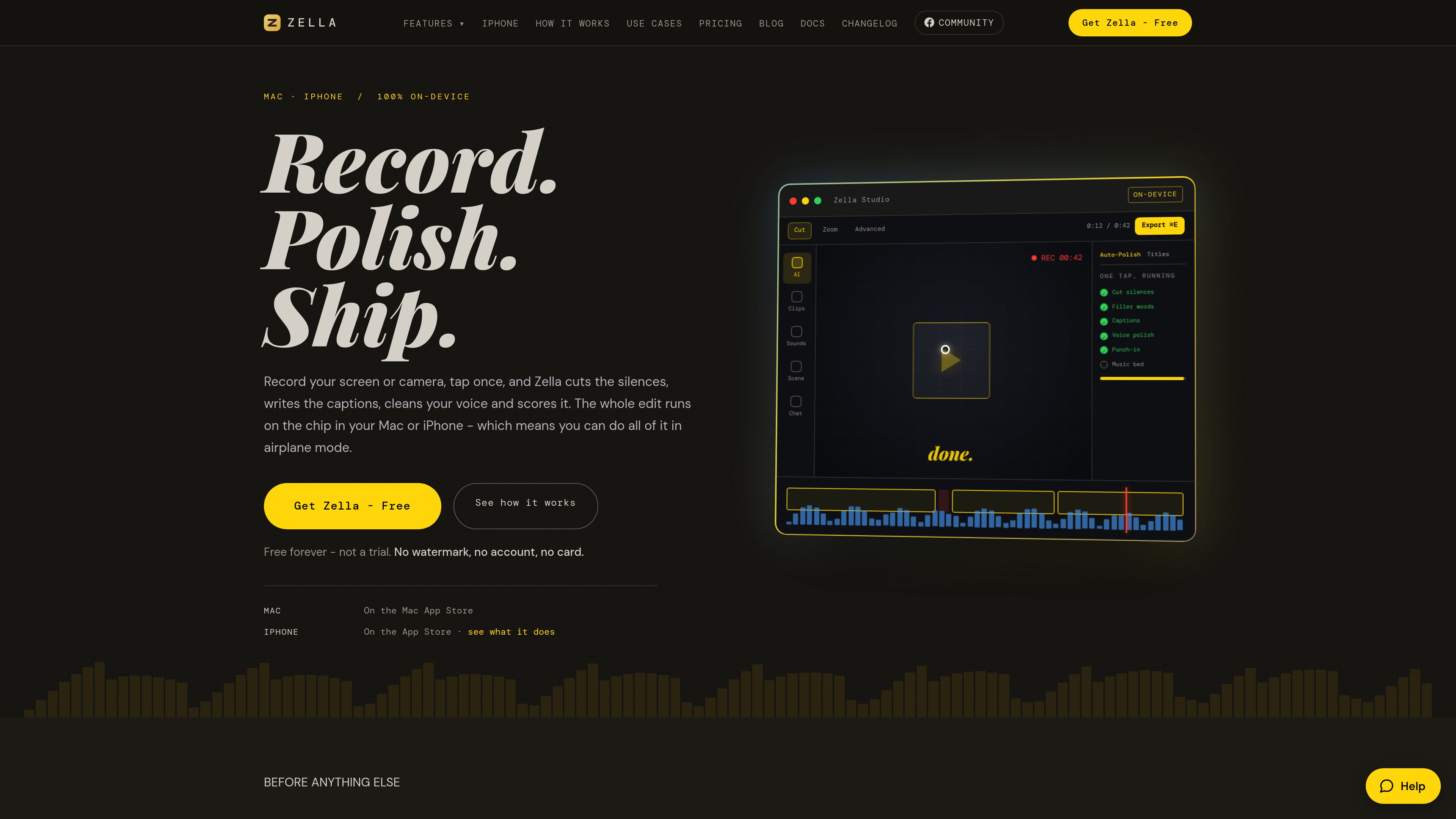
On-device recording and editing
Record a full screen, window, region, camera, or device screen, then edit locally with a timeline, ripple delete, drag-to-reorder, J and L cuts, and up to 50 levels of undo.

Zella is an on-device screen recorder and video editor for Mac and iPhone. It records screen or camera footage, then supports AI-assisted polishing, captions, background removal, reframing, and export without an account or cloud upload.
Zella is an on-device screen recorder and video editor for Mac and iPhone. It captures screen or camera footage and provides tools for cutting, polishing, captioning, reframing, adding effects, and exporting finished videos. The iPhone app is a full touch editor, not only a viewer, and projects can be transferred to Mac as .zella packages.
The app is built around local processing: recording, editing, captions, background removal, voice polish, and export run on the device, including in airplane mode. No account is required and footage is not uploaded. Optional network-dependent functions include the AI Assistant, when used with a personal API key, and stock-footage retrieval for some Auto B-Roll workflows.
Zella Free is available indefinitely and includes unlimited recording, the full editor, AI features, and watermark-free exports up to two minutes at 1080p. Pro is a one-time purchase covering Mac and iPhone that removes the export length limit and adds higher-resolution, alpha-channel, frame-rate, bitrate, batch-aspect, template, and advanced editing options.
Record a full screen, window, region, camera, or device screen, then edit locally with a timeline, ripple delete, drag-to-reorder, J and L cuts, and up to 50 levels of undo.
Auto-Polish can cut silences and filler words, add captions and emphasis zooms, clean voice audio, and duck music. Make it Viral adds a broader one-tap pass with pacing, transitions, sound effects, music, and word-pop captions.
Generate captions on-device, apply caption presets and callouts, remove backgrounds without a green screen, and add a webcam bubble or one of 40 built-in scenes.
The AI Assistant accepts typed editing instructions, while Auto B-Roll can create cutaways. The iPhone app supports a keyless on-device B-Roll mode; optional stock footage can be fetched from Pexels or Pixabay.
Reframe edits to 9:16, 1:1, or 16:9 with face tracking, and use colour looks, transitions, sound effects, voice changers, LUT import, intensity controls, and music that ducks under speech.
Pro adds unlimited export length, 4K output and 8K on Mac, transparent-background export, 60 fps, custom bitrate, multi-aspect export queuing, saved templates, keyframes with Bezier curves, luma scopes, masks, speed ramps, and Beat Sync.
Capture a Mac window, region, or full screen, remove pauses, add captions and punch-ins, then export a concise explanation for sharing or instruction.
Use face-aware reframing for vertical, square, or widescreen output and apply caption, pacing, transition, and sound treatments for Reels, Shorts, or similar platform formats.
Record and edit directly on iPhone when away from a desk. The local workflow supports airplane-mode editing, and a project can later be exported to Mac for larger-screen finishing.
Remove a subject from its background and, with Pro, export an alpha-channel file for placing the isolated clip over another layer in a separate editor or composition.
Use Pro when a recording exceeds the Free export limit or requires 4K, 8K on Mac, 60 fps, a custom bitrate, or multiple aspect-ratio outputs from one edit.
Yes. Zella Free is available forever rather than as a trial. It includes unlimited recording, the complete editor and AI features, and watermark-free exports up to two minutes at up to 1080p. New installs also provide seven days of the complete Pro feature set without a card or account.
No. Recording, editing, captions, background removal, voice polish, and export run on the Mac or iPhone, and the app can work in airplane mode. The AI Assistant and some stock-footage workflows can use the network when enabled; the Assistant sends the typed prompt using the user's own API key, not the video.
Yes. Export the project package from iPhone and open it on Mac. Clips, cuts, captions, titles, callouts, and effects are carried across in the `.zella` project package.
Pro removes the two-minute export cap and adds 4K export, 8K export on Mac, transparent-background export, 60 fps, custom bitrate, a multi-aspect export queue, saved templates, and the advanced depth toolset. One purchase unlocks the Mac and iPhone versions together.
The editor can export MP4, MOV, GIF, and M4A, and can reframe projects to 9:16, 1:1, or 16:9 with face tracking. Free exports are limited to two minutes and 1080p; Pro adds higher-resolution and other output controls.
Traffic data is for reference only.
www.getrescript.com
Rescript is a free, open-source transcript-based editor for speech-driven video and audio. Use it in a browser or desktop app to edit footage by changing a transcript generated locally, then export video, audio, transcripts, or subtitles from your device.
videobgremover.com
AI video background removal and replacement without a green screen, with free previews and pay-as-you-go exports.

www.supercut.cc
Supercut is a private AI video editor that runs in a browser or desktop app, letting creators describe edits such as trimming, reframing, captioning, color grading, and audio cleanup in plain English. It also includes a multitrack timeline and screen recorder for local video workflows.

www.aivideoeditor.app
AVE is a local-first AI video editor for Mac with a real timeline, reviewable edit plans, and local export. It helps creators, marketers, editors, and Mac teams turn footage into polished deliverables while keeping projects on-device by default.

dreamcut.ai
Mac-based AI video editor and screen recorder for polished tutorials, demos, and shareable videos.

screencursor.com
ScreenCursor is a Chrome screen recorder that automatically turns clicks, drags, and keystrokes into timed zoom effects. It is designed for people who want to produce focused MP4 demos without manually placing camera moves or uploading recordings.