
Photo-based observations
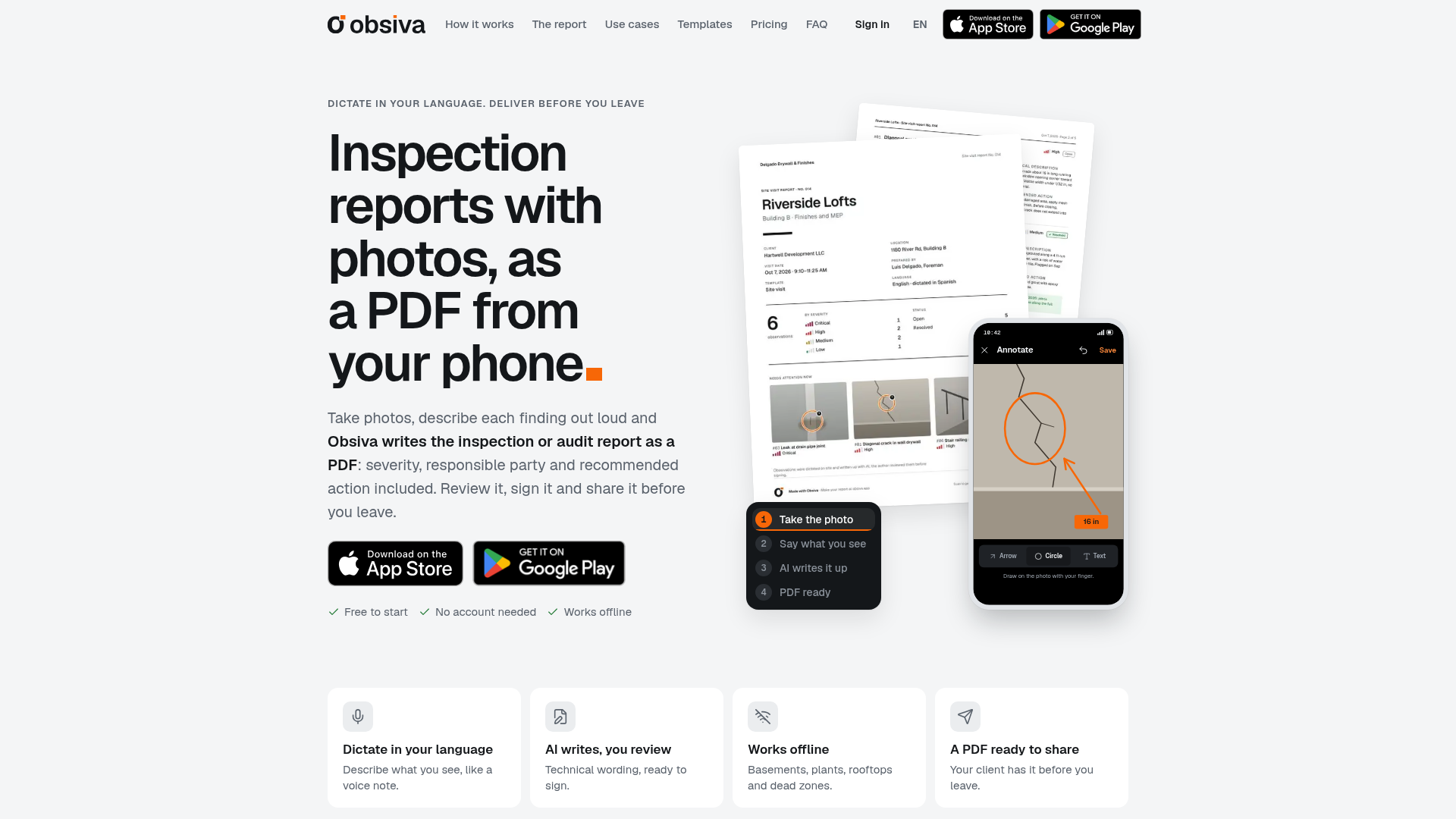
Each captured or gallery photo becomes an observation. Add arrows, circles, or text directly to the image to identify the finding.

Obsiva turns field inspection photos and voice notes into editable PDF reports, with findings, severity, actions, signatures, and follow-up for inspectors and auditors.
Obsiva is a mobile inspection and audit reporting app for people who document findings in the field. Capture or select photos, mark them up, and describe each finding by voice in English or Spanish. Obsiva drafts structured observations with a title, location, technical description, severity, responsible party, and recommended action for review.
After the visit, the app can create a signed PDF with a cover, severity summary, executive summary, photo-based observations, and signatures. Reports can be shared through email or messaging apps, with layouts designed for phone viewing and printing on Letter or A4 paper. Offline work, visit follow-up, and scheduled next visits support inspections in areas with unreliable connectivity.
Each captured or gallery photo becomes an observation. Add arrows, circles, or text directly to the image to identify the finding.
Describe what you see in your own words in English or Spanish. Obsiva drafts technical wording and fills in fields such as location, severity, responsible party, and recommended action for review.
Close a visit to generate a PDF containing a cover, severity totals, executive summary, observations with photos, and signatures. Reports can be shared by email or messaging apps.
Keep working when there is no signal; information is saved on the phone and the app writes up items when the connection returns.
Carry open findings into the next visit, add new photos and dictated notes, and mark items resolved with before-and-after documentation.
Use general inspection, site visit, or property handover templates, and schedule the next visit on a project so remaining open items are available when it starts.
Record progress observations and punch-list items with marked-up photos, severity, responsible parties, and recommended corrective actions.
Document unsafe conditions or acts in the field and associate each finding with a corrective action for review and reporting.
Inspect buildings, plants, or stores over multiple visits, carrying unresolved items forward until they are closed.
Create move-in, move-out, and unit handover reports with room or location details, photo evidence, and signatures.
Capture evidence in stores, warehouses, restaurants, or plants and deliver a client-ready report with an owner assigned to each finding.
Obsiva produces editable PDF inspection or audit reports with photos, severity information, observations, recommended actions, signatures, and an executive summary.
Yes. The app saves work on the phone while offline, and its AI write-up process runs when the connection returns.
The source describes dictation in English or Spanish and supports dictating in Spanish while delivering the report in English or in a bilingual side-by-side format.
Yes. Open findings can be brought into a subsequent visit, updated with photos and notes, and marked as resolved with before-and-after documentation.
The product page states that Obsiva is free to start and requires no account, but it does not provide further plan or limit details.
Traffic data is for reference only.
| Aug | 0 |
|---|---|
| Sep | 0 |
| Oct | 0 |
Traffic analytics are not available yet.

oxolo.com
Oxolo turns voice, photos, and videos into structured construction reports and tasks.

www.clueso.io
Clueso is an AI video and documentation platform that turns screen recordings and other source material into editable product videos and step-by-step guides. It also connects to MCP-compatible AI tools so users can create and revise content through conversational instructions.

lipdub.ai
AI video localization, dubbing, and lip sync for teams adapting videos into 80+ languages.

termaxa.com
A cooperative gate that previews, evaluates, and records shell commands run by AI coding agents.

flur.ee
Fluree is a hosted enterprise AI data platform that turns raw data into trusted, queryable knowledge graphs for AI, analytics, dashboards, apps, and agents. It supports connected, permissioned data workflows instead of scattered context.

cellcog.ai
CellCog is a general-purpose AI employee platform for hiring role-based AI workers, each with its own inbox, task board, and memory. Built for teams and founders seeking AI workers for ongoing knowledge work and coordination with other employees.

kolors-virtual-try-on.com
AI clothing visualization for virtual try-on images from model and garment photos.

onlook.com
Onlook is a visual code editor for designers and product teams, with live React editing, AI-assisted changes, and self-hosting.