
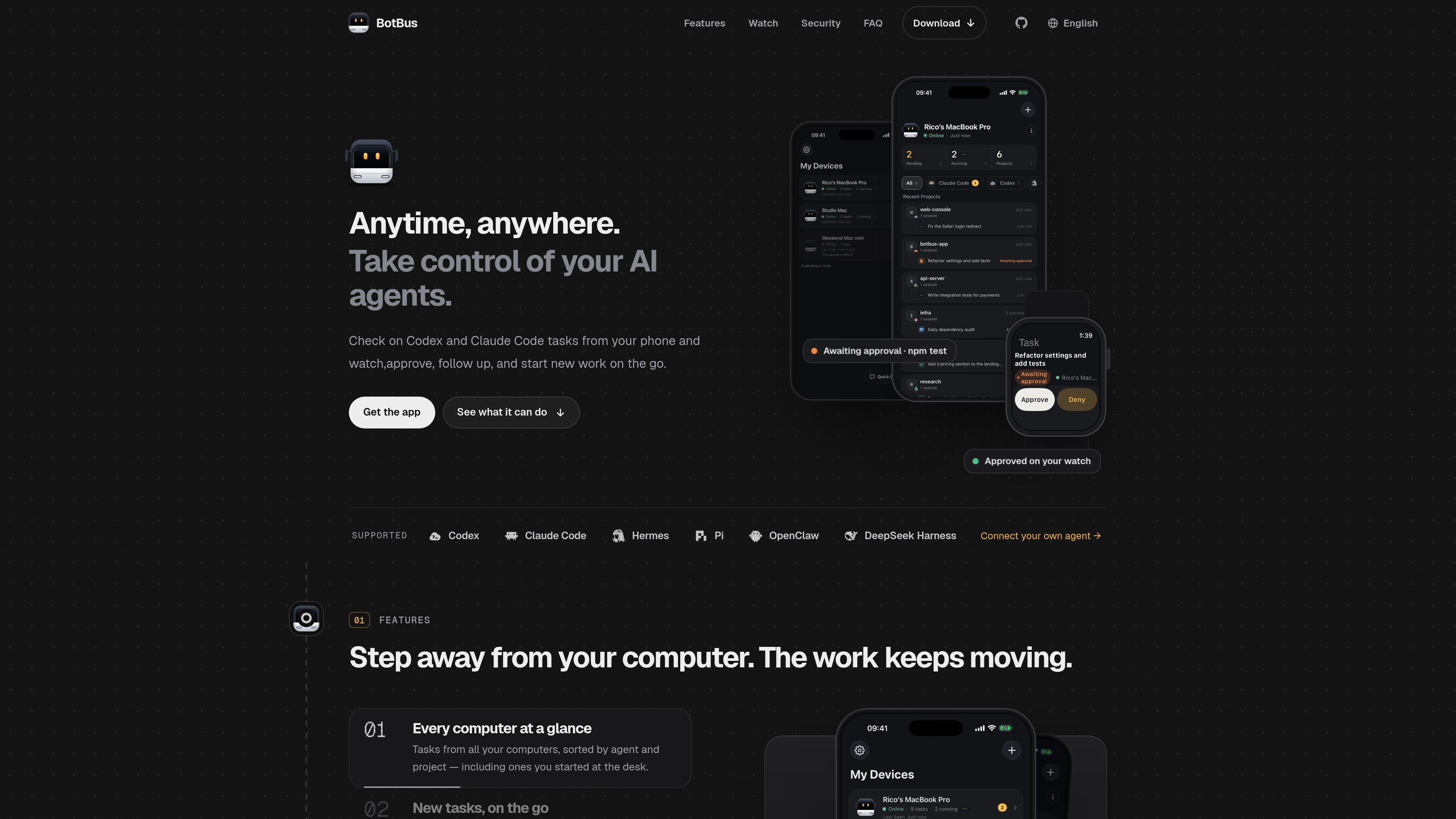
Unified task view
See tasks from paired computers organized by agent and project, including work started directly at the computer.
BotBus brings the status and controls for coding agents running on your computer to your phone and watch, so you can review progress, respond to requests, and start or interrupt tasks remotely.
BotBus is a companion app for monitoring and controlling coding agents running on a computer. Its desktop app runs in the background and discovers supported local agents; paired phones and Apple Watch can show task progress and provide controls for approvals, follow-ups, interruptions, and new work. It is designed for developers who want to keep track of agent tasks when away from their computer. Available controls depend on the connector, task state, and whether the computer is online.
See tasks from paired computers organized by agent and project, including work started directly at the computer.
Choose a computer, project, and agent, enter a task in a sentence, select a model, and optionally run it in its own Git worktree.
Receive prompts when an agent requests permission to run a command, edit files, or asks a question. Respond from a phone or watch, and enable project-level auto-approval where supported.
View a computer screen live from a phone and tap, swipe, or type. Input starts locked; screen control currently supports Mac, and the image and input are end-to-end encrypted.
Access screenshots, files, and videos returned with a task; open referenced images and PDFs, and preview an agent's development server on the phone. Developer web previews are proxied through BotBus servers and are not end-to-end encrypted.
Follow up, interrupt tasks, provide voice input, send photos, review uncommitted changes, and change model or reasoning effort. Common Apple Watch actions work after pairing syncs from the phone.
Review task progress across paired computers and projects from a phone, without returning to each desktop.
Approve a command or file edit, answer an agent's question, or interrupt a task using the mobile app or supported watch controls.
Select a paired computer, project, and agent, then send a short task description; choose a model or isolate the work in a Git worktree when available.
Open task-related screenshots, files, videos, images, or PDFs on a phone, and preview a development server started by an agent.
Built-in support includes Codex, Claude Code, Hermes, Pi, OpenClaw, and DeepSeek Harness. Other agents implementing the Agent Client Protocol (ACP), such as OpenCode, can also connect.
The desktop app supports macOS 26 or later; Linux builds are planned, and Windows 10/11 support is in development. The iPhone and Apple Watch apps require iOS 26 and watchOS 26 or later. Android 8.0 or later is listed as in internal testing.
Already-synced tasks can be viewed without the target computer being online. Approving, following up, starting tasks, and interrupting require that computer to be online and the connector to support the action.
Chats, tasks, and screenshots are encrypted on the device using AES-256 before transmission; the server relays and temporarily holds ciphertext, while keys stay on paired devices. The server does receive relay metadata such as device IDs, online status, update times, and data sizes. Developer previews of web pages are proxied and are not end-to-end encrypted.
Yes. Multiple computers and phones can be paired, with tasks listed separately by device and project. Pairing is initiated by scanning a QR code from the computer.
Traffic data is for reference only.

emdash.sh
Coordinate coding agents across parallel tasks, with isolated Git worktrees, issue-linked context, and in-app change review.

weaveos.com
Weave Router is an intelligent model router for coding agents. It evaluates coding tasks and routes requests across open and closed models, helping developers keep existing agent workflows while managing speed, quality, and model spend.

air.dev
JetBrains Air runs coding agents in parallel, keeps tasks isolated, and lets you review changes in one workspace. Supports Codex, Claude Agent, Gemini CLI, and Junie on macOS and Linux; Windows coming soon.

soloterm.com
Solo is a desktop workspace for running AI coding agents alongside your local stack, helping developers watch processes, restart crashes, and coordinate workflows.

murmell.com
Murmell is a browser-based canvas for running AI coding agents in shared cloud sandboxes. It helps developers coordinate Claude Code, Codex, Kimi, and OpenCode on one project without local setup or file collisions.

thecatenary.app
Catenary is a local-first desktop IDE for running and coordinating multiple AI coding agents on an infinite canvas. It helps developers keep terminals, editors, browsers, worktrees, and agent context visible in one workspace.

kunduz.com
A school-managed homework support platform combining AI guidance and human experts for students.

valuesense.io
A stock analysis platform for researching undervalued companies through fundamentals, intrinsic value tools, and market data.

mentorbook.ai
Mentorbook is an AI learning platform that turns topics, files, and links into courses, quizzes, mind maps, notes, and tutoring chats for self-directed learners, with a free starting plan.

poemgenerator.io
PoemGenerator.io creates haikus, free verse, and sonnets from prompts, with copy, PNG export, and free or paid plans.

dev-swat.com
DevSwat is an agentic AI infrastructure platform for building, running, and scheduling autonomous AI agents. It brings together a browser IDE, chat, workflow automation, code analysis, and governance controls in one web-based environment.

abacum.io
AI-native FP&A platform for planning, reporting, modeling, and forecasting