Findings24Findings24
NavtoAI API icon

NavtoAI API

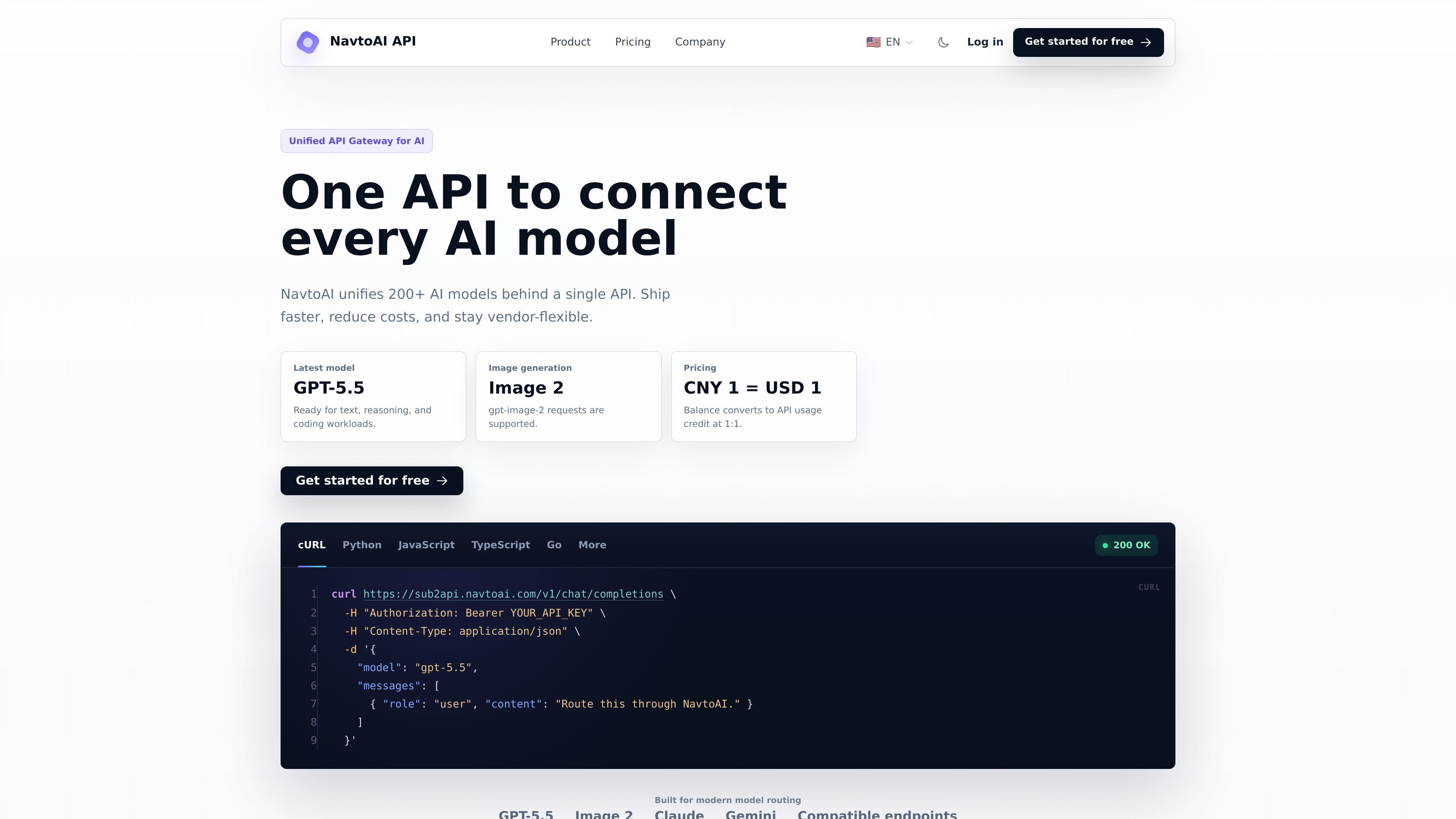
NavtoAI API is a unified AI API gateway that lets developers and teams route requests across 200+ models through one account and one API shape. The collected pages also show API key usage lookup, routing controls, and centralized management for keys, quota, billing, users, and observability.

NavtoAI API

Overview

NavtoAI API is a unified AI API gateway for connecting to multiple model providers through one account and one request shape. The home page says it unifies more than 200 AI models and supports text, reasoning, coding, and image-generation workloads.

It is aimed at developers and teams that want to route AI traffic without wiring each provider separately. The product emphasizes model routing, key management, quota control, billing, users, and observability from a single console, plus a browser page for checking API key usage.

Features

Unified model routing

NavtoAI presents itself as a unified gateway that can route requests across many AI models through a single API pattern.

Broad model coverage

The home page says the platform supports more than 200 AI models, including examples such as GPT-5.5, Claude, and Gemini.

Compatible API requests

A chat completions example on the home page shows a familiar API-key workflow for sending requests to `v1/chat/completions`.

Routing and failover

The page describes smart routing for failover and traffic balancing without changing every client integration.

Centralized account management

The product positions itself as a place to manage keys, quota, billing, users, and observability from one console.

Usage visibility

The key usage page exposes a browser-based lookup for real-time spending and usage status tied to an entered API key.

Use Cases

  • Single-integration model access

    Use one API integration to send requests across multiple model families instead of maintaining separate provider-specific clients.

  • Request routing and failover

    Route traffic and enable failover when you want a single front door for AI requests but need resilience across models or providers.

  • API key usage review

    Check how much a given API key is spending or using in real time from the key usage page.

  • Team administration

    Use the console to manage operational settings such as keys, quota, billing, users, and observability for a shared AI API setup.

  • Multi-workload AI apps

    Run text, reasoning, coding, or image-generation requests through a consistent request pattern such as `v1/chat/completions`.

Pros and Cons

Pros

  • Supports a large catalog of models behind one API entry point.
  • Shows a concrete request example with a standard `v1/chat/completions` workflow.
  • Includes operational controls such as keys, quota, billing, users, and observability.
  • Offers browser-based API key usage lookup without storing the entered key.
  • Mentions smart routing with failover and traffic balancing.

Cons

  • Public pricing and plan limits are not visible in the collected pages because the pricing route leads to a login screen.
  • The available channels page content was not exposed in the collected text, so supported channel details are unclear from these sources alone.

FAQ

What does NavtoAI API do?

NavtoAI API is a unified AI API gateway that lets you send requests through one API shape and route them to supported models behind the scenes.

How do you start using it?

The rendered home page shows a `v1/chat/completions` example using an API key and a model name such as `gpt-5.5`, which suggests a standard API-key-based workflow for chat and routing requests.

What kinds of models are supported?

The source confirms support for 200+ AI models, including text, reasoning, coding, and image generation requests such as `gpt-image-2`. It does not provide a full public list of endpoints or providers on the pages collected here.

Is pricing public on the site?

The pricing page content shows a login form rather than public plan details, so the collected sources do not expose plan names, quotas, or per-model prices.

Can I check API key usage from the site?

The key usage page says an API key can be entered to view real-time spending and usage status, and notes that the key is processed locally in the browser and not stored.

Quick Facts

Category
Developer Tool
Product type
Unified AI API gateway
Primary users
Developers and teams
Source domain
sub2api.navtoai.com
Supported scope
200+ AI models
Notable workflow
API-key-based model routing and usage tracking

Альтернативы NavtoAI API

DDS Hub icon

DDS Hub

DDS Hub is an AI API platform for Claude and OpenAI-family model workflows, with token-based pricing, model selection, and Claude Code setup guidance. It is aimed at developers who want API access, usage-based billing, and basic troubleshooting in one place.

EvoLink icon

EvoLink

EvoLink is an AI model API platform that gives developers one OpenAI-compatible endpoint for accessing text, image, video, and music models from multiple providers. It is positioned for production apps, agents, and workflows that need model comparison, routing, and usage-based access.

ZenMux icon

ZenMux

ZenMux is an enterprise LLM platform with a unified API for multiple model providers, automatic prompt-based routing, and usage-based or subscription pricing. It is aimed at developers and teams building AI applications that need multi-model access, cost visibility, and compensation for certain model failures.

Kie.ai icon

Kie.ai

Kie.ai is a developer-focused AI API platform for accessing chat, image, video, and music models through one interface. It combines model browsing, API keys, billing, usage logs, and per-model pricing for integration-focused workflows.

OpenAI icon

OpenAI

OpenAI is an AI research and deployment company centered on ChatGPT, the API, Platform tools, and Codex. The site helps individuals, developers, and businesses explore conversational AI, build with models, and follow product and research updates.

AakarDev AI icon

AakarDev AI

AakarDev AI helps teams manage AI provider access, project-level setups, logs, and analytics from one dashboard. It supports BYOK workflows and lists providers including OpenAI, Google Gemini, Anthropic, Groq, Mistral AI, and Perplexity AI.