
AI mood board generation
Generate mood boards from a starting vision by choosing a style, color palette, or layout, then let the AI create a board tailored to the prompt.

MoodBoardAI is a web-based mood board maker for creating, editing and sharing visual boards, with product import, background removal and shopping lists for designers.
MoodBoardAI is an online mood board maker for creating, editing, and sharing visual boards for interior design and other inspiration-led projects. The site positions it as a toolkit that combines AI-generated mood boards with a separate Mood Board Editor for additional customization and shopping-list building.
The workflow shown on the site starts with choosing a style or vision, generating a board, refining it through chat and cleanup tools, and then moving it into the editor to add products, create a shopping list, and continue adjusting the design. The same site also points to MyRoomDesigner.AI for turning a mood board into a 3D room-design workflow.
Generate mood boards from a starting vision by choosing a style, color palette, or layout, then let the AI create a board tailored to the prompt.
Refine generated boards by chatting with the AI, changing the prompt, and requesting updates to the design.
Move generated boards into the Mood Board Editor to continue customizing the layout and add more items.
Add products manually or via one-click import, and build a shopping list that includes item prices and a summarized total.
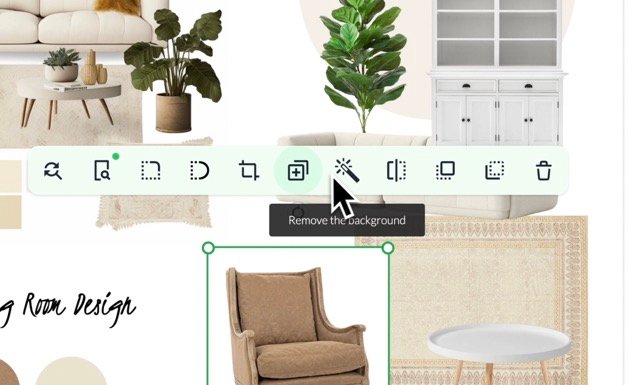
Remove backgrounds, crop, flip, duplicate, upscale, and clean up items while editing a board.
Find similar products and browse a furniture product library to support more realistic mood boards.
Start with a room, brand, or event idea, generate an initial board, and use chat plus cleanup tools to shape the direction before presenting it.
Use the Mood Board Editor to add products, remove backgrounds, crop items, and build a shopping list with prices for a client-facing board.
Turn boards into practical sourcing references by importing favorite items, finding similar products, and tracking the selected products in a price list.
Create visual inspiration boards for categories such as fashion, wedding design, food branding, or restaurant concepts using the same AI workflow.
Upload a mood board into MyRoomDesigner.AI to move from inspiration to a 3D room-design workflow when a more detailed interior plan is needed.
MoodBoardAI supports creating mood boards for interior design, fashion, wedding design, food branding, food photography, restaurant photography, kitchen design, living rooms, dining rooms, bedrooms, gardens, yoga studios, and similar visual projects. The site describes the workflow as uploading images or starting from a style, then generating and refining the board.
Yes. The pricing page says interior designers use MoodBoardAI for client work, including building style collections, comparing product combinations, and presenting visual moodboard concepts faster.
The pricing page says you can cancel anytime from your dashboard subscription settings and access remains active until the end of the billing period. It also says refunds are generally not available after AI generations are used, because the generations consume compute instantly.
The site describes an editing workflow that includes importing AI-generated boards into the Mood Board Editor, adding products manually or with one-click import, removing backgrounds, cropping, flipping, duplicating, and creating a shopping list with prices.
MoodBoardAI offers a free plan and paid personal, business, and premium plans. The pricing page shows that paid tiers add higher monthly limits for AI generations, boards, one-click product imports, and background removal.