
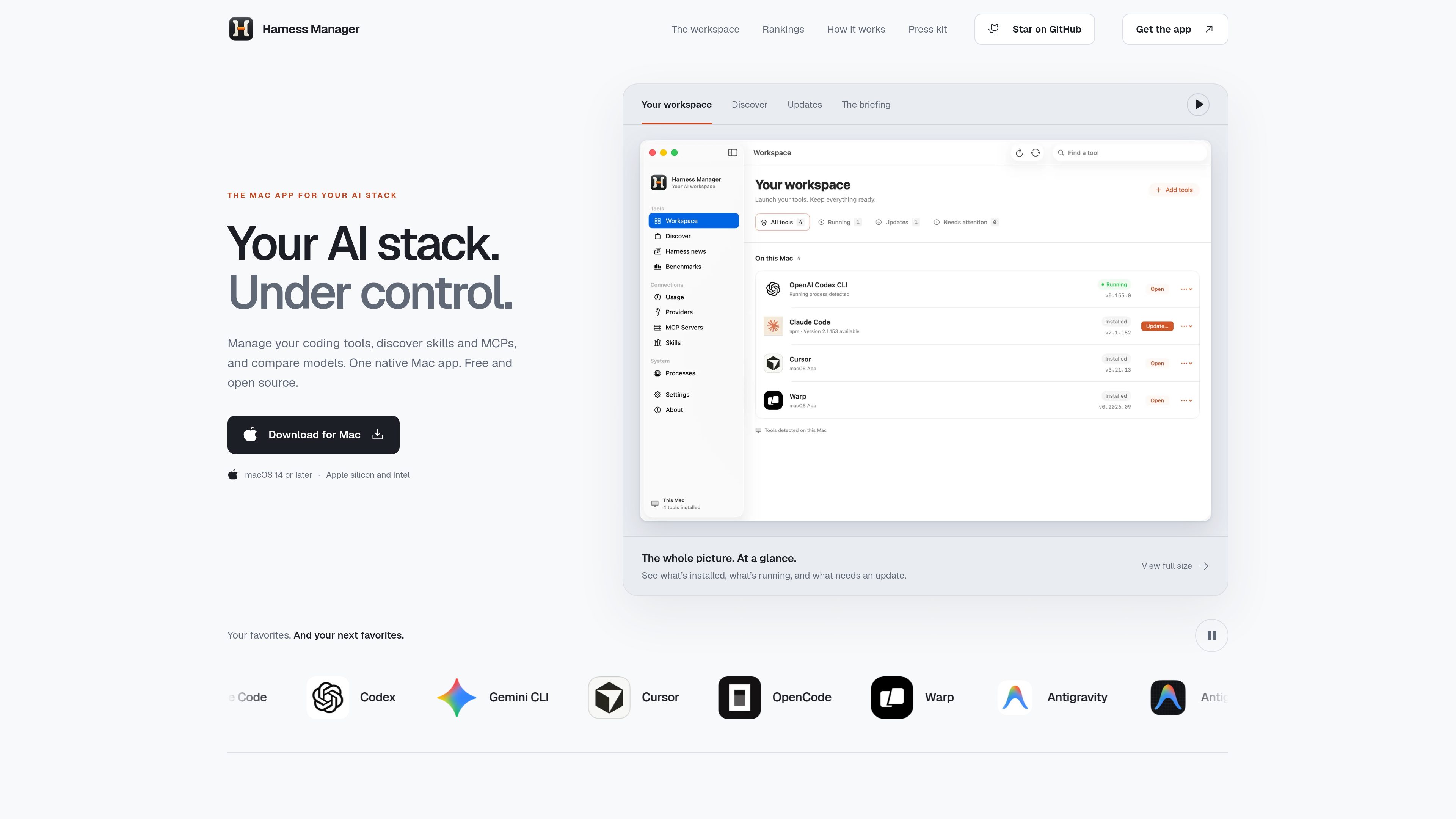
AI stack workspace
View supported tools, installed components, active processes, resource usage, and related projects in one Mac interface.

Harness Manager is a free, open-source native Mac workspace for managing AI coding tools, MCP servers, skills, updates, and model comparisons. It helps developers inspect their local setup, discover additions, review updates, and compare models in one app.
Harness Manager is a native Mac workspace for managing an AI development stack. It brings tools and harnesses, MCP servers, skills, provider configuration signals, updates, running processes, ecosystem news, and model rankings into one app. The goal is to make the moving parts behind AI coding workflows visible and easier to review.
Users can inspect what is installed or running on their Mac, discover additional harnesses, MCPs, and skills, review update commands before running them, and compare models across 31 ranking collections. The app is free and open source under the Apache 2.0 license, with support for macOS 14 or later on Apple silicon and Intel.
View supported tools, installed components, active processes, resource usage, and related projects in one Mac interface.
Browse a catalog of harnesses, MCP servers, and reusable skills to find additions for an AI development workflow.
See which components need updates, inspect the command associated with an update, and choose when to run it.
Review provider configuration signals, MCP servers, skills, and running processes alongside the tools that use them.
Compare models across 31 collections covering coding, design, agents, reasoning, local models, speed, latency, context, and other tasks.
Read news, official releases, and community finds from named sources, with each story linked back to its original publication.
Open the workspace to see which supported tools, providers, MCP servers, skills, and processes are present on a Mac before starting a project.
Browse harnesses, MCPs, and skills when looking for another tool or reusable instruction to add to an existing setup.
Use the updates view to identify outdated components, inspect the proposed command, and decide when an update should run.
Compare coding, design, reasoning, local, or other model collections to create a starting shortlist for a particular project. The site notes that rankings depend on the task.
Read source-linked releases, community finds, and related news in the briefing view instead of tracking each named source separately.
The site lists macOS 14 or later, with support for both Apple silicon and Intel Macs.
The product is described as free and open source. The linked pricing page currently does not provide additional plan or pricing details.
The workspace can show supported tools, installed items, provider configuration signals, MCP servers, skills, running processes, resource usage, and the projects associated with active harnesses.
Harness Manager shows available updates and lets you review the associated command before choosing when it runs. The available source does not specify a broader update-management system.
The app provides 31 ranking collections and individual comparisons across several metrics. The site describes the rankings as a starting point and notes that results depend on the task.

captum.ai
An open source PyTorch library for developers and researchers interpreting model outputs.

thecatenary.app
Catenary is a local-first desktop IDE for running and coordinating multiple AI coding agents on an infinite canvas. It helps developers keep terminals, editors, browsers, worktrees, and agent context visible in one workspace.

cortexdocs.dev
Cortex Docs is an open-source API tooling workflow that turns API specifications and Markdown into interactive documentation, typed SDKs, and MCP servers. It helps developers publish API interfaces for human users, applications, and AI agents from a shared project.
bentoai.dev
Bento Term is a native tmux client for watching and interacting with coding-agent sessions over SSH. It helps developers monitor multiple panes, respond when agents need input, and inspect files from Mac, iPhone, or iPad.

yoetz.dev
Yoetz is a local-first, open-source work ledger that checks completion claims from AI coding agents. It compares the agent’s declared work with host-side records and issues a receipt showing what was verified, the coverage reached, and any open findings.

coplaydev.github.io
Unity MCP is an open-source GitHub project that connects AI assistants with the Unity Editor. It provides LLM-accessible tools for managing assets, controlling scenes, editing scripts, and automating Unity tasks.