Paso icon

Paso

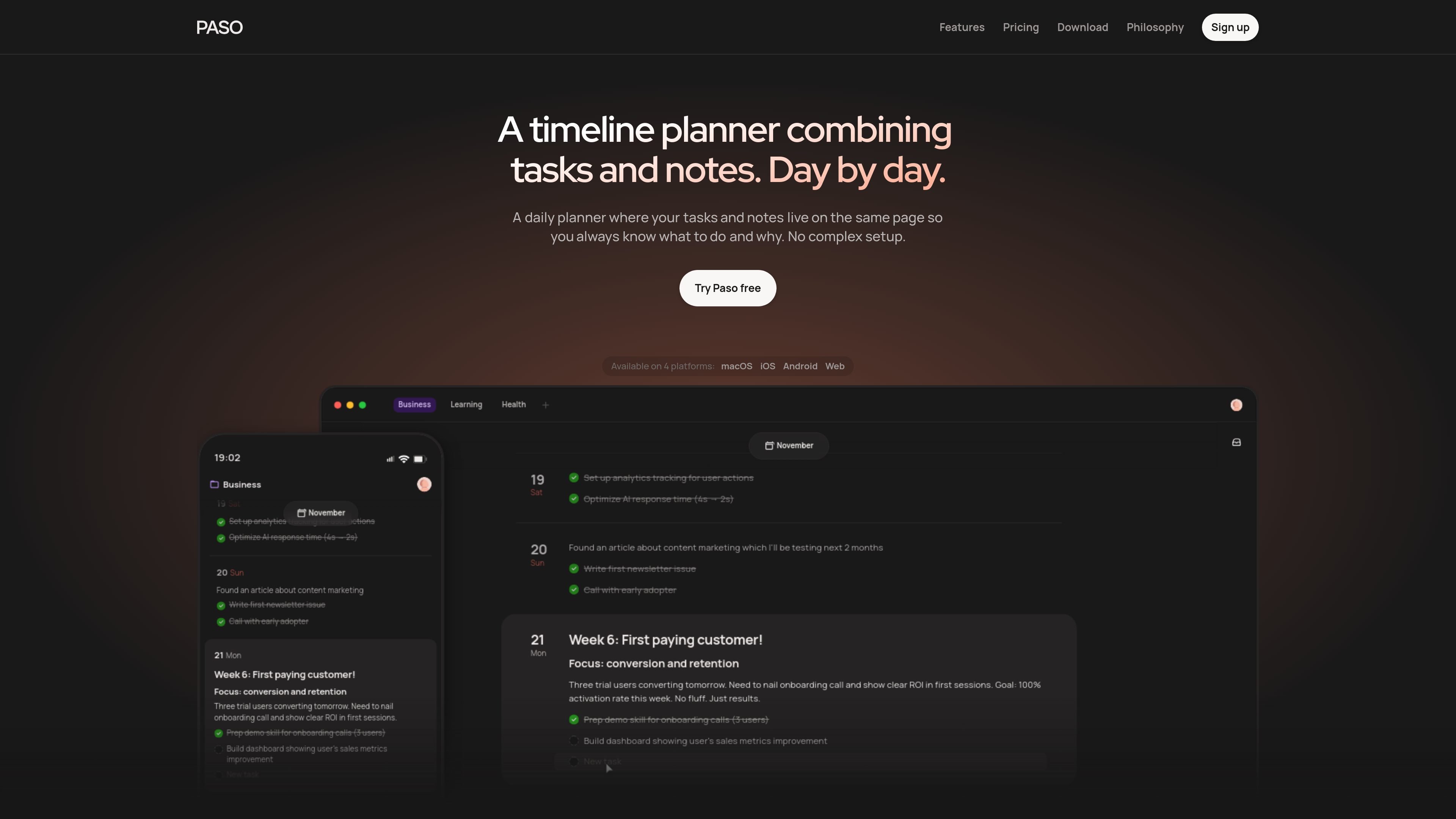
Paso is a day planner that combines tasks and notes on one timeline, with support for reviewing past work and planning ahead. It is available on macOS, iOS, Android, and web, and the site says you can try it for free with no setup required.

Paso

Overview

Paso is a day planner that puts tasks and notes on the same timeline. Instead of splitting planning, capture, and context across different screens, it lets you see what needs doing and why in one place.

The product is built around a long view of progress: you can scroll backward to review completed work, forward to plan upcoming days, and keep multiple projects on one timeline. It is available on macOS, iOS, Android, and web, and the site says it is free to try with no setup required.

Features

Projects

Create separate projects for different lines of work so tasks and notes stay grouped by context instead of mixing everything into one list.

Drafts

Keep unscheduled ideas and rough notes in a staging area until they are ready to move onto the timeline.

Timeline

Plan day by day on a single timeline that you can scroll through to see past work, today, and future work together.

Drag and drop

Move tasks and ideas between the inbox and the timeline, or rearrange items directly as your plan changes.

Writing tools

Use keyboard shortcuts, headings, lists, and tasks to write and organize content quickly inside the app.

Realtime sync and calendar

Sync data instantly across supported devices and jump to distant dates with the calendar for a wider planning view.

Use Cases

  • Daily planning with context

    Use Paso to plan a workday while keeping reminders, notes, and task context together, so you do not need a separate notes app beside your planner.

  • Progress review and forward planning

    Use the backward-and-forward timeline to review what happened last week, understand progress, and map out the next few days from the same view.

  • Managing multiple projects

    Keep several projects on one timeline and switch between them without rebuilding a separate system for each project.

  • Inbox-to-timeline workflow

    Capture rough ideas in drafts, then move them onto the timeline when they are ready to become scheduled work.

  • Lightweight shared planning

    Invite another person to a project when you want shared planning, while keeping other projects private.

Pros and Cons

Pros

  • Tasks and notes live together on one timeline, which keeps context attached to the work.
  • The app is designed to work immediately, with no templates, databases, or tags required to start.
  • It supports review over time by showing past, present, and future in the same interface.
  • Realtime sync and multi-platform availability make it easier to move between devices.
  • Pricing is simple and includes a free tier plus a paid Premium plan.

Cons

  • The feature list is intentionally minimal, so teams that want deep configuration or many workflow layers may find it limited.
  • Some items shown on the features page are marked as coming soon, including collaboration and auto-reschedule.
  • The public sources do not confirm third-party integrations such as Google Calendar.

FAQ

What is Paso best suited for?

Paso is designed to work with tasks and notes on a single timeline, so you can plan, capture context, and review progress in one place. The source also says it is free to try and requires no setup.

Does Paso sync across devices?

The source says Paso includes realtime sync across devices and is available on macOS, iOS, Android, and web, so your timeline stays available on the platforms it supports.

Can I use Paso for both personal and work planning?

Paso can be used for both work and personal projects, and the features page says you can create separate projects, keep drafts in a staging area, and plan on a shared timeline when needed.

Can I share or collaborate on a project in Paso?

The features page says collaboration is planned and marked as coming soon. It also says you can invite someone to a project and share only what you want them to see.

Does Paso integrate with Google Calendar or other tools?

The features page explicitly says Google Calendar integration is not listed as a feature, and the available sources do not confirm any third-party integrations beyond realtime sync across Paso’s own platforms.

Quick Facts

Category
Productivity / Day Planner
Platforms
macOS, iOS, Android, Web
Core model
Tasks and notes on one timeline
Pricing
Free to try; Premium starts at $5/month
Website
paso.to
Plan types
Free and Premium

Paso Alternatives

Chores icon

Chores

Chores is a free iPhone and iPad app for couples, families, and roommates to manage recurring household tasks with shared scheduling, reminders, tracking, and rewards.

MealJar icon

MealJar

MealJar is a meal planning and recipe organization app for families. It helps users plan weekly meals, store recipes from multiple sources, and coordinate grocery lists with household members.

Gemma AI icon

Gemma AI

Gemma AI is a phone call reminder app that calls you with scheduled reminders instead of push notifications. It helps people who want a more direct way to stay on schedule, with Google Calendar sync and conversational call interactions.

dumppp icon

dumppp

dumppp is a mobile capture app for Notion that focuses on rapid note entry, context switching, offline capture, and lightweight property updates. It helps Notion users record thoughts quickly on phone without the usual navigation and loading friction.

SalesViking icon

SalesViking

SalesViking is an innovative AI-powered sales assistant designed to enhance the effectiveness of sales calls and conversations. Its core purpose is to help sales professionals run better, more impactful conversations by providing real-time guidance, asking high-impact questions, and ultimately closing more deals with less stress. By integrating advanced AI technology, SalesViking aims to transform traditional sales processes into more efficient, data-driven interactions. This platform is tailored for sales teams looking to improve their communication strategies, increase conversion rates, and streamline their workflow. Whether you're conducting outbound calls, follow-up conversations, or complex negotiations, SalesViking offers tools and insights to make each interaction more productive.

Happycapy icon

Happycapy

Happycapy is a browser-based agent platform that lets users run Claude Code, manage skills, and delegate tasks inside a secure sandbox. It offers a free tier plus paid plans for more automation, email handoff, and larger workloads.