
Team inboxes
Create shared inboxes for team email and let multiple people work in the same place without stepping on each other’s toes.

Missive is an inbox collaboration platform for teams. Shared inboxes, tasks, internal discussion, automations, and integrations keep work in one workflow.
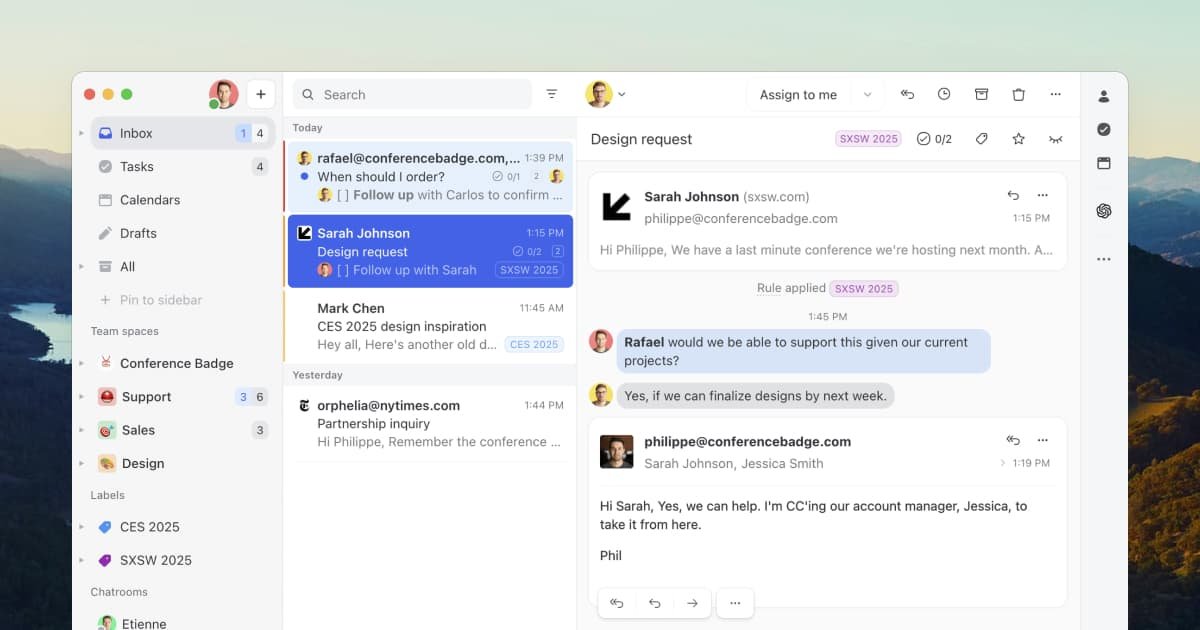
Missive is an inbox collaboration platform for teams that run on email. It combines shared inboxes, tasks, internal discussion, and team coordination tools so people can work together in one place instead of forwarding messages and switching between apps.
The product is built to show what is happening, who is responsible, and what needs attention next. It also adds workflow flexibility through rules, integrations, and AI features, while keeping email at the center of the process.
Create shared inboxes for team email and let multiple people work in the same place without stepping on each other’s toes.
Assign conversations to a team or individual, follow progress, and jump in when needed while keeping visibility across the group.
Discuss messages in internal threads, draft emails together, and share attachments before anything is sent.
Use shared or private team spaces to separate work by group and keep inboxes, tasks, and discussion organized.
Automate repetitive work with rules, templates, and workflow automations that run inside the inbox.
Connect Missive to external apps and AI tools, including ChatGPT, Claude, Gemini, CRM tools, project tools, and custom MCP servers.
Use shared inboxes, assignment, and internal threads when several teammates need to handle the same customer messages without losing context.
Turn inbound emails into trackable tasks so people can see what is due today, tomorrow, or next week without leaving the inbox.
Keep discussions, draft review, and related attachments inside the conversation when multiple people need to shape a reply together.
Connect email to CRM, project management, billing, or automation tools when work needs to move between systems.
Use the AI assistant to draft, reply, or translate messages with context from connected tools like Stripe or a CRM.
Yes. The pricing page says you can try Missive risk-free for 30 days with your whole team, and no credit card is required to start.
Missive is built around shared team inboxes, tasks, internal threads, and assignment workflows so teams can coordinate inside email instead of forwarding messages around.
The pricing page shows plans for up to 5 users, up to 50 users, and unlimited users, so it can fit small teams as well as larger organizations.
The source shows integrations with more than 25 apps, including tools such as ChatGPT, Pipedrive, Trello, and external apps connected through automation and MCP options.
The source highlights team inboxes, shared tasks, internal discussion, automations, analytics, and security features like SAML/SSO and IP restrictions on higher plans.