
Photo to coloring page conversion
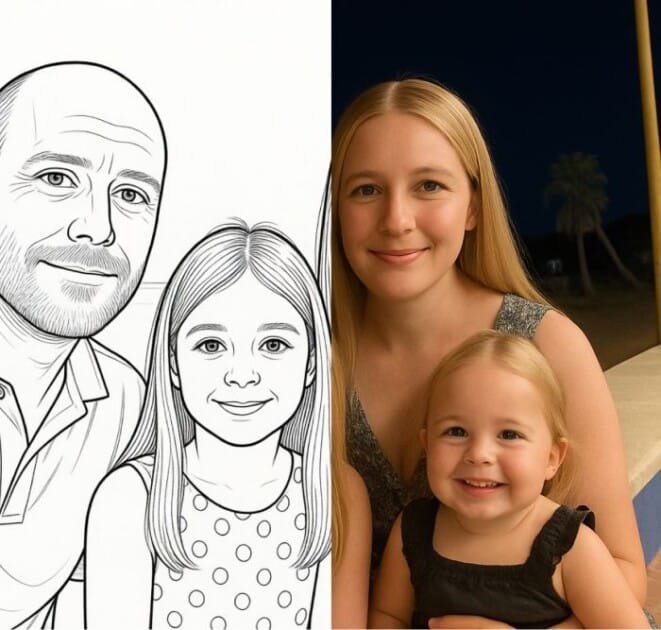
Turn uploaded photos into outline-style coloring pages online. The page says the result is ready to download, print, and color.

Mimi Panda turns photos and text into coloring pages and paint-by-numbers projects with free limited conversions, style presets, and printable outputs.
Mimi Panda is an online coloring-page and paint-by-numbers platform for turning photos and other inputs into printable creative pages. The site positions it for kids and adults, and its core value is converting personal images into simplified line-art or paint-by-number outputs without requiring desktop software.
The main workflow is browser-based: upload a photo, choose a conversion type, generate the result, then review or download the output. The product page also shows AI coloring-page generation and a set of support tools for working with colors, so the service covers both creation and related editing tasks in one place.
The public pages emphasize flexibility in output style. On the photo-to-coloring-page flow, Mimi Panda offers presets such as General, Detailed, Simplified, Anime, Sketch, and Comic, which suggests the tool is meant for different source images and different levels of outline complexity.
The site also shows template-style coloring books in its catalog, along with tools for converting photos into coloring pages or paint by numbers. That makes Mimi Panda useful both for one-off personal projects and for people looking for reusable printable coloring content.
Turn uploaded photos into outline-style coloring pages online. The page says the result is ready to download, print, and color.
Generate coloring pages from text prompts. The navigation and product sections identify a text-to-coloring-page tool alongside the photo workflow.
Create paint-by-number versions from images. The site lists photo-to-paint-by-numbers as a supported workflow.
Generate AI coloring pages with multiple image styles. The page shows options such as General, Detailed, Simplified, Anime, Sketch, and Comic.
Use the browser-based editor and preview flow to compare original and generated images side by side after processing.
Adjust output with color-related tools that appear in the site navigation, including color mixing, palette, drawing grid, and a color simplifier feature.
Upload a family photo, pet photo, or vacation image and convert it into a printable outline that can be colored by hand.
Use the AI coloring-page generator or style presets when you want a more controlled look for a drawing, character, or scene.
Turn an image into a paint-by-numbers project for a guided coloring activity instead of a blank outline page.
Use the catalog of coloring books and themed pages when you want ready-made printable content instead of generating from an image.
Test the service first with the free conversion allowance before deciding whether a paid plan is worth it for higher volume.
Yes. The photo-to-coloring-page tool says you can upload a picture, generate a coloring page online, and download it in minutes. The page also notes that click-to-compare viewing is available after generation.
The page states that the tool accepts JPG, PNG, WEBP, and HEIC files. It also notes a 20 MB maximum file size for uploads.
The site says free users can convert up to 2 photos every 7 days. It also says users can sign up for free to get 8 free credits, and the page shows paid plans for higher limits.
The source supports individual and business use through separate plan labels, including a Commercial plan described for business purposes. Beyond that, the page does not provide business-specific workflow details.
The rendered page does not show a dedicated pricing page with a full plan table, so the public pricing details should be checked on the product page itself rather than a separate pricing URL.