
AI meeting notes and transcription
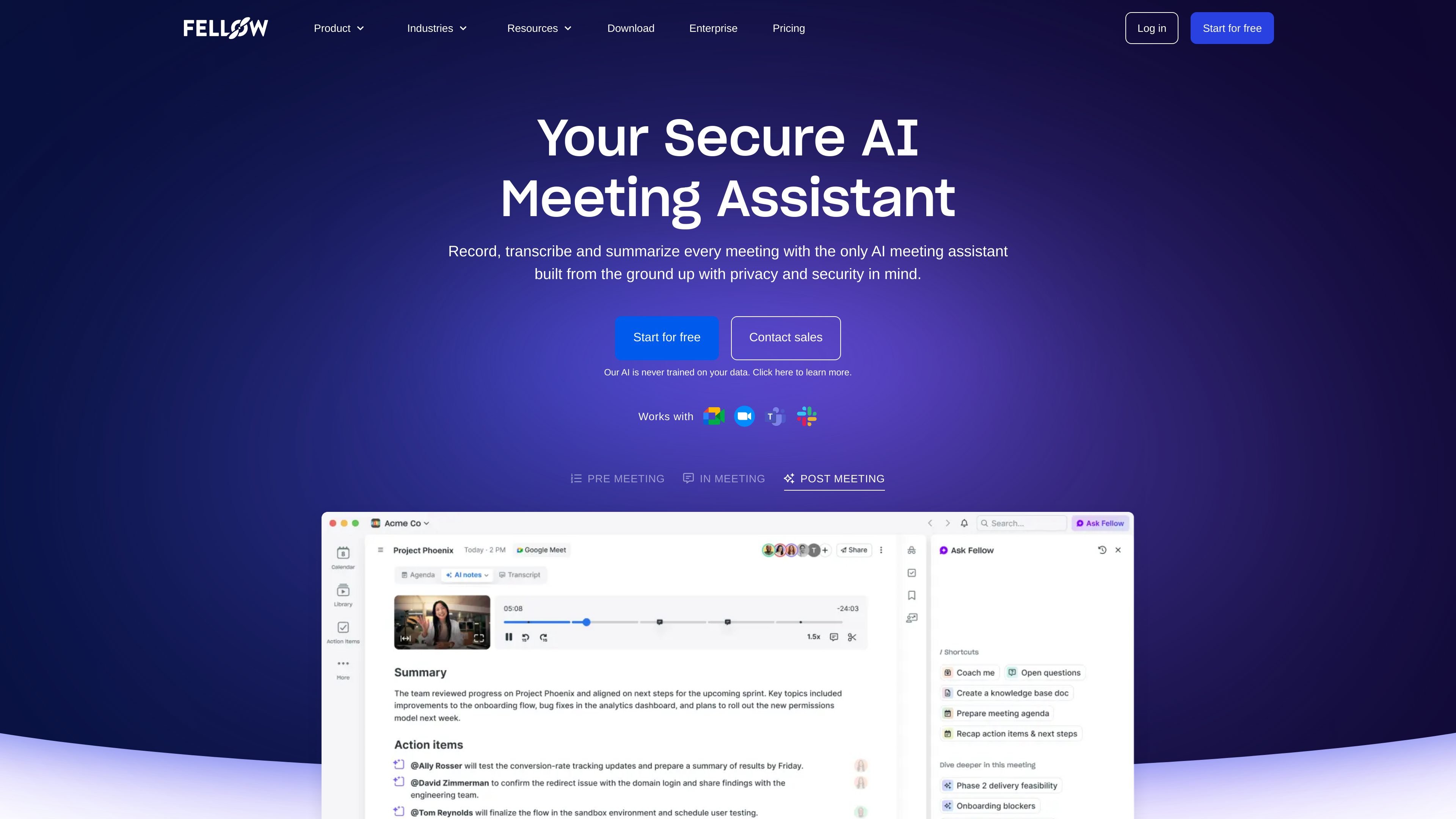
Automatically records, transcribes, summarizes, and extracts action items from meetings so teams can review what was discussed without manual note taking.

AI meeting assistant for transcripts, summaries, and action items
Fellow is an AI meeting assistant and note taker that records meetings, transcribes conversations, summarizes outcomes, and captures action items. It is designed to help teams keep meeting knowledge organized and searchable across Zoom, Google Meet, Microsoft Teams, Slack huddles, Webex, and in-person meetings.
The product emphasizes privacy, access control, and centralized governance for meeting recordings and notes. Its site positions Fellow for teams that want AI meeting support, CRM workflow automation, and stronger controls around who can record, view, and manage meeting content.
Automatically records, transcribes, summarizes, and extracts action items from meetings so teams can review what was discussed without manual note taking.
Ask Fellow turns meeting content into searchable answers and can help generate documents, email follow-ups, memos, and CRM updates from discussions you already have access to.
Keeps recordings, notes, recaps, and related controls in a centralized library so teams can organize meeting information in one place.
Syncs meeting insights into Salesforce and HubSpot and can suggest fields to update based on the conversation, helping keep CRM data current.
Provides collaborative agendas, pre-meeting briefs, and reminders to help participants prepare and keep meetings structured before and after the call.
Includes privacy and control settings such as recording permissions, access controls, domain control, user provisioning, transcript redaction, and analytics on higher tiers.
Customer success teams can use Fellow to prepare for renewal calls, escalation calls, and QBRs with AI-generated briefs that surface past conversations and action items before the meeting starts.
Sales teams can capture meeting notes, generate recaps, and use CRM field update suggestions to keep Salesforce and HubSpot aligned with what was actually discussed.
Leadership teams can centralize meeting records, summaries, and action items so important decisions stay accessible while access controls limit who can view sensitive content.
Operations and IT teams can manage org-wide meeting policies, recording permissions, and transcript controls when they need a standard way to govern meeting capture across the company.
Cross-functional teams can replace scattered manual notes with a shared meeting library that makes past recaps, agendas, and follow-ups easier to find and reuse.
Fellow records meetings across Zoom, Google Meet, Microsoft Teams, Slack huddles, Webex, and in-person meetings, then generates notes, summaries, transcripts, and action items. It also includes an AI assistant called Ask Fellow for searching meetings and generating follow-up content.
The pricing page shows a Free plan, Team, Business, and Enterprise plans. Free and paid tiers include different limits and features, and Enterprise is sold through sales contact rather than self-serve checkout.
Yes. The site says Fellow integrates with tools including Google Meet, Zoom, Microsoft Teams, Slack, Glean, Salesforce, HubSpot, Monday, Asana, ClickUp, Jira, Linear, Notion, Confluence, Zapier, and more.
The site positions Fellow for teams that need privacy, access control, and meeting governance, including regulated industries and enterprise teams. It mentions SOC 2 Type II, GDPR, and security controls such as domain control, user provisioning, transcript redaction, and advanced recording permissions on higher tiers.
The customer success use-case page describes pre-meeting briefs, centralized customer call notes, and streamlined pre- and post-meeting workflows. That suggests it is useful when teams need context before calls and organized follow-up afterward.
Traffic data is for reference only.

brieflyai.com
AI meeting assistant for transcripts, summaries, action items, and follow-up emails
voicecap.ai
VoiceCap is an AI meeting notetaker for in-person and online meetings. It records or imports meetings, produces speaker-separated transcripts, summaries, decisions, and action items, and makes the resulting archive searchable for teams and connected AI assistants.

shop.genspark.ai
Genspark SecondBrain Note is a card-sized AI voice recorder for capturing meetings, calls, consultations, and other conversations. It records offline, transfers audio through the Genspark App, and turns recordings into transcripts, summaries, key points, and action items.

circleback.ai
AI meeting assistant for notes, action items, transcription, search, and automations

sonnetai.com
Meeting assistant that records, transcribes, and creates searchable notes and action items without a visible bot

noty.ai
An AI meeting assistant for teams that turns conversations into transcripts, summaries, and trackable tasks.