
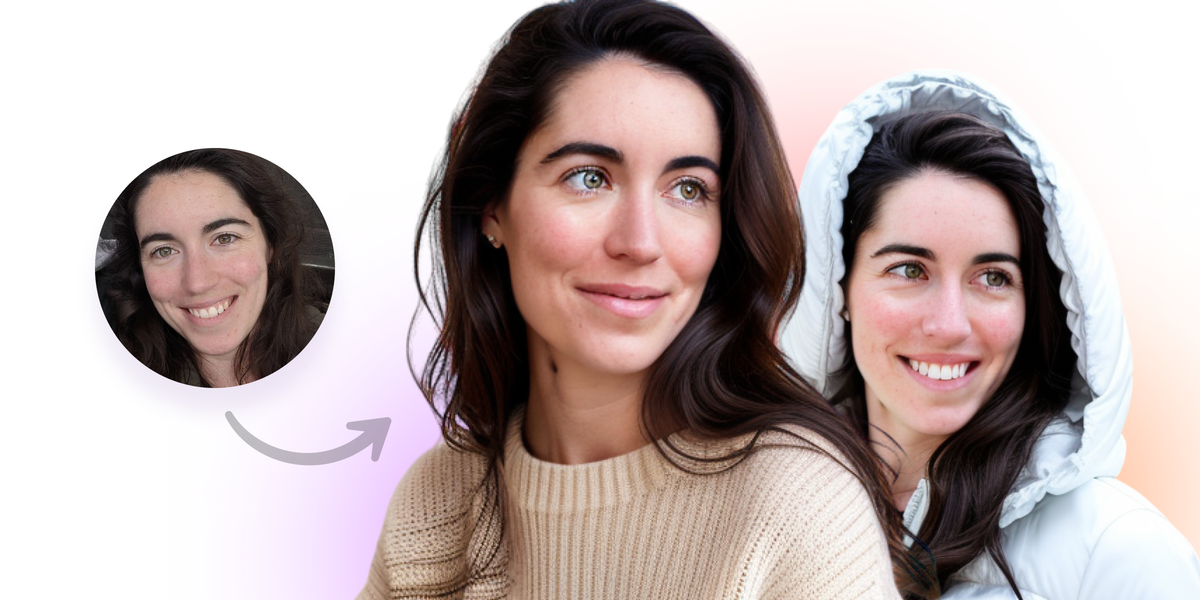
AI headshot generation
Upload a few selfies and receive a gallery of studio-grade headshots without a camera session. The product emphasizes natural, accurate results and says the output should not have an obvious AI look.

Dreamwave creates professional AI headshots from selfies for individuals, teams, and events, with company workflows, event photobooths, and editing.
Dreamwave is an AI headshot platform for individuals, teams, and live events. It turns a few selfie uploads into studio-style portraits and also offers company headshots and event photobooths.
The site positions the product around fast turnaround, editable outputs, and team workflows. For company use, Dreamwave adds bulk invitations, admin review, and HRIS-driven syncing so headshots can stay current across workplace systems.
Upload a few selfies and receive a gallery of studio-grade headshots without a camera session. The product emphasizes natural, accurate results and says the output should not have an obvious AI look.
Generate consistent portraits for a whole company, with options to choose styles, backgrounds, and clothing directions across a roster. The source says the same look can be applied to the entire team from a single selfie per person.
Edit finished portraits by changing outfits, swapping backgrounds, and refining details with prompts or simple tools. The source says this works without Photoshop or manual retouching.
Invite teams, send reminders, review galleries, and bulk-download final headshots from a central admin workflow. The company page also mentions custom due dates and uploads on behalf of teammates.
Use the event photobooth for conferences, trade shows, and activations. The source says it supports branding on booth screens, confirmation emails, delivery pages, and live slideshows.
Connect company headshots to HRIS systems and downstream workplace apps. The source names Workday, ADP, Rippling, Gusto, BambooHR, Slack, Outlook, Teams, Okta, and badging as supported examples.
Use Dreamwave to create a polished profile photo from a few selfies when you need something suitable for LinkedIn, company bios, or personal websites.
Use the company headshots workflow to keep portraits consistent across departments, offices, and time zones, with centralized invites, reminders, and download management.
Use the HRIS sync flow when employee photos need to follow onboarding and directory changes across systems like Workday, ADP, Rippling, Gusto, or BambooHR.
Use the event photobooth at conferences or trade shows when you want a branded experience that gives attendees a useful headshot and captures leads.
Use the editor to swap outfits, backgrounds, or small details after generation when a team needs a different visual direction without rerunning a shoot.
Dreamwave is designed to generate professional headshots from a few uploaded selfies. The source also shows it supports team workflows and event photobooths.
The company headshots flow supports team invites, reminders, review, and bulk download. The source says teammates can upload selfies privately or an admin can upload on their behalf.
The source describes an AI editor that can change outfits, swap backgrounds, and retouch details without Photoshop. Company plans also include bulk actions and admin controls.
The source says the company and AI headshot flows return galleries in about 1-2 hours or about two hours. Exact timing may vary by use case.
The source states Dreamwave does not sell data, does not train on customer photos, and can delete data. It also says data stays in the US for company headshots.
Traffic data is for reference only.

headshotpro.com
HeadshotPro is an AI headshot generator that turns a few selfies into professional business headshots for individuals, teams, and companies.

pfpmaker.com
PFPMaker is a web-based AI profile picture maker that turns selfies into professional or creative portraits, with background removal, styling tools, and premium editing for social, work, and messaging.

higgsfield.ai
Higgsfield AI creates and edits images, videos, and voice content with AI, prompts, references, Supercomputer, and MCP workflows.

picsart.com
Picsart is an AI creative platform for generating, editing, and designing images and videos, with plans for individuals, teams, and enterprises.

hotpot.ai
AI platform for images, headshots, graphics, writing, editing, and design

pixelbin.io
Pixelbin is a web-based AI studio for creating, editing, and automating image and video workflows.