
Review local git changes
Open a local repository and review the uncommitted diff before it becomes a pull request. The app is aimed at code an AI agent has already written in your working tree.

Diffsmith is a native macOS code review app for local git changes made by AI coding agents like Claude Code, Cursor, Codex, and Copilot. Leave inline comments and send them back as a prompt or via a local MCP server.
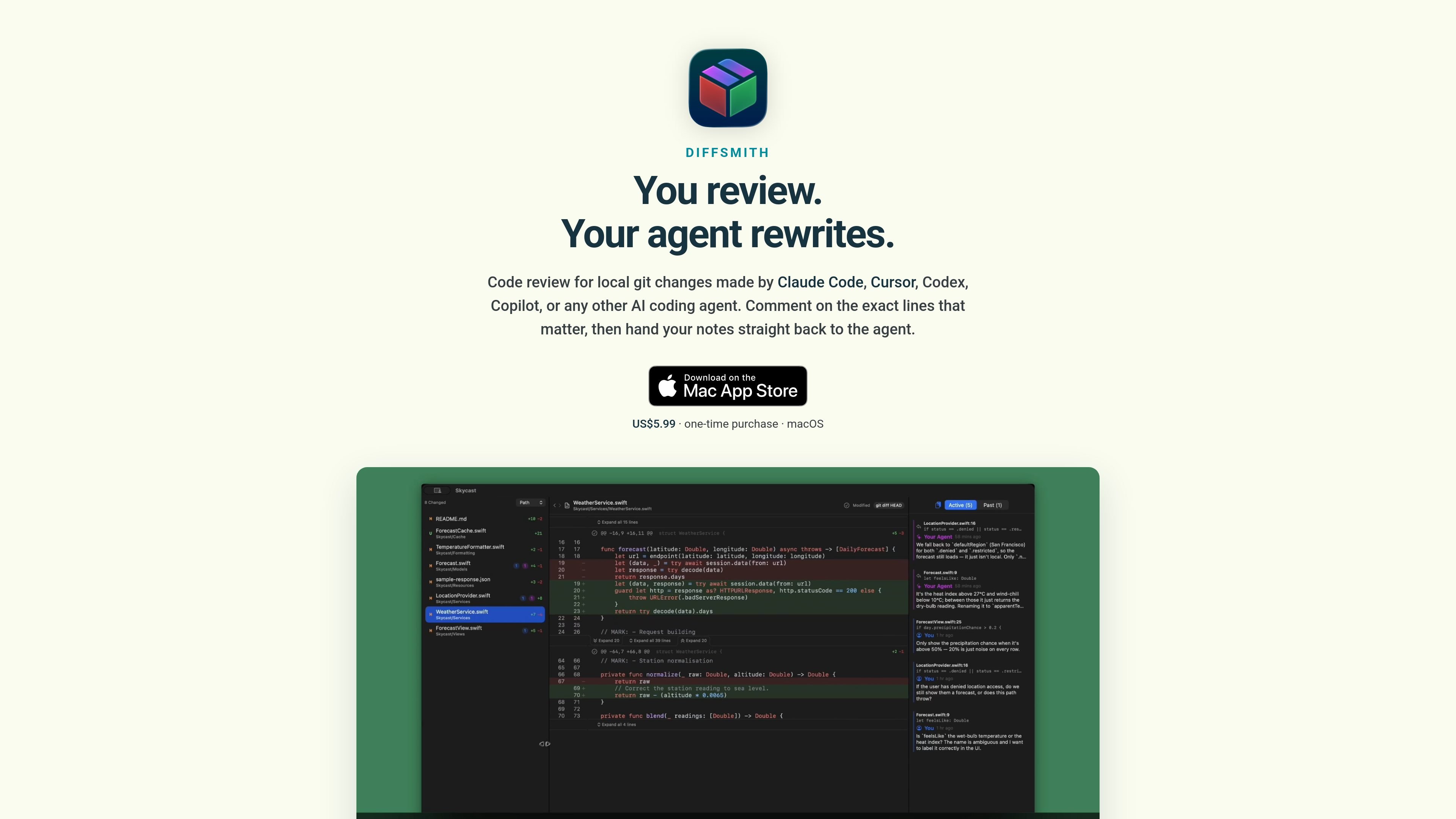
Diffsmith is a native macOS app for reviewing local code changes made by AI coding agents. It opens a repository, reads the uncommitted git diff, and lets you attach comments directly to lines so you do not have to retype file names or line numbers by hand.
The workflow is designed for code that is still moving. Diffsmith can re-diff as files change on disk, so you can start reviewing before the agent finishes. When you are done, your notes can be copied back as a prompt or passed to the agent through the app’s optional local MCP server.
Open a local repository and review the uncommitted diff before it becomes a pull request. The app is aimed at code an AI agent has already written in your working tree.
Click any line to leave a comment anchored to that exact spot, then send those notes back to the agent as a prompt. A sidebar lists all comments so you can jump between them quickly.
Turn on the built-in local MCP server if you want the agent to read your comments directly and reply inside Diffsmith. The setup guide provides snippets for Claude Code, Cursor, Codex, Windsurf, VS Code, and Zed.
Diffsmith re-diffs as files change on disk, so you can start reviewing while the agent is still working instead of waiting for a finished batch of changes.
Switch between syntax-highlighted side-by-side or inline diffs, expand context, hide whitespace, and review HEAD or HEAD plus staged changes. Modified, added, deleted, renamed, and untracked files are all shown with per-file stats.
Use a fully customizable prompt template, open multiple repositories at once, mark hunks and files as read, and keep track of Past Comments when code changes after you leave feedback.
Review code that Claude Code, Cursor, Codex, Copilot, or another agent has written in your local repository before you turn it into a pull request.
Leave comments on specific lines while the agent is still editing files, then let Diffsmith re-diff as the work changes instead of waiting for a completed batch.
Connect a local AI tool over MCP so it can read your notes and answer them inside the app, reducing copy and paste between review and generation.
Open multiple repositories at once and copy comments from one or all of them when you are handling more than one active codebase.
Use the diff viewer’s inline or side-by-side layout, theme choices, whitespace toggle, and adjustable font size to match your preferred review style.
Yes. The source says Diffsmith reviews uncommitted changes in your local git working tree and works with Claude Code, Cursor, Codex, Copilot, and other AI coding agents. You can either copy your comments back as a prompt or connect an agent over MCP so it can read and reply in the app.
In Diffsmith, open Settings → Agent and turn on the built-in MCP server. It listens on http://127.0.0.1:34337 and is bound to loopback only. Then add the provided snippet for your agent, such as Claude Code, Cursor, Codex, Windsurf, VS Code, or Zed.
No. The privacy policy says Diffsmith does not collect, store, or transmit personal information, does not connect to the internet, and makes no outbound network requests of its own. Comments and preferences are stored locally on your Mac.
No. Diffsmith reviews local uncommitted work and can diff against HEAD or HEAD plus staged changes, so you do not need to commit or push before reviewing.
The page says Diffsmith is a one-time purchase of US$5.99 on the Mac App Store with lifetime access and no subscription.