
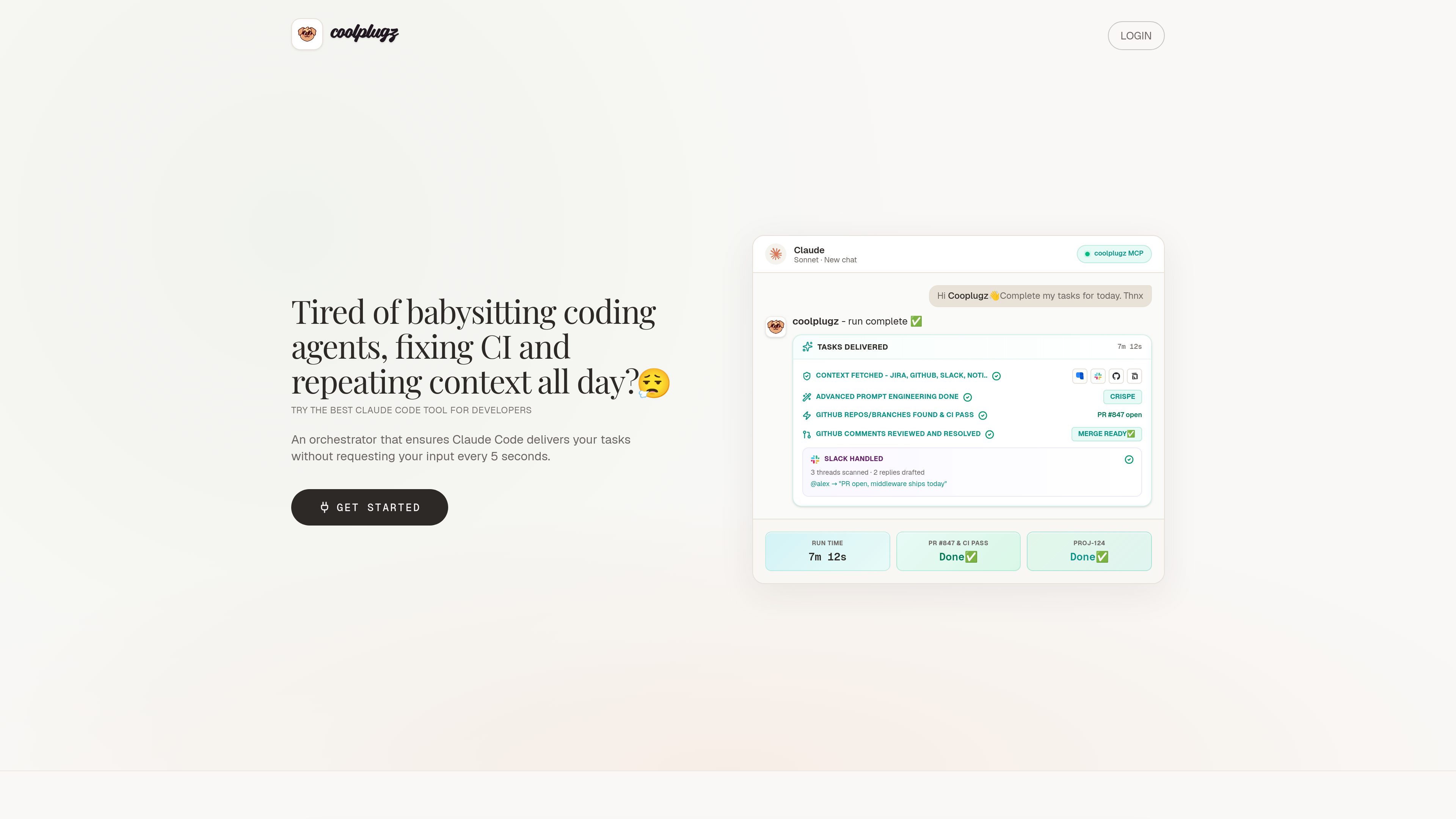
Context gathering from work tools
CoolPlugz pulls context from Jira, GitHub, Slack, and Notion so Claude Code can work with project details already in view.

CoolPlugz는 Claude Code를 위한 오케스트레이션 계층으로, 컨텍스트를 모으고 구조화된 워크플로를 실행해 지속적인 감독을 줄이면서 코딩 작업을 완료하도록 돕습니다. Jira, GitHub, Slack, Notion, CI 사이의 컨텍스트 전환을 줄이고 싶은 개발자를 위한 제품입니다.
CoolPlugz is an orchestration layer built to guide Claude Code through coding tasks with less manual supervision. Its core job is to gather project context, structure the work, and keep execution tied to source systems such as Jira, GitHub, Slack, Notion, and CI.
The product is framed around reducing context switching and AI fatigue for developers. Rather than acting as a generic chat interface, it organizes a task loop that can fetch context, drive implementation, verify results, and present completed work for approval or redo.
CoolPlugz pulls context from Jira, GitHub, Slack, and Notion so Claude Code can work with project details already in view.
The product guides work through an agentic loop of gathering context, taking action, and verifying output instead of leaving each step to manual prompting.
The site shows workflows that include branch finding, CI fixes, review comments, and a ready-to-merge handoff.
Deliverables are presented in Claude for actions such as Approve & submit or Reject & redo, so the user can review work before it is posted or merged.
The Pro plan describes persistent orchestration across tasks and projects, along with the ability to customize the orchestrator with your own instructions.
The troubleshooting guide documents alternatives for Slack API blocks and GitHub SSO or PAT issues, including a browser-based workflow when Slack access is restricted.
Use CoolPlugz when you want Claude Code to keep moving through a task without constant back-and-forth prompts.
It is positioned for branch discovery, CI troubleshooting, and resolving review comments before a pull request is ready to merge.
The product gathers context from multiple systems so developers do not have to move between chat, issue trackers, code review, and CI logs themselves.
The site includes Slack-related workflows and guidance for drafting replies, which fits teams that need asynchronous coordination around development work.
The guides cover Slack API blocks and GitHub SSO/PAT access, which makes the product relevant to teams with stricter company permissions.
It orchestrates Claude Code around coding tasks by gathering context, structuring the workflow, and helping verify work before submission.
The site names Jira, GitHub, Slack, and Notion, along with CI-related workflows.
Yes. The pricing page lists a 7-day free trial with no card required.
The pricing page shows Free Trial, Pro, and Enterprise options, with Enterprise handled through sales contact.
The troubleshooting guide describes fallback approaches for Slack API blocks and GitHub SSO or PAT requirements, including a browser-based Slack workflow and PAT-based GitHub access when needed.
트래픽 데이터는 참고용으로만 확인하세요.

oomol.com
OOMOL은 Gmail, GitHub, Notion을 AI 에이전트에 연결해 Codex, Claude Code, Cursor에서 인증된 도구를 재사용하도록 하며, 무료·유료·사용량 기반 요금을 제공합니다.

www.agentconnect.md
AgentConnect를 사용하면 Claude Code, Codex, Gemini CLI와 같은 ACP 에이전트를 Slack, Telegram, Discord, GitHub에 연결해 팀이 평소 협업하는 채널에서 업무를 맡길 수 있습니다. 오픈 소스이며 자체 호스팅이 가능하고, 에이전트 워크플로를 위한 역할, 도구, 메모리, 설정 가능한 트리거를 제공합니다.

trytrellis.app
Trellis는 Claude Code와 Cursor를 위한 AI 프레임워크 겸 툴킷으로, 문서와 GitHub 리소스를 제공합니다.

conductor.build
Conductor는 격리된 워크스페이스에서 Claude Code, Codex, Cursor 에이전트를 동시에 실행하는 Mac 앱으로, 개발자가 작업을 위임하고 변경 사항을 검토한 뒤 로컬에서 병합하도록 돕습니다.

happycapy.ai
브라우저에서 Claude Code 실행, 스킬 관리, 안전한 샌드박스 내 작업 위임을 지원하는 에이전트 플랫폼.

supalaunch.com
CLI, VS Code, JetBrains를 지원하는 Claude Code용 프로덕션 설정 패키지로 재사용 가능한 지침, MCP 구성, 훅, 워크플로 템플릿을 제공합니다.