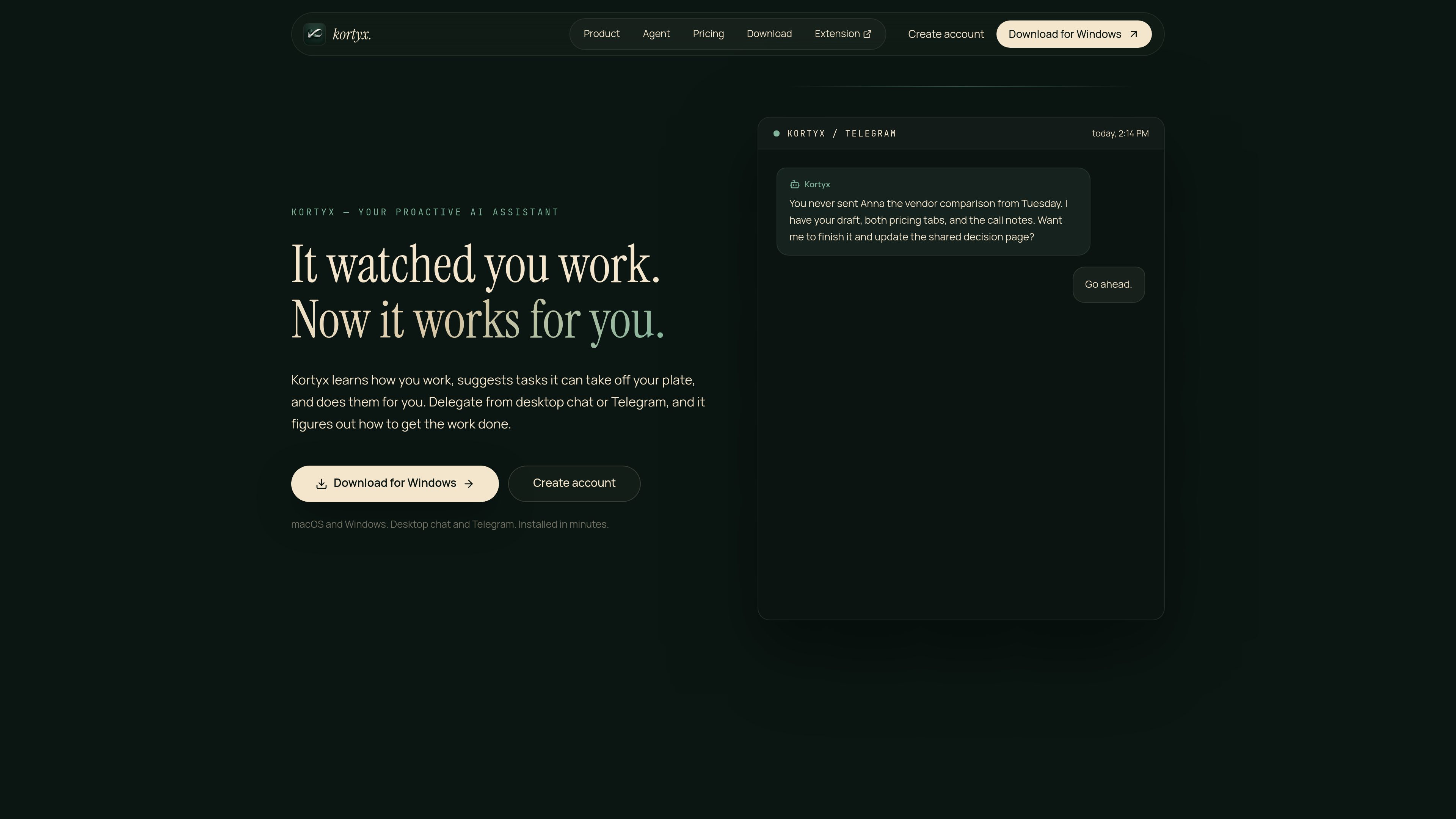
Kortyx is a proactive AI assistant that learns how you work, captures context from desktop and browser activity, and can suggest and carry out tasks with your approval. It is designed for people who want an AI agent that can use their work history, drafts, and pages to help finish routine or incomplete work.

Kortyx preview

An AI assistant that learns your work context

Kortyx learns from the work you already do, then uses that context to suggest tasks it can take off your plate and complete for you. It is designed around capture, memory, delegation, and execution rather than one-off chat prompts.

The product is available as a desktop app for macOS and Windows, with optional Chrome and Telegram connections. According to the site, it can observe desktop and browser activity with permission, answer from memory, run browser sessions, execute code in an isolated sandbox, and wait for approval before sending, submitting, or spending anything consequential.

Core capabilities

Passive capture and memory formation

Kortyx records work context with permission and turns it into structured memory it can use later. The site says it can capture apps, pages, meetings, drafts, and browser activity while redacting sensitive information such as passwords, payments, and private browsing on the device.

Proactive task delegation

Instead of waiting for a prompt, Kortyx can notice unfinished or stalled work and send a proposal through desktop chat or Telegram. It only pings when it has a specific task it believes it can help finish, and it shows what the suggestion is based on.

Agentic execution with approvals

When a task is accepted, Kortyx can plan the work, use a browser session, fill forms, and interact with pages. More sensitive steps are approval-gated, so the user remains the final check before anything is sent or submitted.

Sandboxed code and file work

The product says it can write code for scripts, spreadsheets, and file processing in a secure sandbox. This keeps the work separate from the user’s machine while still allowing it to handle more technical tasks when needed.

Persistent recall and grounded chat

Paid plans include deeper memory access and full-depth grounded chat over private context. The site also describes Recall history, which surfaces past context that the assistant has learned from previous work.

MCP access and reusable skills

Kortyx mentions multi-agent MCP access to the same memory and the ability to save repeated tasks as skills. It also says repeated work can become scheduled skills that the assistant can rerun later.

Practical ways people can use it

  • Finishing work you started but did not send

    A user can rely on Kortyx to find drafts, notes, and recent context, then propose a concrete next step such as finishing a comparison, updating a decision page, or sending a follow-up that was left unsent.

  • Handling browser-based research and publishing steps

    Kortyx can open pages, compare current information from browser sessions, and prepare actions that require navigation or form entry. The site shows it being used for vendor pricing comparison and publishing a recommendation after review.

  • Managing tasks away from the desk

    Telegram support lets the assistant message the user about useful tasks it can complete and receive approval remotely. This is meant for times when the user is away from their desktop but still wants to review or authorize work.

  • Turning repeated workflows into saved skills

    When a task happens often, Kortyx says it can convert that work into a skill and rerun it on a schedule. That makes it more relevant for recurring routines such as updates, checks, or periodic follow-ups.

  • Supporting file, spreadsheet, or script-based work

    For jobs that go beyond chat and browser clicks, Kortyx says it can run code in a secure sandbox to process files or automate spreadsheet-style tasks while keeping execution off the local computer.

Pros and Cons

Pros

  • Combines capture, memory, delegation, and execution in one workflow instead of treating chat as a separate step.
  • Supports desktop chat, Telegram, and optional Chrome context, which gives it several ways to receive context and approvals.
  • Uses approvals for consequential actions such as sending, submitting, or spending, which gives users a clear checkpoint.
  • Can handle browser work, code execution, and scheduled follow-up tasks, not just conversation.
  • Offers a free tier and a paid Pro plan, so users can test the loop before paying.

Cons

  • Setup is still multi-step: the site points to a desktop app, optional Chrome extension, and Telegram linkage.
  • The product’s strongest workflow appears to depend on desktop/browser context, so it may be less useful for people who want a standalone chat-only assistant.
  • The public site does not spell out broad team collaboration features or a wide integrations list beyond the systems mentioned on the pages.

FAQ

What platforms does Kortyx support?

The site says Kortyx has a desktop app for macOS and Windows. It also offers a Chrome extension for browser context and Telegram linking for delegation and proactive pings.

Does Kortyx act automatically, or does it ask before doing important work?

Kortyx can plan and execute work, but external actions and higher-risk steps are approval-gated. The site specifically says sending, submitting, or spending anything waits for user approval.

Can I pause capture?

Yes. The pricing FAQ says capture can be paused at any time, and sensitive contexts such as passwords, payments, and private browsing are redacted on the machine.

How is Kortyx priced?

The pricing page shows a Free plan and a Pro plan at $20 per month. It also says Kortyx is not priced by AI tokens; you bring or connect your own AI provider in the app.

What does the Pro plan add?

The site says Pro unlocks the deeper parts of the product, including full Recall history, ongoing proactive delegation, full-depth grounded chat over private context, and multi-agent MCP access to the same memory.

Quick Facts

Category
AI Assistant
Primary platforms
macOS and Windows desktop app
Optional connections
Chrome extension, Telegram, MCP
Pricing model
Free plan and Pro plan; own AI provider required
Primary workflow
Capture context, suggest tasks, request approval, then execute
Source domain
kortyx.co

Kortyx 분석

Kortyx· 월간 방문 수 2.9천· 글로벌 순위 #5,135,509

트래픽 데이터는 참고용으로만 확인하세요.

월간 방문 수
2.9천
글로벌 순위
#5,135,509
카테고리 순위
-
사용자 이탈률
25.6%
평균 방문 시간
12:20
방문당 페이지 수
2.18

트래픽 추이

2.9천1.9천970.705월: 1835월6월: 06월7월: 2,9127월
월간 방문 수 - 3
5월183
6월0
7월2912

트래픽 소스

아직 트래픽 분석 데이터가 없습니다.

주요 지역

아직 트래픽 분석 데이터가 없습니다.