
Image-to-video workflow
Upload a still image and generate a short video in a few steps. The homepage describes a workflow that starts with uploading a photo and ends with previewing and downloading the result.

ImageMover is an online AI image-to-video generator that turns still photos into short videos for creators, marketers, and businesses. Free daily credits and credit packs.
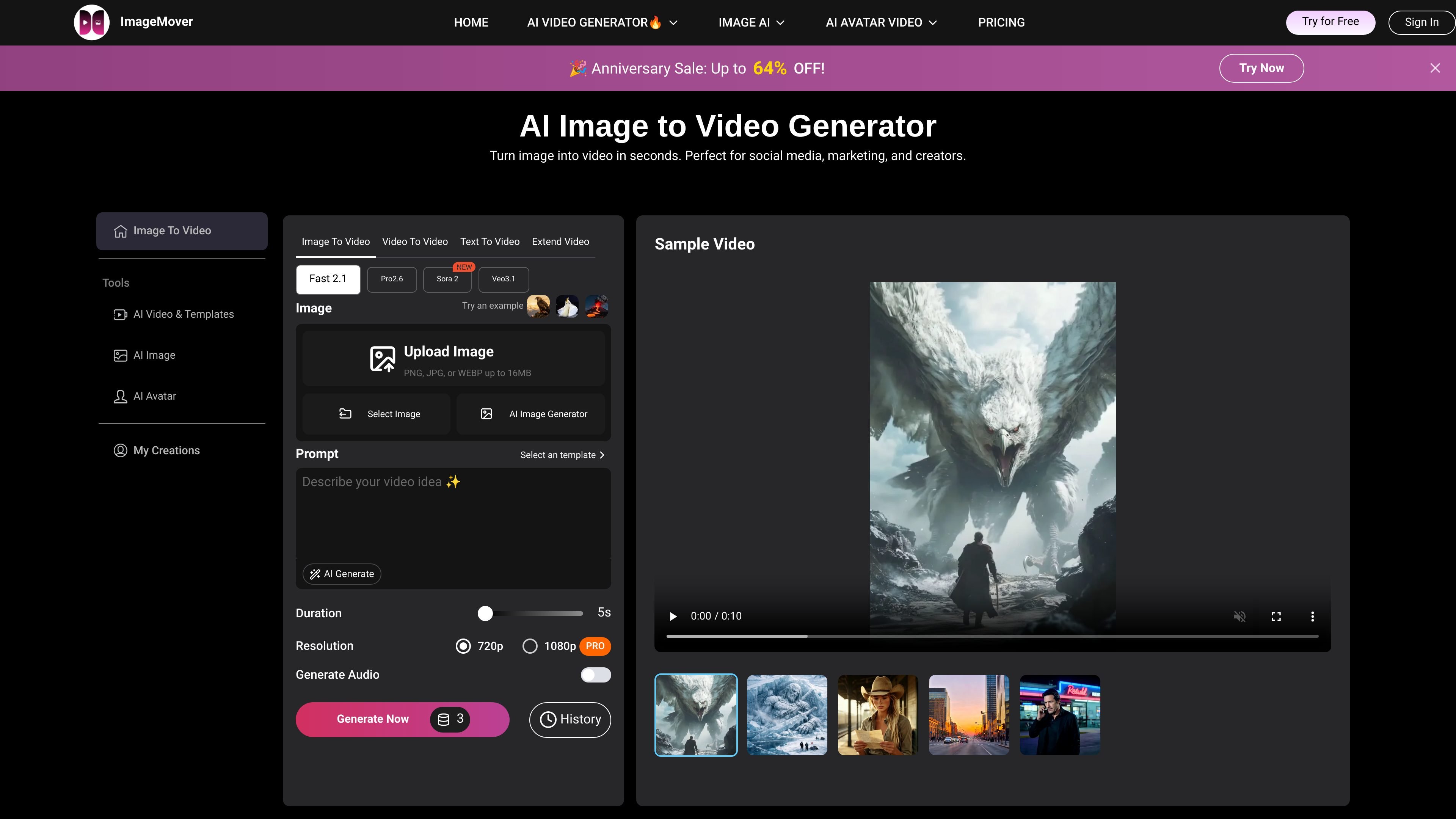
ImageMover is an online AI image-to-video generator that turns still photos into short videos. The homepage presents it as a tool for creators, marketers, and businesses that need quick motion content from a single image.
The product flow is straightforward: upload an image, choose generation settings, preview the result, and download the finished video. The site also highlights custom start and end frames, multiple AI models, and automatic sound effects as part of the creation workflow.
Pricing information shows a free daily-credit option and one-time credit packs for additional use. The pricing page also notes support for no-watermark downloads, priority queue access, VIP support, and access to related tools such as photo to video, script to video, video upscaler, rewrite, and audio add-on features.
Upload a still image and generate a short video in a few steps. The homepage describes a workflow that starts with uploading a photo and ends with previewing and downloading the result.
Choose from multiple AI video models, including Fast 2.1, Pro 2.6, Sora 2, and Veo 3.1. The site presents these options as part of the video customization step.
Adjust duration, resolution, sound effects, and start and end frames. These controls are described as part of the generation workflow and give users more control over the output.
Set both opening and closing frames to guide transitions and keep scenes more consistent. The homepage highlights custom start and end frame control as a core capability.
Add automatically generated sound effects and ambient audio to the finished video. The homepage says this can make the output more immersive without manual audio editing.
Preview, edit further, regenerate, extend, and then download the final version. The source describes this as the post-generation workflow before export.
Create short social videos from product photos, campaign images, or branded visuals. The homepage explicitly mentions social media, marketing, and e-commerce-style use cases.
Turn product shots into video ads or promotional clips for launches and paid campaigns. The site calls out AI product videos and brand promotions as part of the intended workflow.
Generate short-form clips for TikTok and YouTube Shorts from a still image. The homepage and FAQ both point to short-form content creation as a common use case.
Animate portraits, pet images, birthday photos, or travel shots into shareable motion pieces. The homepage lists birthday, pet, action, sci-fi, and talking avatar examples.
Use the photo-to-video workflow to build visual recaps, pitch visuals, or portfolio intros. The photo-to-video page describes turning photos into recap videos, personal-brand videos, and pitch videos.
ImageMover is an online AI image-to-video generator that turns static images into short videos. The site says you can upload an image, customize settings, preview the result, and download the finished video.
The source says ImageMover supports PNG, JPG, and WEBP uploads up to 16MB. For the photo-to-video page, it also mentions JPEG, PNG, and BMP support.
The pricing page states that generated videos are exported in MP4 format.
Yes. The homepage says ImageMover offers a free AI image-to-video experience, and the pricing page shows free daily credits plus one-time credit packages for additional use.
The homepage says ImageMover offers language pages in Japanese, French, Spanish, German, Italian, Dutch, Korean, and Portuguese.