
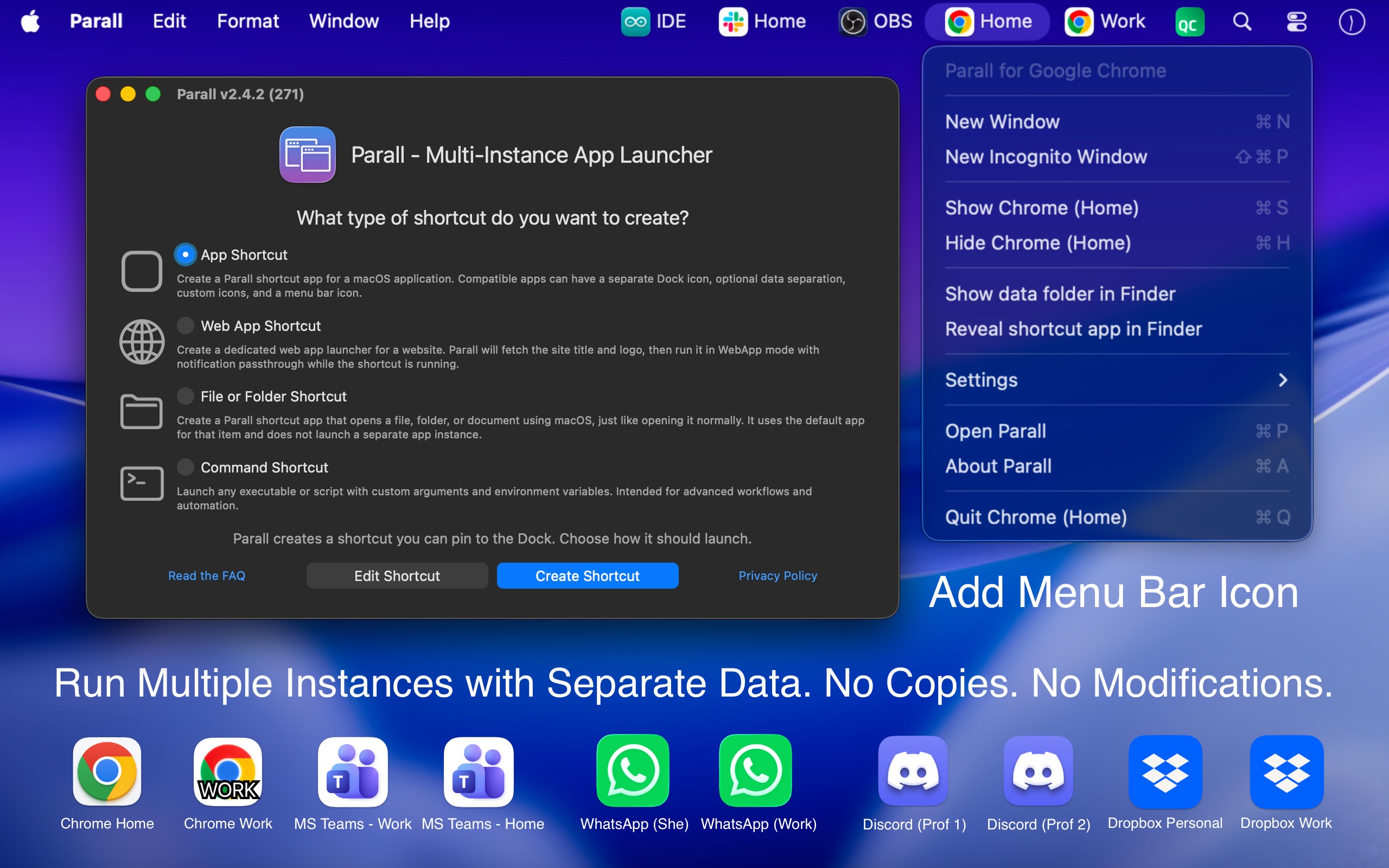
Separate app instances
Run multiple supported instances of the same macOS app side by side, with distinct shortcut names and Dock identities instead of repeatedly switching one app between accounts or profiles.

Parall is a native macOS launcher for creating separate instances of supported apps, websites, files, folders, and command-line tools. It helps users maintain distinct app identities, data paths, profiles, and launch settings where macOS and the target app support them.
Parall is a native macOS launcher for running separate instances of supported applications. It creates lightweight shortcuts that can give each instance its own name, Dock icon, launch settings, and—when supported by the target app—separate accounts, profiles, settings, and data paths.
The original application bundle is not copied, repackaged, re-signed, or modified. Shortcuts continue to launch the installed app, so its normal updater and code signature remain in use. Parall also creates Web App Shortcuts from any website URL, plus file, folder, and command-line shortcuts with configurable arguments and environment variables.
Its operation is local and offline for shortcut creation and launching. Compatibility is app-specific: supported Chrome-, Firefox-, Electron-, Eclipse-, and ToDesktop-based applications can receive automatic data separation, while other compatible apps may use features such as HOME redirection or custom launch variables.
Run multiple supported instances of the same macOS app side by side, with distinct shortcut names and Dock identities instead of repeatedly switching one app between accounts or profiles.
Assign separate data folders, storage paths, accounts, profiles, or settings where the target app supports independent data. Parall can automatically configure separation for supported app families, including sandboxed applications.
Convert any website URL into a native WebKit-based shortcut with its own Dock identity and configurable website storage path.
Create command, file, and folder shortcuts with custom command-line arguments, environment variables, HOME overrides, and selected advanced Info.plist values.
Customize shortcut labels and icons, apply Light or Dark appearance overrides, configure optional menu bar icons, and use supported Dock effects or animation.
Parall works without a background daemon, bundled browser engine, or external helper download. It launches the original installed app through standard macOS mechanisms rather than modifying app bundles or system files.
Create independent shortcuts for supported communication, browser, productivity, or other apps so different accounts and profiles can remain available at the same time where the app permits separate data.
Use separate app data paths, HOME overrides, and environment variables for tools such as supported IDEs or Arduino IDE setups, keeping project configurations, toolchains, boards, or libraries apart.
Turn frequently used web services into individual Dock shortcuts with distinct names, icons, and storage, allowing website-based workflows to be separated from one another.
For compatible educational workflows, configure redirected shortcut data to be erased when the shortcut quits so each experiment or student session can begin without manually clearing previous data.
Run separate supported instances of Philips Hue Sync with independent data so different instances can be associated with different LED assignments for separate displays.
No. Parall launches the original installed app through a separate shortcut. It does not copy, repackage, re-sign, inject into, or patch the target app, and the original app's updater can continue to work.
No. Behavior depends on the target app and its data architecture. Parall has compatibility profiles for supported apps and app families; other apps may require a compatible HOME override or advanced configuration. Check the compatibility list before setup.
Yes, but launch order can matter. When using a shortcut with the original app, start the original app first. To avoid that dependency, create two Parall shortcuts and use those instead; they can then be started in either order.
For browser-based authorization, close the original app and every other instance of the target app, set Safari as the default browser, and authorize only the instance being configured. After the browser returns to the target app and sign-in is confirmed, the other instances can be reopened.
Shortcut creation and launching work locally and offline. Parall has no automatic telemetry, background daemon, bundled Chrome engine, or required external helper. The site documents a separate optional network action for downloading compatibility settings.

www.stashformac.com
Stashは、アプリやシステムコントロールを常時表示せずに、画面の端や隅からすぐにアクセスできるmacOSユーティリティです。Hidden Dock、App Launcher、Edge Sliders、Corner Dials、App Profilesに加え、iPhone用コンパニオンアプリのStash Deckが付属します。

iconsforfree.com
Icons for freeは、Webサイト、アプリ、プレゼンテーション、個人プロジェクト向けのオリジナルLine 01アウトラインアイコンを集めたブラウザベースのコレクションです。線幅と色をカスタマイズし、アカウントなしでSVGまたはPNGをダウンロードできます。CC0 1.0で公開されています。

www.launchie.app
Launchie is a fullscreen app launcher for macOS 26 Tahoe and macOS 27 that restores a Launchpad-style visual grid. It lets users organize apps with custom ordering, folders, Spaces, search, and layout backups.

www.greypaint.app
Greypaintは、Sparkle appcast、Homebrew、GitHub Releases、Mac App Storeを一つのリストで確認できるmacOSアプリ更新ツールです。利用可能な更新を確認し、適用時期を管理し、選択したアプリを一元管理できます。

wattmateapp.com
A macOS battery diagnostic tool that shows which apps use power and what quitting them may save.

contrive.app
Contriveは、Slack、Notion、Google Driveなどの対応ワークスペースアプリを1つのコマンドバーから検索し、AIの回答を得て操作できるスタンドアロンのデスクトップアプリです。ブラウザーのタブを切り替える必要はありません。