
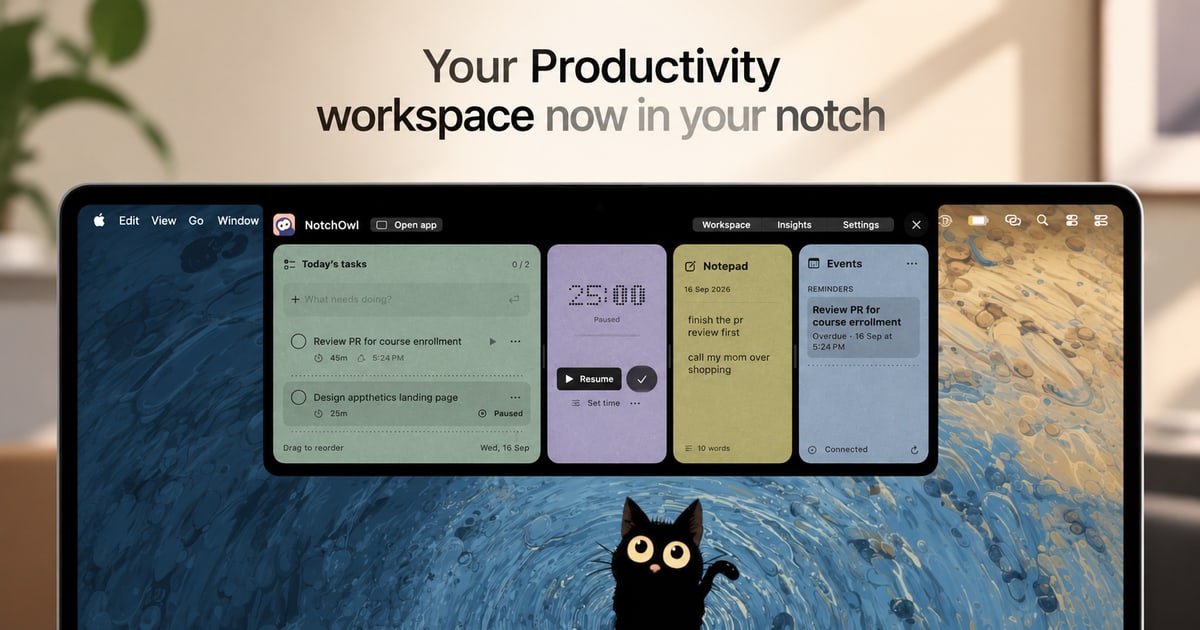
Task management from the notch
Add and organize tasks in the workspace without opening a separate productivity window. The workspace can be opened by hovering over the notch, pressing Option–N, or using the menu-bar icon.

NotchOwl is a Mac workspace for managing tasks, focus sessions, notes, and upcoming calendar events from the notch or menu bar. It is designed for keeping a personal daily workflow accessible without opening separate windows.
NotchOwl is a menu-bar productivity workspace for Apple silicon Macs running macOS 14 or later. It puts tasks, focus timers, notes, activity information, and optional calendar events in a compact interface opened from the Mac’s notch, with Option–N, or from the menu-bar icon.
Its core workflow is simple: capture tasks or ideas, choose what to work on, and keep a timer visible while focusing. The app also records completed tasks and active focus time so users can review daily activity. On displays without a notch, NotchOwl opens at the top center of the screen or in a full dashboard.
Add and organize tasks in the workspace without opening a separate productivity window. The workspace can be opened by hovering over the notch, pressing Option–N, or using the menu-bar icon.
Select a task and start a timed focus session with either a time limit or a stopwatch. Timers can be paused, resumed, or extended by five minutes, and they remain visible beside the notch while working.
Capture ideas, links, and loose ends in a daily notepad that saves as you type. Place the cursor on a line and press Command–Return to convert that line into a task.
Review completed tasks, active focus time, and daily activity in one place. Insights count active focus time rather than time when the Mac is asleep.
Show today’s upcoming events from calendars already added to Apple Calendar on the Mac. Calendar access is optional, and NotchOwl only reads events; it does not create, edit, or delete them.
After activation, tasks, notes, and timers work locally and planner data stays on the Mac. Planner data can be exported as a JSON backup.
Choose one task, set a countdown or stopwatch, and keep the running timer visible near the notch while working in another app.
Use the daily notepad for quick thoughts, links, and loose ends, then turn individual lines into tasks when they become actionable.
Check completed tasks, active focus time, and daily activity to see what work was finished and where attention was spent.
Optionally connect Apple Calendar to view upcoming events alongside tasks, while leaving calendar changes to Apple Calendar itself.
Open the workspace at the top center of a display below the menu bar, or use the full dashboard, when the Mac or display has no notch.
NotchOwl requires macOS 14 or later, and the current download supports Apple silicon Macs. A Mac with a notch is not required; on other displays, the workspace opens at the top center of the screen or in a full dashboard.
Calendar access is optional. When enabled, NotchOwl reads today’s upcoming events from calendars already added to Apple Calendar on the Mac. It does not create, edit, or delete events.
Yes, after license activation. Tasks, notes, and timers work locally. Internet access is required for activation, deactivation, and update checks.
The lifetime license includes every NotchOwl feature, lifetime updates, and activation on up to three Macs. The installer is free to download, but a paid license is required to use the app.
Yes. Deactivate the current Mac in Settings under License, then enter the license key on the new Mac. Deactivation requires an internet connection, and the three-Mac activation limit still applies.

toki.com
Tokiは、テキスト、音声メモ、スクリーンショット、メールをカレンダーの予定やリマインダー、タスク計画に変換し、会議の調整もサポートするAIカレンダー・スケジュールアシスタントです。個人、チーム、家族など、複数の予定を管理する人に適しています。

thoughtsformac.com
Thoughts is a native macOS note-taking app that lives in the menu bar, letting you quickly save text, voice recordings, images, screenshots, links, and video notes. It is designed for capturing ideas without an account or subscription, with optional AI tools powered by a provider key you supply.

blancbrowser.com
Blanc is a minimal desktop browser for macOS, Windows, and Linux with built-in ad and tracker blocking, private tabs, and keyboard-first navigation. It is designed for people who want a smaller browser surface while keeping tools for tab organization, profiles, reference viewing, and optional encrypted sync.

www.bzgapps.com
Coherence X turns websites into standalone macOS apps powered by Chrome and other supported Chromium-based browsers. It is designed for Mac users who want separate Dock-accessible apps, browser profiles, extensions, and link behavior for web services.

trynearfield.com
Nearfield is a native Mac app that combines two Apple Studio Displays into one true left/right stereo speaker system. It is designed for Mac users who want system-wide stereo playback, app-based routing, and normal volume control without manually maintaining an Aggregate Device.

www.conscioussai.com
ConscioussAIは、macOS、Windows、iOS、Androidに対応したAI実行アシスタントです。ユーザーの許可を得てアプリ、ブラウザー、ファイル、メッセージ、ワークフローを操作し、指示や会話をスマートフォンとPCでのタスク完了につなげます。