
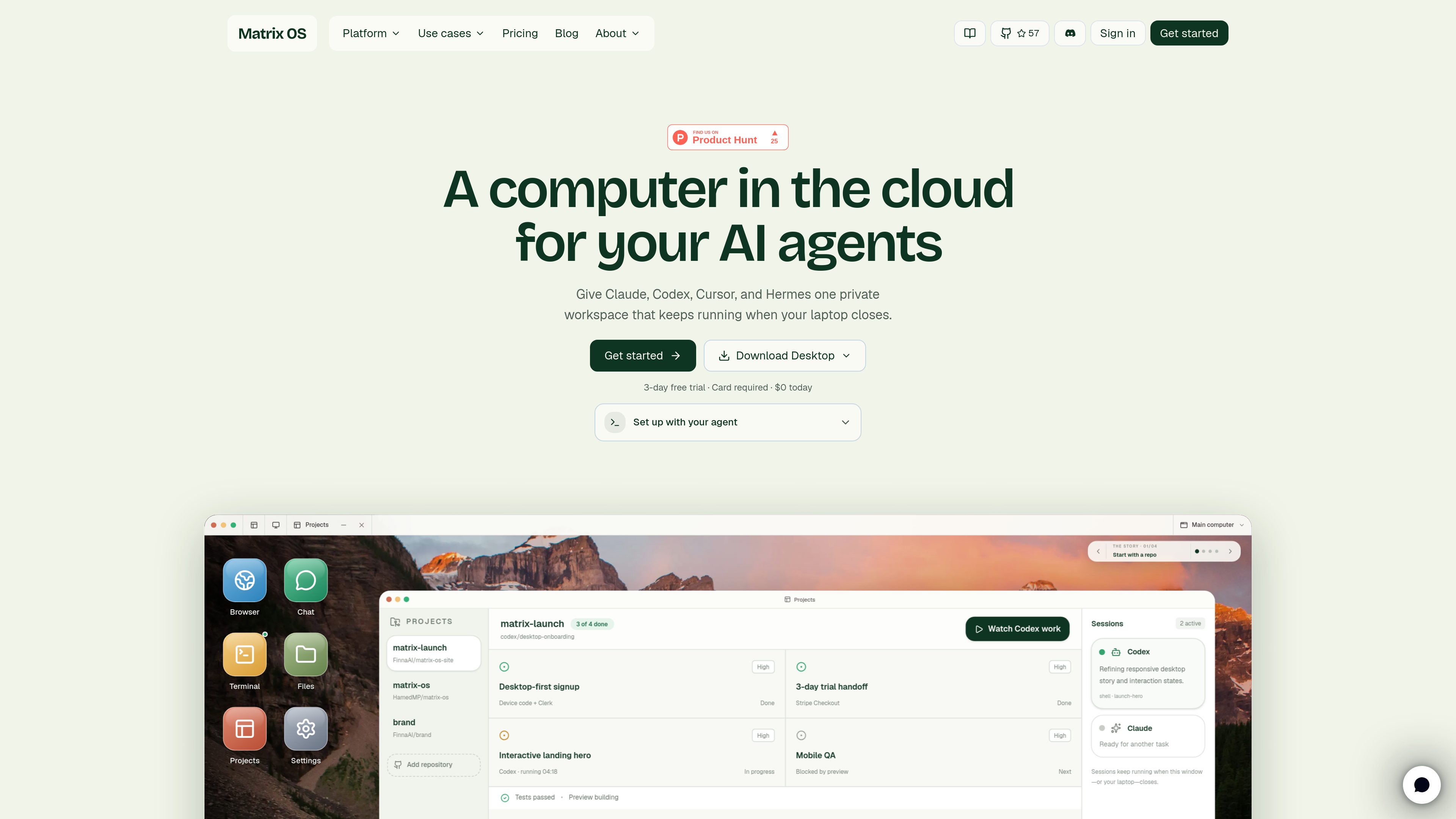
Browser-accessible cloud computer
Open Matrix OS in a browser to reach the same workspace from different devices without depending on a single local machine.

Matrix OS è un computer cloud e uno spazio di lavoro AI nel browser, che offre da qualsiasi dispositivo accesso a file, app, terminali, anteprime e flussi di lavoro degli agenti.
Matrix OS provides a cloud computer that opens in a browser and brings together files, apps, terminals, previews, and AI agents in one workspace. The product is built for people who want to run coding tools or assistant workflows on a persistent remote machine instead of a local laptop.
The site presents Matrix OS as a choice between managed Matrix Cloud and a manual VPS install. Managed Cloud provisions the computer and handles routing, auth, updates, backups, billing, and integrations, while the VPS path gives operators more control over their own Linux server and infrastructure.
Open Matrix OS in a browser to reach the same workspace from different devices without depending on a single local machine.
The workspace is designed to hold files, apps, terminal sessions, previews, and workflows together so work can continue over time.
Users can choose Matrix Cloud for a managed experience or install Matrix on their own apt-based Linux VPS for more direct control.
The documentation describes five core agents: Builder, Researcher, Deployer, Healer, and Evolver, each with a distinct role and tool access.
Users can add custom agents through markdown files and extend the system with directory-based skills that load on demand.
Matrix OS is positioned for autonomous coding and assistant workflows that need a durable computer, approvals, notifications, and memory.
Run tools such as Claude Code, Codex, Cursor, OpenCode, Pi, Gemini CLI, and similar agents inside an always-on cloud workspace with terminals, previews, and tests.
Let developers evaluate coding agents in isolated hosted computers when security policy blocks local installs or browser handoffs on company laptops.
Provision the same Matrix environment for classes, research groups, or hackathons so students can start working without setting up their own machines.
Use the workspace for research, planning, meeting prep, follow-ups, reports, inbox triage, dashboards, and documents that benefit from a persistent computer and connected tools.
Run a Matrix-native assistant with scheduled workflows, memory, approvals, notifications, and connected tools without building a separate server stack.
The source describes Matrix OS as a cloud computer and AI workspace that you access in a browser. Your device acts more like a viewer for the remote workspace.
Matrix OS offers two paths: managed Matrix Cloud and a manual install on an apt-based Linux VPS that you control.
The agent documentation names five core agents: Builder, Researcher, Deployer, Healer, and Evolver. The system can also load custom agents and skills.
The source highlights developers running coding agents, enterprise teams testing AI tools, university labs and workshops, and people using professional assistant workflows.
The quickstart says you do not need a credit card to create an account, although Checkout requires a card when you complete billing for a computer.
I dati sul traffico sono solo a scopo di riferimento.
| giu | 13649 |
|---|---|
| lug | 19802 |
| ago | 36797 |
Le analisi del traffico non sono ancora disponibili.

weaveos.com
Weave Router è un router intelligente di modelli per agenti di programmazione. Valuta le attività di coding e instrada le richieste verso modelli aperti o chiusi, consentendo agli sviluppatori di mantenere i flussi di lavoro degli agenti esistenti e gestire velocità, qualità e spesa per i modelli.

murmell.com
Murmell è una tela accessibile dal browser per eseguire agenti di programmazione AI in sandbox cloud condivise. Permette agli sviluppatori di coordinare Claude Code, Codex, Kimi e OpenCode su un unico progetto, senza configurazioni locali né conflitti tra file.
nodeterm.dev
nodeterm è un gestore di terminali basato su nodi che esegue agenti di programmazione come nodi attivi su una tela infinita. È pensato per chi vuole organizzare in modo spaziale terminali, sessioni degli agenti ed elementi correlati dell’area di lavoro su macOS o Linux.

cowco.app
CowCo è un editor nel browser per progetti e file locali, pensato per lavorare con agenti AI senza caricare i file sul cloud.

www.cybedefend.com
CybeDefend è una piattaforma di sicurezza del codice progettata per i flussi di lavoro di programmazione con l’IA. Il livello VibeDefend esamina i prompt degli agenti e i diff, applica le regole del progetto e aziendali, protegge dalle azioni rischiose e riunisce le scansioni di codice, dipendenze, segreti, infrastruttura e CI/CD prima di una pull request.

dedaluslabs.ai
Dedalus Labs offre macchine Linux persistenti per i workflow degli agenti, con avvio rapido, stato conservato e controllo tramite CLI. Si paga solo il calcolo attivo; inattività e storage sono inclusi gratuitamente.