
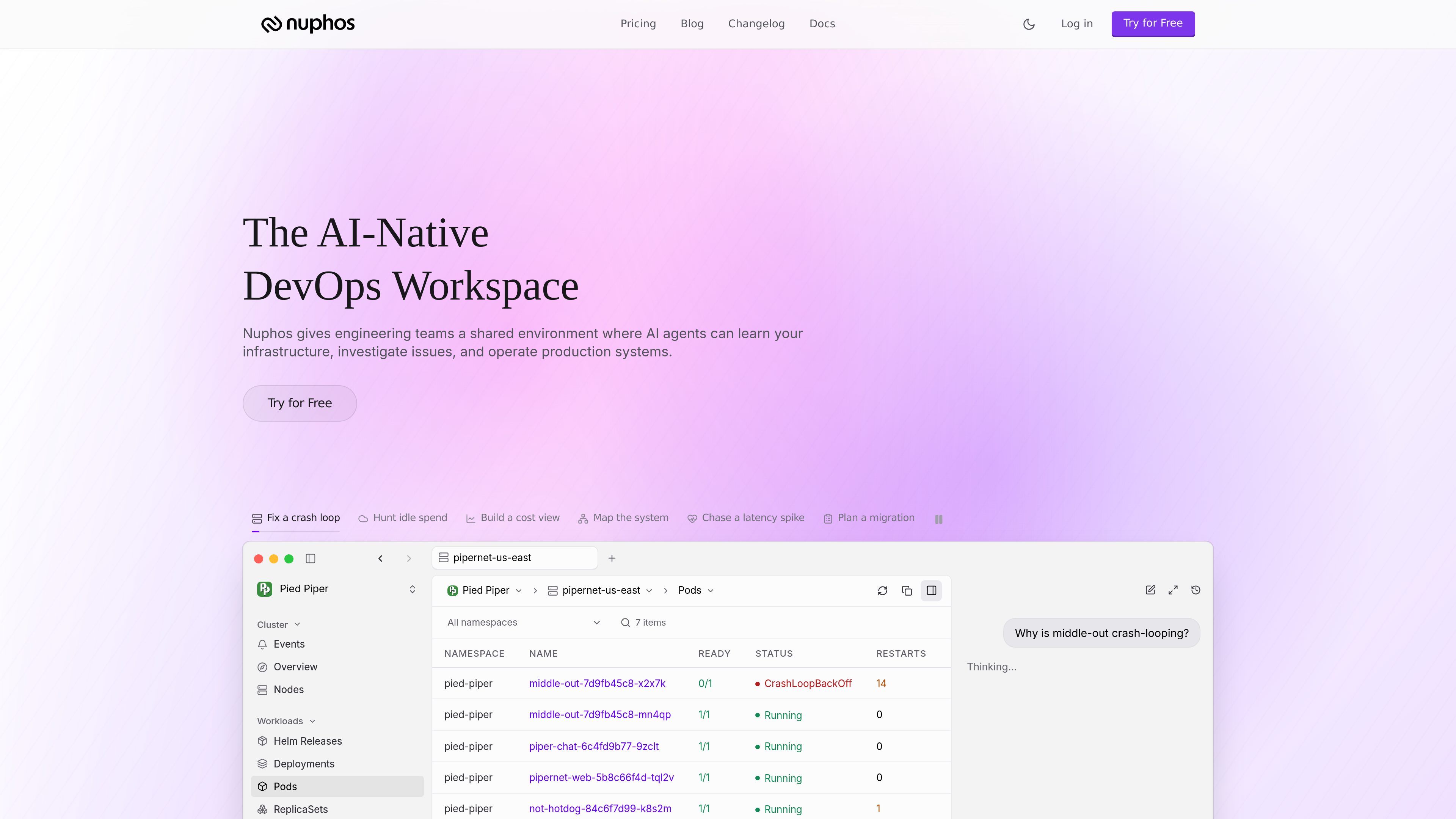
Shared agent workspace
Teams work in one workspace where AI agents and humans share the same operational context instead of using separate point tools.

Nuphos est un espace de travail DevOps natif de l’IA pour les équipes d’ingénierie. Il fournit un environnement partagé où les agents d’IA peuvent apprendre l’infrastructure, analyser les incidents et exploiter les systèmes de production avec approbation humaine et traçabilité des audits.
Nuphos is a DevOps workspace built for engineering teams that want AI agents to participate in production work with human oversight. It combines a shared environment, infrastructure connectors, IAM-scoped sessions, approval flows, and audit trails so agents can investigate and act within defined permissions.
The product is aimed at operational workflows such as incident response, cloud migration, deployment planning, and production health checks. The site presents Nuphos as a place where teams can connect cloud and tool surfaces, share agent usage across the workspace, and keep the same safety controls across plans.
Teams work in one workspace where AI agents and humans share the same operational context instead of using separate point tools.
Agents operate through IAM-scoped sessions with human approval steps, so actions are constrained by permissions and reviewable before execution.
Every plan includes audit trails, with longer history available on higher tiers for reviewing what agents and users did in production.
Nuphos supports cloud and tooling connectors such as AWS, GCP, Kubernetes, Zeabur, Slack, GitHub, and PagerDuty, with connector limits increasing by plan.
Agent usage is pooled across the workspace rather than billed per seat, and paid plans can keep running past the included amount with controlled overage.
The product provides downloads for macOS, Windows, and Linux, with separate builds for Apple Silicon, Intel Mac, and Windows ARM or x64.
Use agents to inspect cluster state, follow alerts, and help trace failures such as crash loops or latency spikes while keeping approvals in place.
Teams can ask agents to map infrastructure and plan migrations across cloud and Kubernetes environments before making changes.
The homepage highlights workflows like hunting idle spend and building a cost view, which suits teams reviewing cloud usage and waste.
Nuphos can support everyday work around deployments, service surfaces, and production health checks across connected infrastructure.
Paid plans are built for workspace-wide use, making it possible for several teammates to connect their accounts and work from the same agent pool.
Nuphos is an AI-native DevOps workspace where engineering teams can connect infrastructure, let agents investigate issues, and manage production systems with human approval and auditability.
The download page lists builds for macOS, Windows, and Linux, including Apple Silicon and Intel Mac, plus Windows and Linux x64 and ARM options.
No. The pricing page says Dev includes up to three members and the paid plans above it are unlimited for members, with pricing based on the workspace rather than individual seats.
On Team and higher, agents can continue working with overage billing and a monthly cap you control. The FAQ says an incident in progress will not be interrupted mid-task.
The pricing page mentions cloud connectors for AWS, GCP, Kubernetes, and Zeabur, plus tool connectors such as Slack, GitHub, and PagerDuty. It also mentions bots in Slack, Lark, Discord, and iMessage on the Dev plan.
Les données de trafic sont fournies à titre indicatif uniquement.
| mai | 0 |
|---|---|
| juin | 0 |
| juil. | 0 |
Les analyses de trafic ne sont pas encore disponibles.
Les analyses de trafic ne sont pas encore disponibles.

rootly.com
Gestion des incidents native de l’IA pour les équipes d’ingénierie
www.coldtea.ai
Coldtea est un environnement de livraison logicielle propulsé par l’IA pour les équipes qui souhaitent gérer au même endroit l’assurance qualité, la surveillance de la production, la détection des bugs, la création de tâches et les correctifs. Il s’exécute sur votre machine pour repérer les régressions et les problèmes de production après l’écriture du code.

canyontechs.ai
CanyonTechs AI est un produit de remédiation automatique basé sur un LLM. Il analyse les journaux de production, détecte les incidents et soumet des correctifs sous forme de pull requests signées. Ce service organisé en espaces de travail propose une inscription et une connexion aux particuliers comme aux entreprises.

trysoup.dev
Soup CLI est un outil en ligne de commande open source dédié au post-entraînement et aux workflows associés aux modèles : fine-tuning, entraînement par préférences, évaluation, fusion, déploiement et préparation des données. Il s’adresse aux personnes qui souhaitent gérer l’entraînement et la mise en production de modèles avec une seule CLI hors ligne, sur leur propre matériel ou du matériel emprunté.

antideploy.com
Antideploy est une plateforme de déploiement qui analyse le code de l’application, détermine le runtime et l’infrastructure nécessaires, les construit et sert l’application via HTTPS. Déployez depuis GitHub, un dossier local, une API ou des agents de programmation sans écrire de Dockerfile ni de configuration YAML.

middleware.io
Observabilité full-stack des logs, métriques, traces, infrastructures, applications et expérience utilisateur, avec OpsAI pour détecter les problèmes et faciliter leur résolution.