
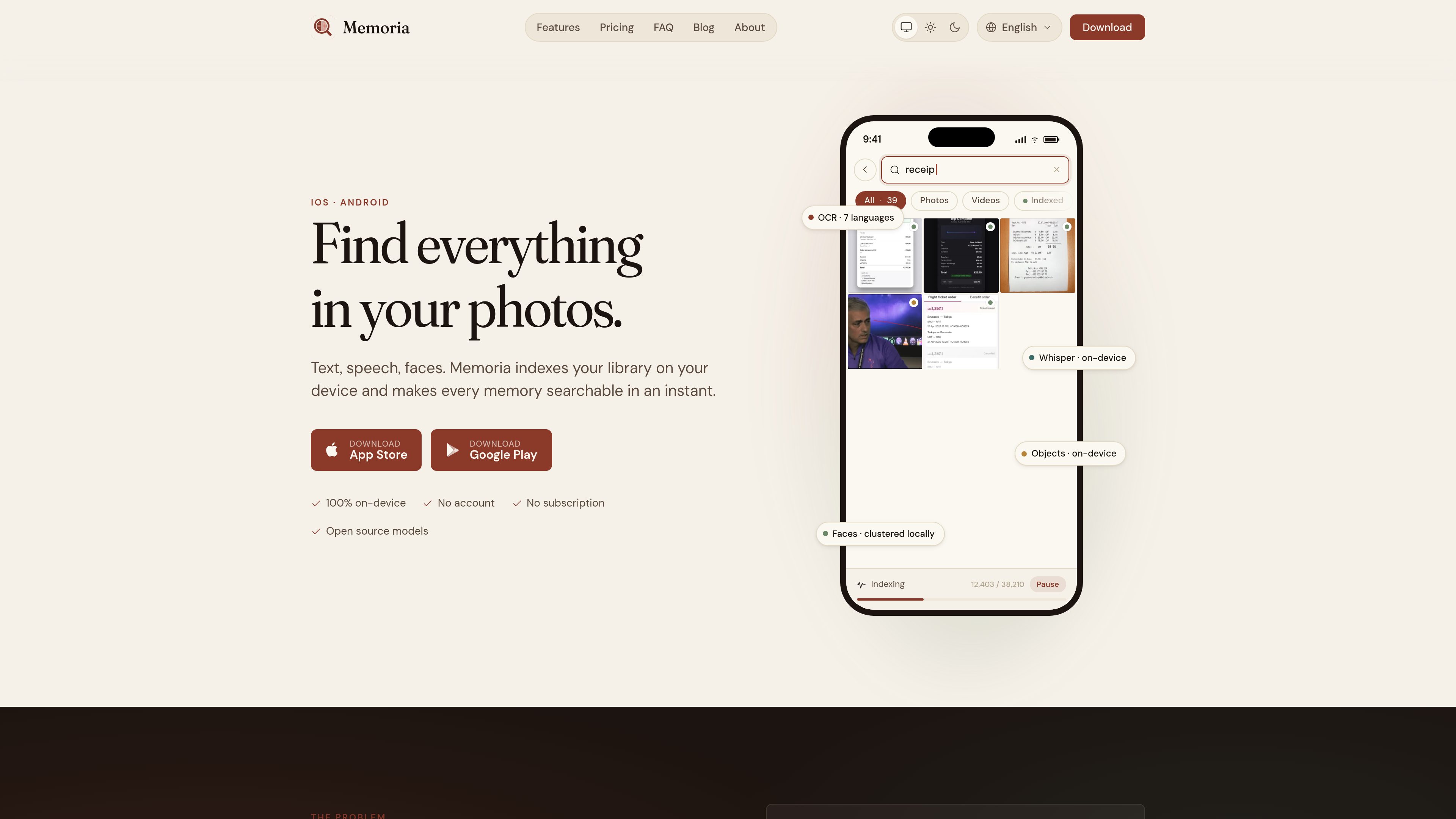
Full-text media search
Search across text found in images, words spoken in videos, object labels, person groups, place names, and camera metadata. Suggestions are drawn from the vocabulary in the user’s own library.

Memoria est une application de recherche de photos et de vidéos qui fonctionne sur l’appareil et permet de retrouver du texte, des paroles, des objets, des visages, des lieux et les métadonnées de l’appareil photo dans votre bibliothèque personnelle. Conçue pour les collections volumineuses difficiles à parcourir, elle traite tout localement, sans compte ni abonnement.
Memoria is a local photo and video indexing app for iOS and Android. It makes personal media searchable by extracting text from images and video frames, transcribing speech, recognizing objects, grouping faces, and reading available location and camera metadata. Search results can be narrowed by media type and indexing status.
The app is intended for libraries containing material such as documents, receipts, whiteboards, screenshots, lecture recordings, meetings, memes, and everyday photos. Processing takes place on the device, so the media library and search activity do not need to be sent to a cloud service. Memoria does not require an account or an ongoing subscription.
Search across text found in images, words spoken in videos, object labels, person groups, place names, and camera metadata. Suggestions are drawn from the vocabulary in the user’s own library.
Memoria reads text in photos and samples key frames from videos. It supports English, French, German, Spanish, Italian, Portuguese, and Japanese, with Fast, Balanced, and Quality processing modes.
Whisper can transcribe speech locally in more than 99 languages, with multiple model sizes for balancing transcription capability and storage use. An Apple Speech option is available without downloading a Whisper model.
The app detects and clusters faces on the device, allowing users to name and merge groups. It also recognizes objects and converts GPS metadata into searchable place names through reverse geocoding.
Search results can be filtered by photo, video, indexing state, or whether no text was found. The viewer includes a configurable one- to five-column grid, full-screen image viewing, video playback, zoom, and an information drawer with extracted details.
Indexing continues while the app is closed, pauses on low battery, and can be restricted to charging periods. Progress is shown with item counts rather than an indeterminate loading indicator.
Search for a phrase from a receipt, invoice, whiteboard, slide, or meme instead of manually opening images one by one.
Use speech transcription to locate a topic or phrase in videos, including recordings where the useful information is spoken rather than displayed as text.
Name locally clustered face groups and use them to retrieve photos of a particular person without sending face data to an external service.
Combine text, object labels, locations, and camera metadata to narrow results across both photos and videos, then inspect extracted information in the detail view.
After setup and any optional model download, use the local index without a network connection. The database can also be exported as a SQLite file for safekeeping or import on another device.
No. Memoria processes media on the device. The only described network request is the optional, one-time download of a Whisper transcription model. The app can run without a network connection after that.
The product is available on iOS and Android. OCR supports English, French, German, Spanish, Italian, Portuguese, and Japanese. Whisper supports automatic transcription in more than 99 languages.
On a modern phone, the first pass takes a few minutes per thousand photos. Videos that require audio transcription take longer. Indexing continues in the background, pauses on low battery, and can be configured to run only while charging.
Yes. The app can export its database as a SQLite file from Settings → Advanced → Export database. That file can be imported on a new device to avoid reindexing. Photos remain in the phone’s own photo library; uninstalling Memoria removes its local index unless it was exported.
No. Memoria has a free tier that indexes up to 250 media items, while Memoria Plus unlocks indexing for the full library through a one-time purchase processed by Apple or Google. Pricing may vary by the product’s current offer, so the app store listing is the appropriate source for the current amount.
Les données de trafic sont fournies à titre indicatif uniquement.

beaconfind.app
BeaconFind est une application privée de recherche de fichiers par IA pour Windows, qui les retrouve par leur sens plutôt que par leur nom exact. L’indexation et la recherche restent sur votre appareil, avec Ctrl+K, la recherche multilingue et des réponses citant vos documents.

dashworks.ai
Assistant IA pour les questions professionnelles, avec recherche unifiée dans les apps, documents, sites web et Slack

memfree.me
Moteur de recherche IA hybride pour votre base et le web

ducky.ai
Ducky est une plateforme de recherche et de récupération IA entièrement gérée pour créer des fonctionnalités RAG sur texte, images, PDF et données structurées.

xdge.ai
xdge est un assistant de travail basé sur l’IA pour rechercher, organiser et réutiliser les connaissances de l’entreprise dans Slack, Gmail, Notion et Jira, avec aide via Slack, Collections et capture des réunions.

rename.click
RenameClick est une application de bureau locale pour macOS et Windows qui renomme, organise et recherche les fichiers par contenu, avec des suggestions d’IA à valider avant application.