
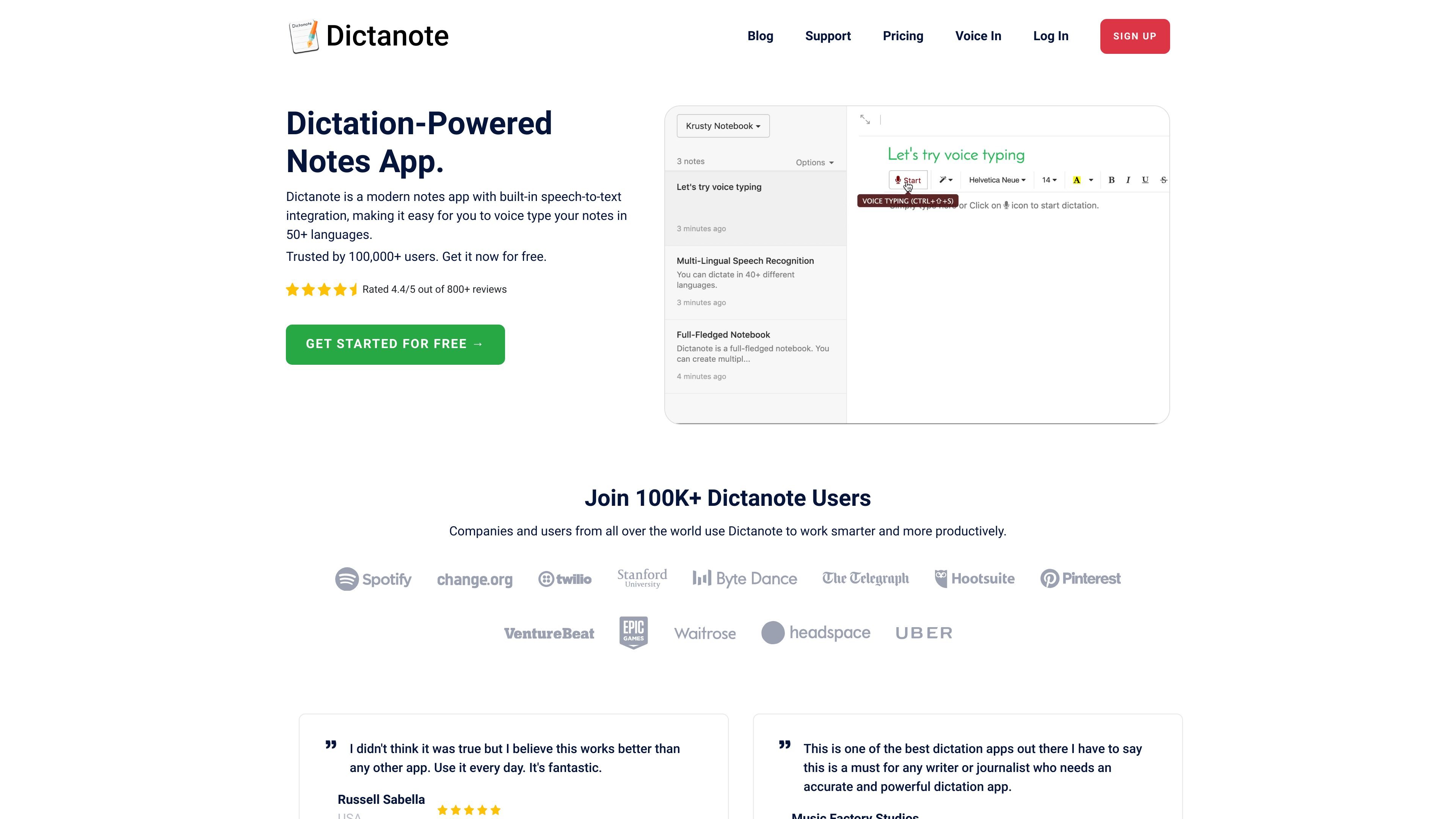
Voice typing with keyboard editing
Type notes with your voice in real time, switch back to the keyboard when needed, and use the app as a standard note editor when you are not dictating.

Dictanote est une application de prise de notes vocale avec conversion parole-texte, synchronisation cloud et commandes vocales.
Dictanote is a dictation-powered note-taking app with built-in speech-to-text integration. It lets you switch between typing and voice input while creating notes, and it supports speech recognition in more than 50 languages.
The product is positioned for people who want to capture notes, meeting summaries, drafts, or other written content faster with voice dictation. It also includes related AI and transcription tools, including AudioScribe for rewriting voice notes into clearer text and Dictanote Transcribe for converting recorded audio and video files to text.
Type notes with your voice in real time, switch back to the keyboard when needed, and use the app as a standard note editor when you are not dictating.
Dictanote supports speech recognition in 50+ languages and 80+ dialects, with voice input designed to work across multilingual note-taking workflows.
Use built-in voice commands to insert punctuation, technical terms, and corrections without leaving the microphone workflow.
Use keyboard shortcuts to start or stop dictation and switch languages more quickly during note capture.
Dictanote stores notes in the cloud, supports offline editing, and can be installed as a standalone app on supported platforms.
AudioScribe and Dictanote Transcribe extend the product into AI note cleanup and audio-to-text transcription for recorded files.
Draft notes, outlines, and long-form writing by speaking first and switching to the keyboard when you need to refine the text.
Capture meeting notes, meeting recaps, and action items while keeping the app running in the background so the notes are saved automatically.
Record ideas in your own words, then use AudioScribe to turn rough speech into cleaner, more readable text with punctuation and filler-word removal.
Upload recorded audio or video files to Dictanote Transcribe when you need a transcript from a file instead of live dictation.
Use custom voice commands and voice-based editing to correct dictation, insert repetitive text, or automate frequent entry tasks.
Dictanote works on desktop in Google Chrome and Microsoft Edge on Windows, Linux, and Mac. It also supports Android in Google Chrome and iPhone in Safari 12+ for editing, but voice dictation is not available on iPhone.
Yes. The homepage states that notes are automatically synced to the cloud and available on all your devices.
Yes. The pricing page says Dictanote Pro includes unlimited notebooks, background dictation, custom voice commands, voice-based editing, images in notes, and AudioScribe.
Yes. Dictanote Transcribe is a separate product for converting pre-recorded audio and video files to text, while Dictanote is the note-taking app with built-in voice typing.
The site says you can manage your subscription from Account Settings and cancel from the same page. If you cancel before the end of the term, Pro access continues until the last day of the subscription period.
Les données de trafic sont fournies à titre indicatif uniquement.

cleftnotes.com
Prise de notes vocale pour appareils Apple, avec transcription locale, capture hors ligne et synchronisation sécurisée.

dictro.com
Dictro est une application privée de dictée avec IA pour Mac qui transcrit la parole en texte soigné dans n’importe quel champ de texte Mac standard. Le fonctionnement par défaut reste sur l’appareil, avec un Fast Mode cloud et un historique local facultatifs.

transkriptor.com
Transkriptor convertit l’audio et la vidéo en texte modifiable grâce à l’IA, pour les réunions, cours, entretiens, appels et notes vocales. Disponible sur le web, ordinateur, mobile et Chrome, avec résumés, exports et vocabulaire personnalisé.

frigade.com
Yap est une application de dictée gratuite et open source pour macOS. Elle transforme la parole en texte dans tout champ de saisie grâce à la reconnaissance vocale sur l’appareil et au stockage local des transcriptions. Sans compte, clé API, télémétrie ni code réseau.
spokenly.app
Spokenly est une application de dictée IA pour Mac, iPhone et Windows qui convertit la voix en texte dans toute application. Elle prend en charge des modèles locaux hors ligne gratuits, la transcription cloud avec Pro ou vos propres clés API, et plus de 100 langues.

speakly.ai
Speakly est un outil gratuit de transcription vocale par IA qui transforme la parole en texte soigné dans plus de 100 apps, avec édition IA, raccourcis et mode agent sur Mac, Windows, iPhone et Android.