
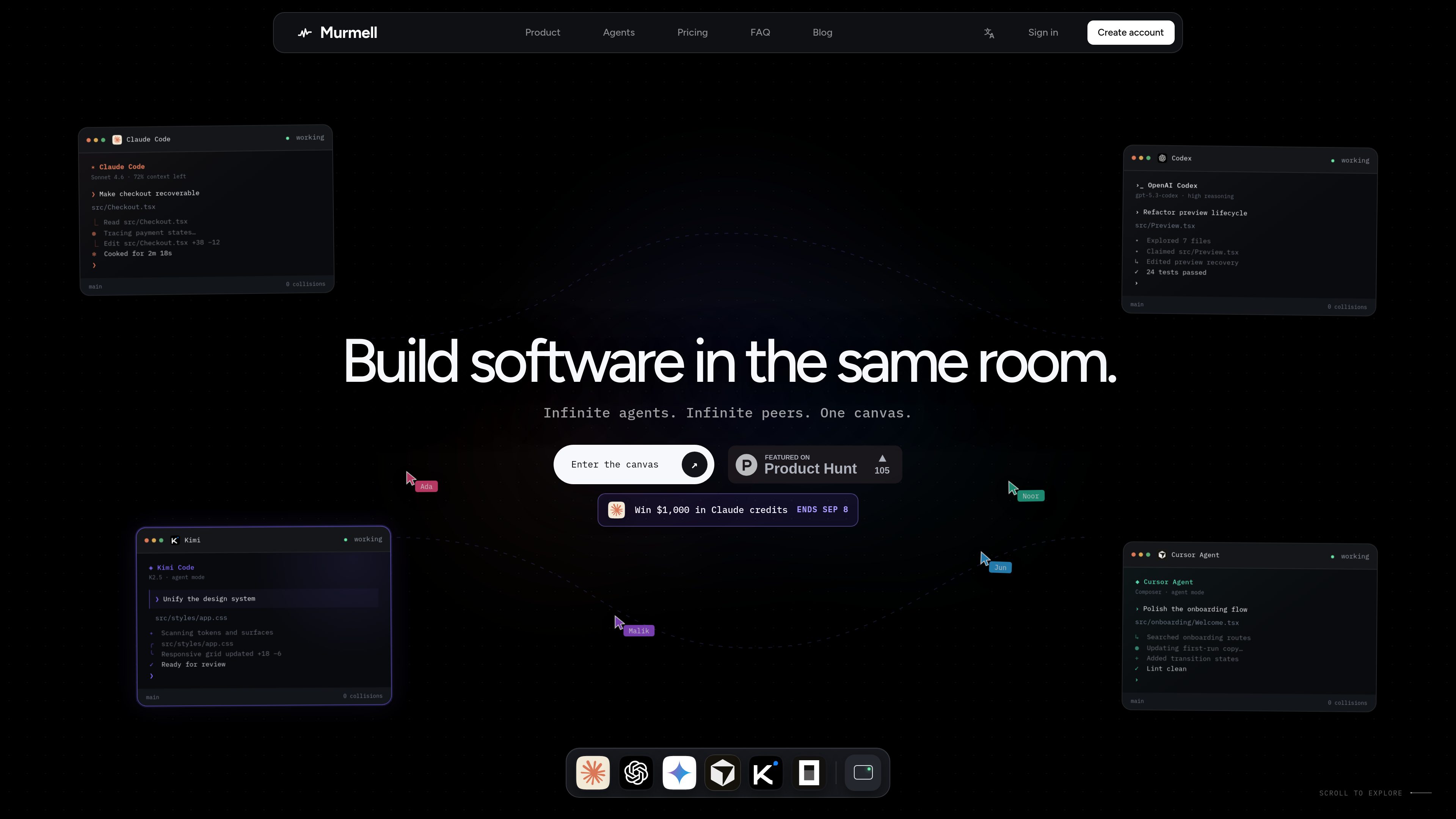
Multi-agent browser canvas
Open multiple coding agents in the same project and manage them from one shared canvas rather than separate local sessions.

Murmell es un lienzo en el navegador para ejecutar agentes de programación con IA en entornos aislados compartidos en la nube. Permite coordinar Claude Code, Codex, Kimi y OpenCode en un mismo proyecto, sin configuración local ni conflictos entre archivos.
Murmell is a browser-based canvas for running several AI coding agents on one shared project directory in the cloud. It is built around a live workspace where agents can work in parallel and other people on the link can watch the session as it happens.
The product’s core purpose is to make multi-agent coding safer and easier to coordinate. Murmell uses file reservations, shared terminals, and persistent cloud sandboxes so teams can avoid overlapping edits, keep a session in sync, and work without setting up the agents locally.
Open multiple coding agents in the same project and manage them from one shared canvas rather than separate local sessions.
Agents reserve file paths before editing, which helps prevent simultaneous writes to the same file.
Projects run on cloud machines managed by Murmell, so the workspace is not tied to one developer’s laptop.
Everyone with access to the canvas can see the same terminals, cursors, and live previews while work is underway.
The site names Claude Code, OpenAI Codex, Kimi, and OpenCode as supported agents, with more mentioned on the homepage.
Murmell publishes numbered guides for common tasks such as using Claude Code without local installation, splitting work across several agents, and sharing a session live.
Use Murmell when you want different agents to work on separate parts of the same repository at the same time, with reservations reducing the chance of file collisions.
The guides describe opening a real Claude Code terminal from the browser, which is useful when you want to use the agent without installing it locally.
Share a canvas link so another person can observe the same terminals, cursors, and previews without refreshing or replaying the session.
Use the persistent cloud sandbox when you want the workspace to live on Murmell’s machines rather than on a developer laptop.
The examples on the homepage show tasks like checkout recovery, preview refactoring, and design-system updates handled by separate agents in the same room.
The site explicitly names Claude Code, OpenAI Codex, Kimi, and OpenCode, and the homepage also says “and more.”
According to the site, agents run on dedicated cloud machines managed by Murmell, while the local machine is only used for the browser.
Murmell uses a reservation system: an agent claims the file paths it is about to edit before writing, so other agents wait until those paths are released.
Yes. The site says a canvas can be shared as a link and watched live, with no need to replay or refresh the session to stay in sync.
The site indicates Starter is free forever and mentions paid Pro and Builder plans, but the dedicated pricing page fetched for this review returned a 404, so the public pricing information is limited in the collected pages.
Los datos de tráfico son solo como referencia.

www.tryport22.com
port22 es una app para iOS y un agente para macOS que supervisan y controlan sesiones de agentes de programación en un terminal. Envía transcripciones al iPhone, avisa cuando se necesita entrada y admite Claude Code, Codex y OpenCode.

omlx.ai
oMLX es un servidor de inferencia LLM nativo de macOS, basado en MLX, para ejecutar localmente en Apple Silicon modelos compatibles de lenguaje, visión-lenguaje, embeddings y reranking. Diseñado para flujos de trabajo con agentes de programación, funciona con Claude Code, OpenClaw, Cursor y clientes compatibles con OpenAI.

air.dev
JetBrains Air es un entorno de escritorio para ejecutar agentes de programación en paralelo, mantener las tareas aisladas y revisar los cambios desde un solo espacio de trabajo. Compatible con Codex, Claude Agent, Gemini CLI y Junie en macOS y Linux; Windows llegará próximamente.

soloterm.com
Espacio de trabajo de escritorio para ejecutar agentes de programación con IA junto a tu stack de desarrollo local, supervisar procesos y coordinar flujos de trabajo sin convertirse en un IDE completo.
superagent.computer
Superagent es una app para Mac que permite a un agente de programación trabajar en un navegador real y un simulador de iPhone, con chats persistentes en tu equipo. Observa cómo crea, edita y prueba proyectos en tu Mac con tu suscripción actual de Claude Code.
superqode.dev
SuperQode es una capa de harness de código abierto para agentes de programación que permite descubrir, crear, ejecutar, evaluar y optimizar harnesses de agentes desde un solo terminal. Ofrece interoperabilidad entre A2A, ACP, MCP y UHP para que los equipos sigan usando sus agentes de programación y modelos actuales.