
Visual workflow builder
Map automation logic visually, then configure integrations and nodes without writing code. The site positions this as the primary way to define how an agent behaves.

TaskAGI is a no-code AI automation platform for building, testing, and deploying agentic workflows. Connect apps, use browser automation, and launch templates without code.
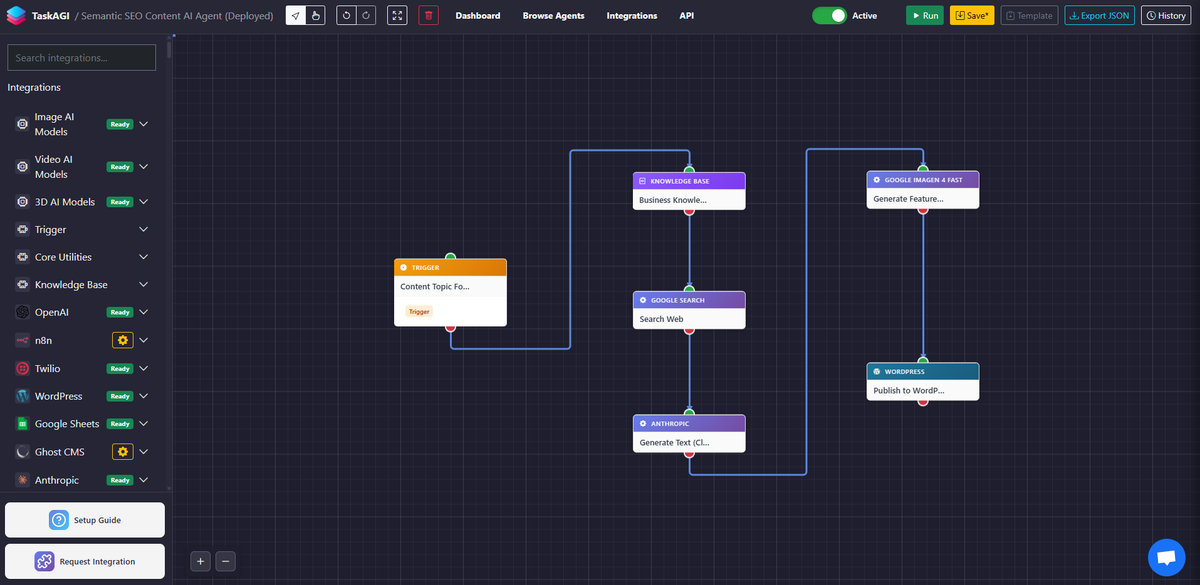
TaskAGI is a no-code platform for building AI automations and agentic workflows. It is designed to help users connect apps, add AI to a workflow, test the result, and deploy it quickly from a visual builder.
The site emphasizes both general-purpose automation and prebuilt agents. In the published examples, users can start from templates, connect services such as OpenAI, Anthropic, Google Sheets, WordPress, Gmail, Twitter, and Facebook, and use browser automation when an integration or API is not available.
Map automation logic visually, then configure integrations and nodes without writing code. The site positions this as the primary way to define how an agent behaves.
Build, test, and launch AI agents from a drag-and-drop environment. The product emphasizes real-time testing and one-click deployment.
Use browser automation when no direct integration or API is available. The source says TaskAGI can fill forms, log in to websites, browse pages, and extract data.
Start from a large template library instead of creating every workflow manually. The homepage claims hundreds of templates, and the product surfaces prebuilt agents for common tasks.
Connect to a broad integration catalog that includes AI models, spreadsheets, email, WordPress, social platforms, analytics tools, and scrapers. The browse page lists 451+ integrations.
Deploy scheduled or repeatable reporting workflows that combine data collection, analysis, and delivery. The social media template shows automated reports sent to Gmail after analysis with OpenAI.
Marketing teams can automate recurring social media reporting by pulling data from Twitter and Facebook, running AI analysis, and sending a formatted report to Gmail.
Sales and growth teams can enrich leads by combining research, verification, CRM updates, and follow-up actions across tools such as Apollo, Hunter.io, HubSpot, Slack, and Gmail.
Teams that publish content on WordPress can connect AI models and workflow steps to manage content publishing and SEO-related automation.
Operations teams can use browser automation to work around missing APIs by filling forms, logging into sites, browsing pages, and extracting information from web interfaces.
Agencies can deploy templates and adapt them to client workflows instead of designing every automation from scratch.
TaskAGI is a no-code platform for building AI automations and agentic workflows. It combines visual workflow building with integrations, AI model connections, and browser automation so you can deploy automations without writing code.
The source shows prebuilt agent templates, a visual builder, browser automation, and integrations with tools such as OpenAI, Anthropic, Google Sheets, WordPress, Gmail, and various browser and data services.
The site says users can deploy agents in one click from a template library, or build and test workflows in the drag-and-drop builder before launching them.
The collected sources show several paid plans and a limited-time lifetime offer, but the pricing page itself is not available in the provided evidence. Exact current terms should be checked on the site before purchase.
The source highlights individual workflows and team-oriented use cases, including marketing teams, sales workflows, agencies, and operations-style automations. It does not provide a separate team-admin product page in the evidence provided.