
Ready-made templates
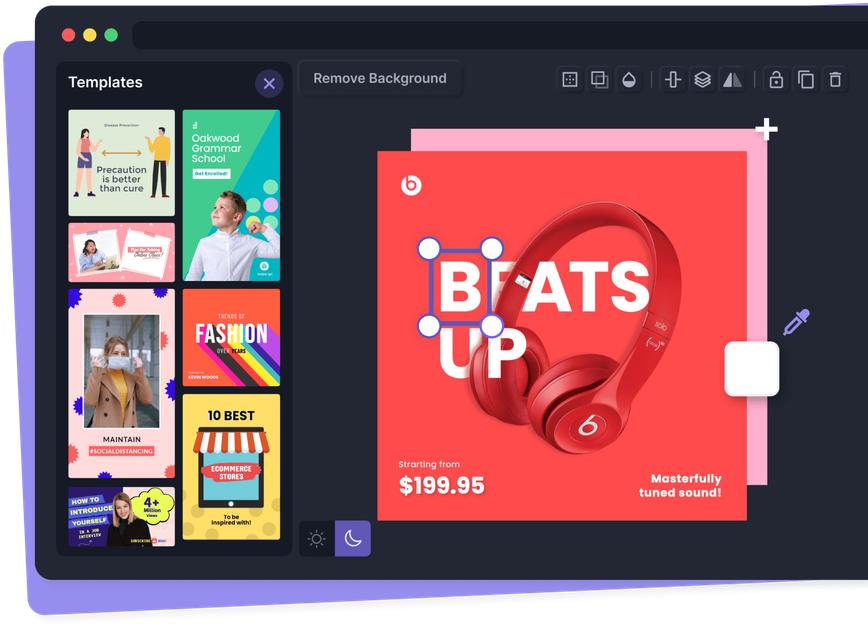
Choose from thousands of ready-made templates for social posts, headers, thumbnails, email graphics, and other common formats, then adjust them in the editor.

Pixelied is a web-based graphic design and photo editing suite for branded visuals, social graphics, mockups, template-led editing, background removal, vector uploads, and a free plan.
Pixelied is an online graphic design and photo editing suite for creating branded visuals, social graphics, mockups, and other marketing assets in the browser. The site positions it as a fast, easy-to-use tool for non-designers who want to make designs with templates and a few clicks rather than build everything from scratch.
Its product pages highlight template-driven design, image editing, background removal, mockups, vector uploads, illustration and icon libraries, and workspace-based collaboration. The pricing page also shows a free plan with no credit card required, alongside paid Pro and Pro+ plans for users who need more templates, AI credits, storage, brand presets, or advanced image tools.
Choose from thousands of ready-made templates for social posts, headers, thumbnails, email graphics, and other common formats, then adjust them in the editor.
Use the built-in photo editor to crop images, add text, borders, shadows, filters, opacity, layers, and alignment, and combine or duplicate visual elements as needed.
Remove image backgrounds in a single click and create transparent, high-resolution cutouts for products, people, or other graphics.
Build designs with millions of royalty-free stock photos, thousands of icons, and a library of hand-drawn illustrations.
Upload vector files and edit their colors, styles, backgrounds, and other design elements directly in the platform.
Create workspaces for brands or projects, keep separate assets and settings, and invite team members to collaborate in specific workspaces.
Create social posts, stories, ads, and headers from ready-made formats, then adjust text, images, and branding without starting from a blank canvas.
Prepare product graphics, transparent cutouts, and promotional visuals for online stores using background removal, mockups, and stock assets.
Build thumbnails, banners, and channel artwork for video or streaming profiles using the template library and resizing tools.
Organize designs for different clients or brands in separate workspaces, each with its own files, settings, and members.
Import SVG or vector files and adjust their appearance directly in Pixelied when a project needs edits to existing artwork.
Yes. The site says Pixelied is made for non-designers, and the editor is designed to let you choose templates, make a few adjustments, and download a design without needing graphic design skills.
Yes. The pricing page says you can get started on a free plan with no credit card required.
Pixelied says its templates, stock photos, mockups, icons, illustrations, and elements can be used for commercial purposes, with no attribution required for those assets.
The site says it adds new templates, formats, stock photos, and icons daily, so the library is intended to stay current and expand over time.