
Video generation through multiple entry points
The platform supports creation from scratch, from templates, from AI scripts, or from PPT, making it suitable for users with different skill levels and levels of prepared material.

魔珐有言 is a 3D digital human AI video platform that turns text, scripts, or PPT into videos for creators and teams.
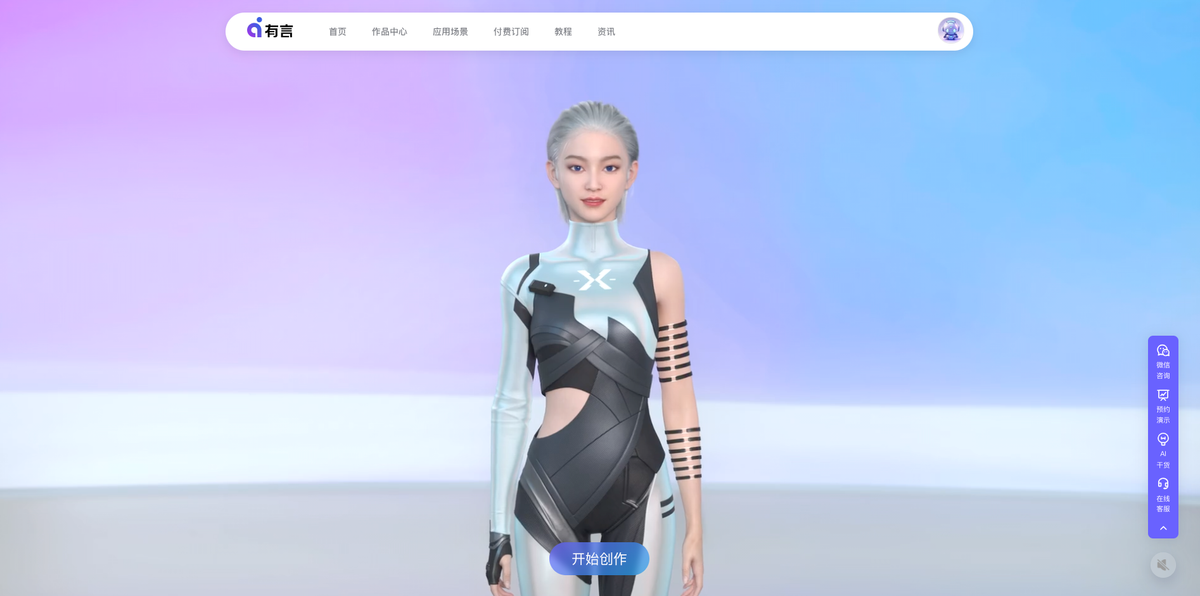
Yuyan is a 3D digital human AI video generation platform that focuses on quickly creating videos from text, scripts, or PPT. According to the official site, it does not require filming, editing, or post-production; AI automatically generates scenes, lighting, character appearance, actions, and camera movement to help users complete video content production more quickly.
Based on information from the product pages, avatar pages, and help center, Yuyan is aimed at both individual creators and enterprise teams, and is suitable for content production scenarios such as training, explanations, marketing, government services, education, and cultural tourism. The platform provides digital human selection, personalized avatar editing, voice synthesis, multilingual output, shot planning, and post-production packaging capabilities, with the goal of lowering the barrier to video creation and improving iteration efficiency.
The platform supports creation from scratch, from templates, from AI scripts, or from PPT, making it suitable for users with different skill levels and levels of prepared material.
Users can choose from thousands of ultra-realistic 3D digital humans, and the page also provides online editing for clothing, hairstyles, makeup, accessories, facial features, and face shape.
After text is entered, AI can generate voice, motion, and expressions, and supports multilingual and multiple voice-timbre narration, making it suitable for explanations, training, marketing, and cross-border content.
The platform includes nearly a thousand 3D scenes and supports AI camera movement and shot combinations to help generate a more complete video structure.
Scripts and PPTs can be edited directly, allowing videos to be updated quickly, which is suitable for courses, releases, and events that change frequently.
The help center lists enterprise service directions including asset customization, API access, and privatized deployment, indicating that the platform also targets enterprise workflows beyond standard creation.
Suitable for teams that need to quickly produce course videos, internal training, product explanations, or knowledge-sharing videos. The page examples mention uses such as corporate training, course production, and knowledge base building, and PPTs and written materials can be turned into videos.
Suitable for marketing teams that want to mass-produce promotional videos, product explainers, event notices, or brand content. Official site examples show it can be used for social media operations, product introductions, holiday campaigns, and consistent brand expression.
Suitable for creating content for schools, classrooms, and online teaching. Site examples mention that teachers can use PPTs to generate course videos, and that multilingual courses and educational promotion are also supported.
Suitable for government and public service scenarios that require policy explanations, service guidance, public announcements, or front-desk displays. Page examples include smart government services, digital publicity agents, and police education campaigns.
Suitable for video production that needs cross-border communication or multilingual dubbing. The homepage explicitly states support for multiple languages and dialects such as English, Spanish, French, and Japanese, with one-click translation and natural narration generation.
Yuyan is positioned as a 3D digital human AI video generation platform, where users can choose a digital human avatar, enter a script, and generate a video. The homepage and help center both state that it supports quickly creating videos from text and PPT content, and also provide guidance on editing, packaging, and exporting.
Based on the homepage and avatar pages, Yuyan provides thousands of ultra-realistic 3D digital humans and supports personalized avatar editing, motion and expression generation, voice synthesis, multilingual narration, and scene and shot pairing. The help center also mentions enterprise services such as asset customization, API access, and privatized deployment, but the specific details are not expanded in the current sources.
The subscription page shows that Yuyan offers a personal trial plan, a personal starter plan, a personal standard plan, and an enterprise plan. The personal plans emphasize individual commercial-use authorization, while the enterprise plan is for business commercial use and team collaboration; the page also states that the plans differ in Yuyan coins, available generation time, resolution, asset library access, and editing rights.
The help center and subscription page both show that the platform supports a fairly complete video creation workflow, including registration and login, choosing an avatar, writing a script, editing the script or PPT, adjusting the person and scene, adding shots and post-production packaging, and then exporting the finished work.
The subscription page clearly distinguishes between personal commercial-use authorization and enterprise commercial-use authorization. The personal plans are suitable for business activities centered on an individual; if the beneficiary of the video is a company or studio, or if it is used for a company WeChat account, internal training, live-streaming sales, promotion, or similar scenarios, the enterprise commercial-use plan should be selected.