
Picture-based asset search
Search 3D stock marketplaces by image instead of relying only on text queries. The product positions this as a visual way to find assets faster and jump directly to the asset page.

Asseter.AI is a digital asset management platform for CG artists and production teams. It combines AI tagging, batch import, automatic preview generation, desktop sync, and picture-based asset search to make large asset libraries easier to organize and reuse.
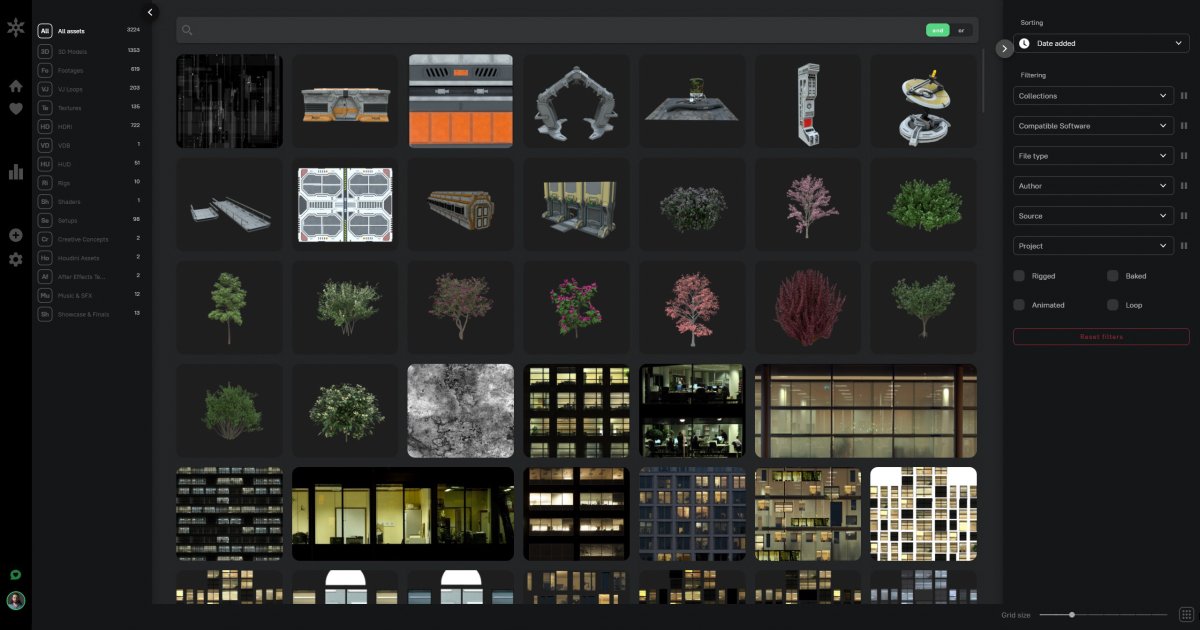
Asseter.AI is a digital asset management platform built for CG artists and production teams that need to organize, search, and reuse 3D and media assets. The product combines AI tagging, batch import, automatic preview generation, and desktop sync so asset libraries can be searched and managed more quickly than by folder browsing alone.
The site also includes Scout, a visual search tool for finding 3D assets by picture across supported stock marketplaces. Together, the Asseter library workflow and Scout search workflow are aimed at teams that maintain large asset collections, need to reuse past work, or want to move from reference images to usable assets faster.
Search 3D stock marketplaces by image instead of relying only on text queries. The product positions this as a visual way to find assets faster and jump directly to the asset page.
Use built-in computer vision and AI object detection to identify the kinds of assets needed to recreate a reference image in 3D. This is aimed at assembling matching scenes and concepts more efficiently.
Import assets in batches with the Scan & Import app and add items from inside the DCC workflow through one-click import. The site also says one-click export is available.
Generate previews automatically during import, including for 3D models and pro media formats such as HAP, DXV3, and image sequences. This reduces manual preview work while assets are added.
Organize and enrich assets with AI tagging, AI categorization, and AI description generation. The pricing page also lists table view and batch edit tools for managing metadata.
Access assets in the web app or through the desktop app, with Asseter Assistant handling synchronization between the web library and local machines. The pricing page also lists API access and statistics engine support.
A studio can move a large existing library into Asseter using the Scan & Import workflow, then use AI tagging, categorization, and generated previews to make old assets searchable instead of leaving them buried in folders.
A designer can search by image when text keywords are not enough, especially for visual references or hard-to-name assets. Scout is positioned to search across supported 3D stock marketplaces and open the asset page directly.
A production team can manage assets in the web app and sync them to local machines with Asseter Assistant. The pricing page describes the Assistant as a desktop app for synchronization between the web app and local machines.
Artists working in a DCC can use the product’s one-click import and export flow to move assets without leaving their software environment. The site says the app is built to make assets available inside favorite DCC tools.
Studios with many assets can use table view, batch edit, statistics, and API access to manage the library at scale. The pricing page lists these controls as part of the platform’s management stack.
Asseter is a digital asset management platform for CG teams and individual creators. The source pages describe web-based browsing, search, upload, download, AI tagging, desktop sync, and optional DCC workflows through the Asseter Assistant.
The pricing page says Asseter offers cloud plans and an enterprise option with on-prem hosting. The FAQ also says cloud-based and local installation are available, with local installation available exclusively on the enterprise plan.
The pricing page describes Asseter Assistant as a desktop application for syncing assets between the web app and local machines. It currently supports sync, and the FAQ says future releases are planned to add DCC integration plus AI-powered discovery and batch import.
Asseter’s pricing page says the cloud plans include a 14-day free trial. The same page also shows a free plan and paid tiers, while the enterprise plan is handled through contact sales.
The pricing page says there is a minimum commitment of five users for standard plans, and it also says there are no setup fees. The source does not provide more detailed onboarding or team-size rules beyond that.