
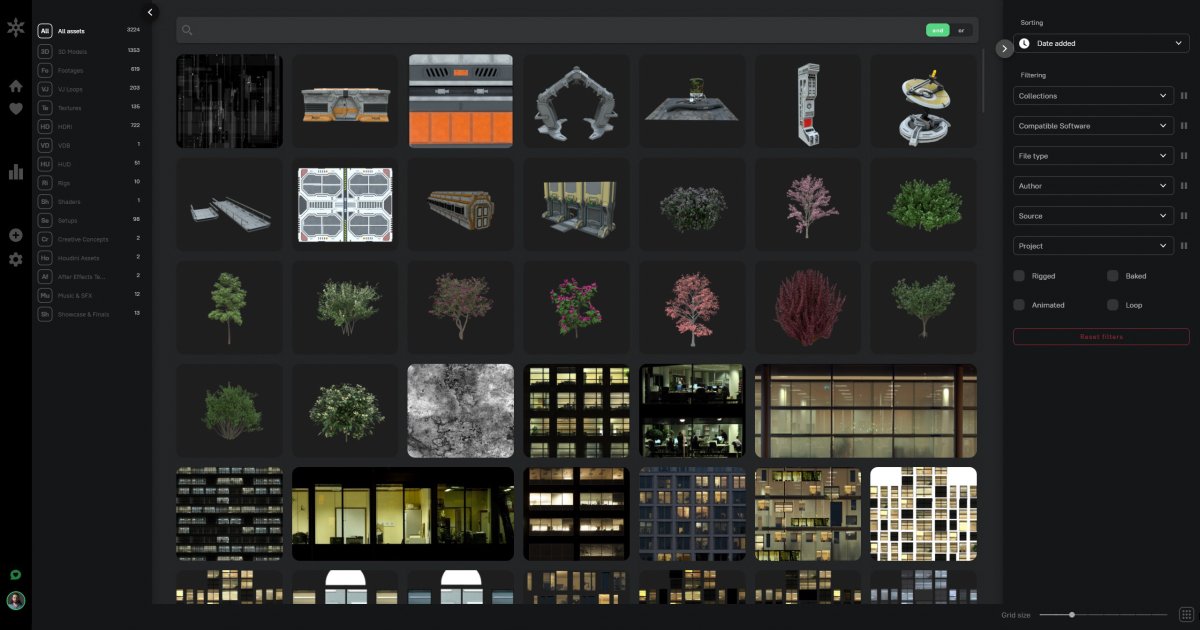
Picture-based asset discovery
Find files in your own library using an uploaded reference image, an asset similar to a selected item or dominant-color matching.

Organize and find CG production assets with an AI-assisted library
Asseter.AI, marketed as Asseter, is an AI-assisted digital asset management product for CG artists and production teams. Organize your own models, images, video and other production files in a web library with tags, custom metadata, previews and search filters.
AI tagging and categorization help describe imported assets, while picture-based search can locate similar files in the library. Cloud and Enterprise on-premises options support different studio setups. The platform is offered through Early Access, and some desktop and integration workflows remain in development.
Find files in your own library using an uploaded reference image, an asset similar to a selected item or dominant-color matching.
Computer vision suggests tags, asset types, categories and subcategories. Artists can apply suggested tags or tag multiple assets together during import and in the web interface.
Define metadata fields for each asset type, such as author, render engine and compatible software. Search tags and custom attributes, combine terms with AND/OR operators and narrow results with metadata filters.
Upload files or folders by dragging them onto the web page and use import filters to select files. Asseter generates thumbnails and browser previews for supported models and media formats.
Preview supported 3D models in an integrated browser player and inspect video thumbnails by moving the cursor across them. File sequences are treated as a single asset, keeping sequence-based production material together.
Python and REST APIs support custom asset uploads, retrieval and metadata operations. Discuss access and implementation for your studio setup before planning an integration.
Start with a reference picture to find similar items in your own production library, instead of first translating visual details into tags.
A team consolidating production folders can use the alpha desktop import app to scan folders, categorize files, create previews and prepare an editable metadata sheet for batch import.
Artists can group models, images and other asset types into project collections, then filter by compatible software or linked projects when preparing a new scene.
Technical directors can use the APIs to connect asset uploads and retrieval to production tracking tools or custom utilities, incorporating library operations into existing workflows.
Starter is $10 per user per month with cloud hosting and 100 GB of storage. Standard plans typically start at a five-user commitment; Enterprise pricing is negotiated separately.
Yes. NAS and local-installation workflows are available with Enterprise on-premises deployment. Users can obtain a direct path to an asset file or folder on the NAS.
The feature list includes HDRI, EXR, DPX, VDB, image sequences, CAD models and formats associated with Cinema 4D, Houdini, 3ds Max, Maya and ZBrush. Available preview types depend on the asset format.
Computer Aided Import is marked alpha. CSV import, moderation Waiting Room, saved searches, custom lists and external sharing are marked as forthcoming. Asseter Assistant currently provides sync; confirm DCC integration and AI-import availability for your setup.
No. Add your own existing or newly created assets. Cross-marketplace image search is presented as the separately named Scout tool.
Cloud plans offer a 14-day trial. The trial library is limited to 100 assets. Choose the paid library plan for ongoing use and confirm your team’s required capacity.
Traffic data is for reference only.
