
Plain-English workflow creation
Describe the work in plain English, and the product turns it into an agentic workflow in seconds without code or prompt engineering.

Expertise is an AI executive assistant for account executives that automates sales admin work like CRM updates, meeting prep, follow-ups, and prospecting. It is built for plain-language workflow creation and background execution across connected sales tools.
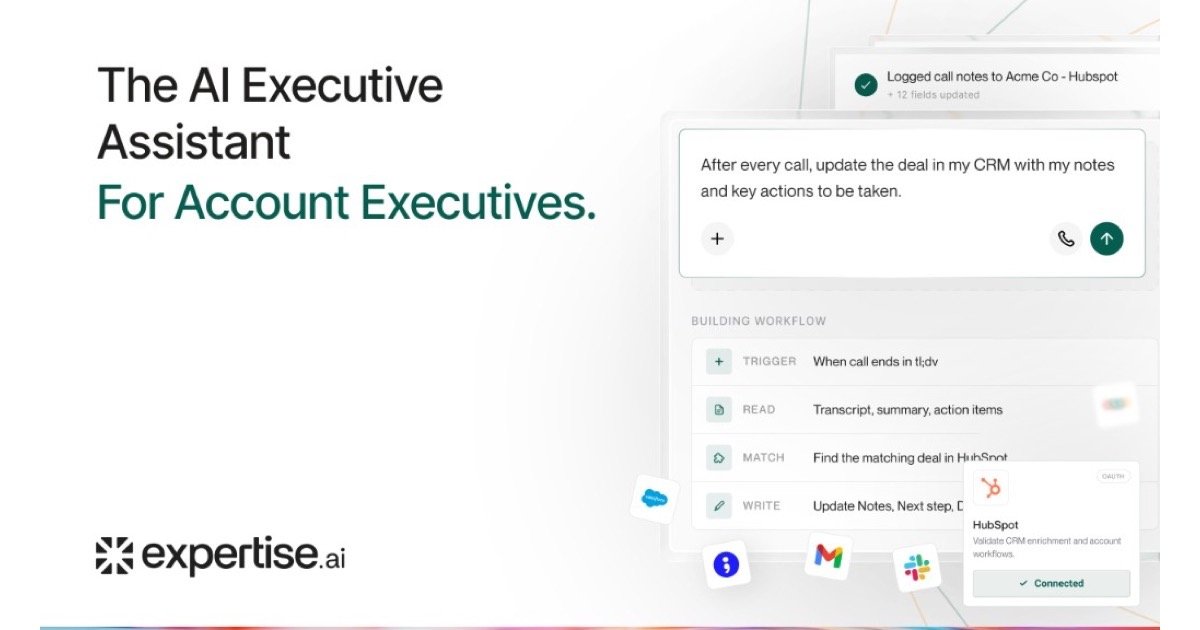
Expertise is an AI executive assistant for account executives. It is designed to handle repetitive sales admin work such as CRM updates, meeting prep, follow-up drafts, prospecting, and pipeline hygiene so reps can spend more time selling.
The product centers on simple workflow creation: you describe the task in plain language, connect the relevant tools, and let the agent run scheduled or triggered work in the background. The homepage shows examples such as pre-call research briefs, competitor alerts, renewal and upsell signals, and dead-deal revival tasks.
Describe the work in plain English, and the product turns it into an agentic workflow in seconds without code or prompt engineering.
Connect CRM, inbox, calendar, Slack, LinkedIn, and related sales tools so the agent can read from and write to your stack.
Run scheduled and triggered tasks in the background, then review only the steps that need human approval.
Create account discovery, buying-signal tracking, deal-risk alerts, CRM signal sync, and pre-call briefs from the tasks shown on the homepage.
Train an AI agent on URLs, PDFs, Docs, text, or a sitemap, then deploy it on a website.
Use HubSpot integration, live chat handoff, and two-way CRM sync on higher plans, with Salesforce support listed on Enterprise.
Generate pre-call research briefs, pull in account signals, and have the assistant prepare a meeting-ready summary before a scheduled call.
Capture call outcomes, draft recaps, and update CRM records such as deal stage or follow-up notes after a conversation.
Track funding, hiring, leadership changes, competitor mentions, and buyer engagement across target accounts to surface timely outreach opportunities.
Watch deals for stalls, quiet periods, or negative movement, then flag which opportunities are worth re-engaging and which to let go.
Send follow-up drafts, renewal and upsell signals, and other next-step prompts so reps can move deals forward without manual tracking.
The site says Expertise can save time within the first hour by turning plain-English instructions into workflows. It is positioned for tasks like CRM updates, follow-ups, and meeting prep, which it can run repeatedly once described.
The site shows it can handle CRM updates, meeting prep, follow-up drafts, prospecting, account discovery, buying-signal tracking, deal-risk alerts, and pre-call briefs. The exact mix depends on the workflow you describe.
The homepage says you connect your stack, describe the work, and let Expertise run it. It also says no code is required, and the product connects with tools such as CRM, inbox, calendar, Slack, LinkedIn, and call or dialer tools.
The pricing page says billing includes included credits first, then bonus credits, then any overage. It also says you can opt into pay-as-you-go overage on Pro instead of hitting a hard stop.
The site says Expertise AI is SOC 2 Type II and GDPR compliant, with encryption and access controls. It also notes support for opt-out and do-not-call handling.