
Finder context-menu tools
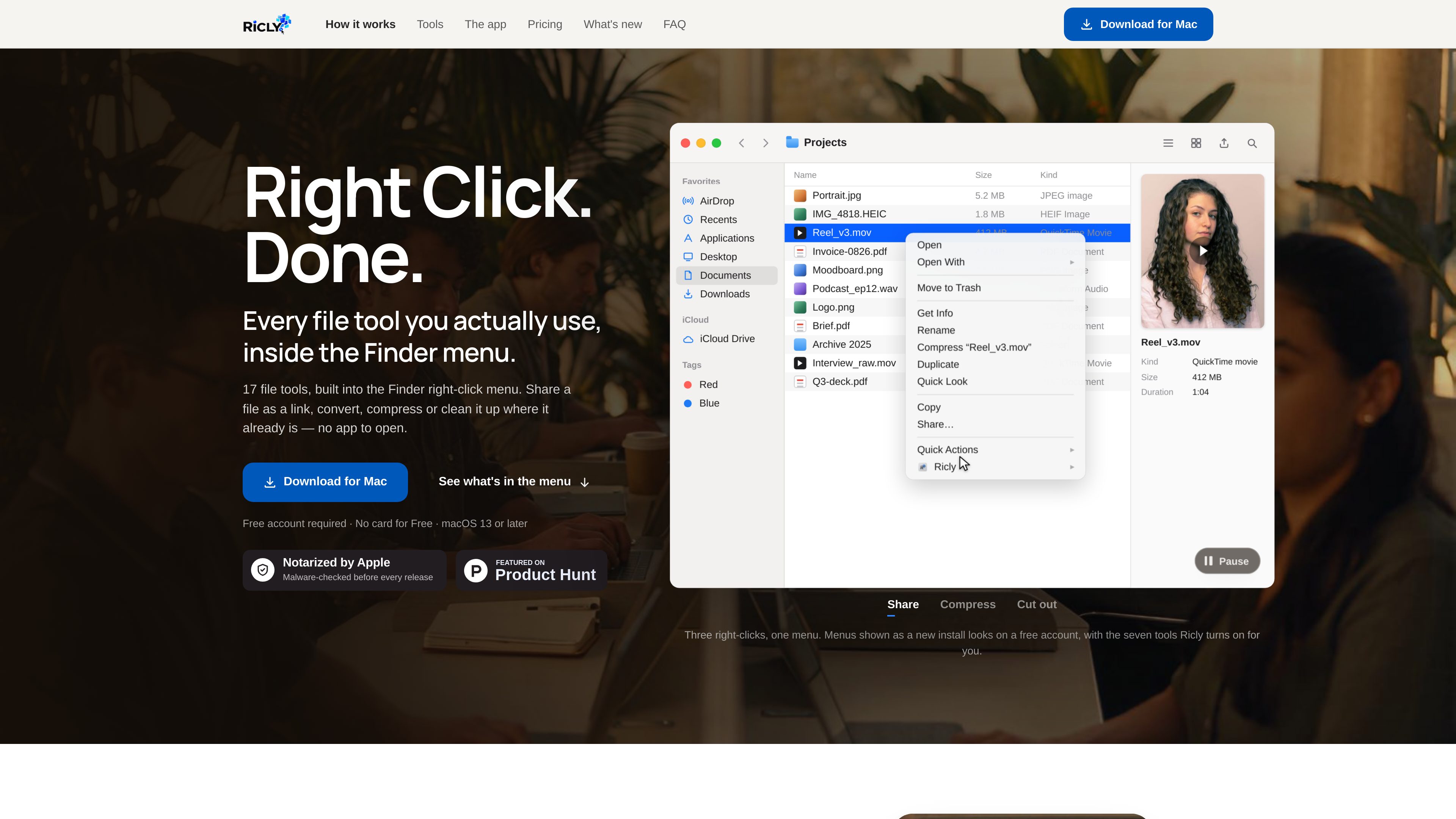
Select a file or folder in Finder and access Ricly actions from the right-click menu instead of opening a separate utility. The full toolkit contains 17 tools.

Ricly is a macOS utility that adds file conversion, cleanup, organization, sharing, and other tools to the Finder right-click menu. It helps Mac users handle common file tasks without opening a separate application or browser.
Ricly is a macOS utility that adds 17 file tools to the Finder right-click menu. It handles common file work such as conversion, compression, resizing, renaming, PDF creation, duplicate-file review, image background removal, and link sharing from the location where files already live. Local tools are designed to avoid a separate browser upload and download workflow.
The app supports macOS 13 or later and requires an account. Its free plan includes 13 tools with no card required; Pro adds the complete 17-tool set and removes the documented monthly limits. Ricly is listed as a 297 MB download for Apple silicon and Intel Macs.
Select a file or folder in Finder and access Ricly actions from the right-click menu instead of opening a separate utility. The full toolkit contains 17 tools.
The toolset includes Audio to MP3, HEIC to JPG, Image to WebP, Video to MP4, Compress Image, Compress PDF, Quick Resize, and Strip Metadata for common media and document workflows.
Remove Background processes JPG, PNG, HEIC, and TIFF images on the Mac. It can create a transparent PNG, pure-white JPG, or store-ready square output while leaving the original unchanged.
Find Duplicates scans a selected folder recursively for byte-for-byte identical files and sends reviewed copies to the Trash. PDF Merge lets users arrange files before combining them into one document.
Upload & Share copies a selected file online and puts the resulting link on the clipboard. A menu-bar view shows active shared links, their remaining lifetime, and opening counts.
Ricly also includes Batch Rename, Extract Text (OCR), Photo Grid, Generate Icon Set, and Upscale Image; these tools are part of the 17-tool product set, with availability depending on the plan.
Use background removal to turn portraits, product photos, logos, or other subjects into transparent, white-background, or store-ready square images. Results are saved beside the source file without overwriting it.
Convert formats such as HEIC to JPG, images to WebP, audio to MP3, or video to MP4, and compress large images or PDFs before delivery or storage.
Select scans, office documents, notes, and PDFs, arrange their order in the merge panel, and create a single PDF for handoff or submission.
Scan a project folder and its subfolders for exact duplicate files, review each group, and move selected copies to the Trash while keeping the operation recoverable.
Use Upload & Share from Finder when a recipient needs a URL rather than an email attachment. Free links last three days; Pro links last 30 days.
Ricly supports macOS 13 or later and is listed for both Apple silicon and Intel Macs. The download is listed as 297 MB.
The website states that operations such as Remove Background run on the Mac. For that tool, the image is not sent to a server; network access is needed for sign-in, not for processing the photo. Upload & Share is different because it intentionally uploads a file to create a link.
The free plan costs $0, requires an account, and does not require a card. It includes 13 tools. Documented examples include 10 background-removal images per month, 10 files sent to the Trash per month for duplicate cleanup, five PDF Merge runs per month, and Upload & Share links with three-day expiration, 1 GB online at a time, and three uploads per day.
Pro includes all 17 tools, 20 GB online at a time for sharing, 30-day links, unlimited uploads, and no monthly usage caps for the listed tools. The pricing page offers monthly and annual billing, and a 30-day trial for new subscribers that requires a payment method.
No. The Remove Background page says the output is saved in the same folder beside the original, and existing filenames are not overwritten. Repeated runs receive a new filename.

notchpop.com
NotchPop 是一款 macOS 效率岛,将媒体控制、文件处理、剪贴板历史、计时器、日历信息和实时活动等常用工具集中在 Mac 刘海或浮动岛中,支持有无实体刘海的 Mac。

www.stashformac.com
Stash 是一款 macOS 实用工具,让应用和系统控制项随时触手可及,同时无需让它们一直显示在屏幕上。

getaktar.com
免费开源的菜单栏文件上传工具,支持 macOS 和 Windows,可上传至自有 S3 兼容存储并复制可分享链接。

contrive.app
独立桌面应用,在一个命令栏中搜索工作区工具、获取 AI 答案并执行操作,无需在浏览器标签页之间切换。

focusfirewall.com
Focus Firewall 是一款 macOS 专注工具,可在无需浏览器扩展的情况下跨浏览器屏蔽分散注意力的网站和应用,帮助你自动安排专注时段、进行有计划的短暂休息,并查看本地浏览时间报告。