
Semantic icon search
Search for concepts and actions such as “shopping cart,” “log out,” or “a lady cooking” instead of relying only on exact icon names. The MCP workflow describes hybrid keyword and semantic ranking across the available sets.

IconsDB is a searchable library of open-source icons, logos, flags, and emoji, with semantic search and code-ready outputs for web developers and designers. Its MCP server lets supported coding agents find icons by intent and return imports suited to a project's existing icon packages.
IconsDB is a searchable library for open-source icons, logos, file-type symbols, flags, and emoji. It brings together collections such as Lucide, Heroicons, Tabler, Phosphor, Material Symbols, Font Awesome, Simple Icons, and multiple emoji sets.
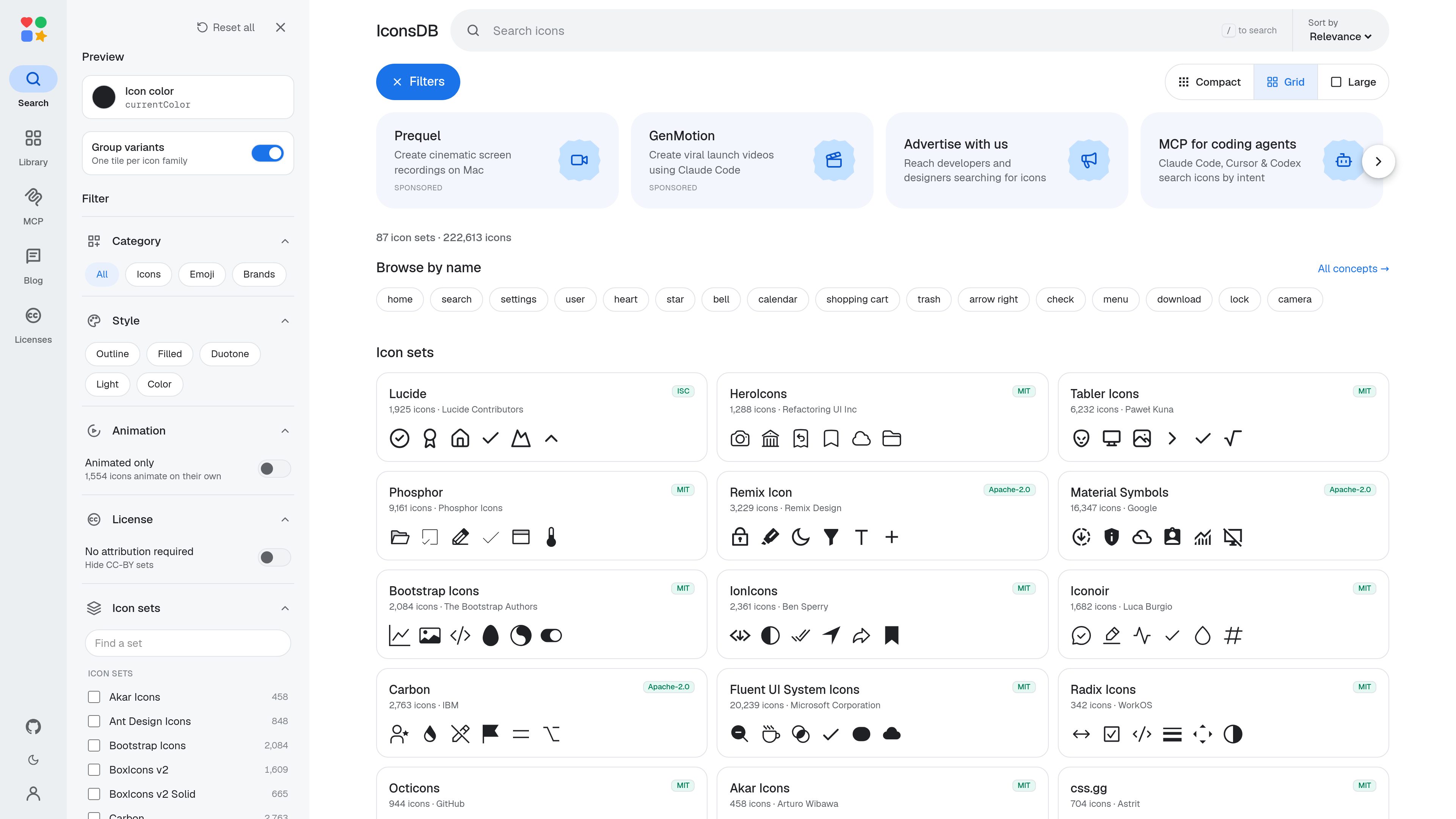
Users can search by concept, browse by icon name or collection, and narrow results by category, visual style, animation, and license-related filters. Results can be previewed with different colors and layouts, then used in implementation formats including SVG, React, Vue, and CSS.
For development workflows, IconsDB provides a remote MCP server for supported coding agents. The server can inspect project dependencies, search for icons by intent, favor a set that covers multiple concepts consistently, and return package-aware imports or alternative component formats. Each icon retains the license selected by its original author, so licensing and attribution should be checked before redistribution or use of branded artwork.
Search for concepts and actions such as “shopping cart,” “log out,” or “a lady cooking” instead of relying only on exact icon names. The MCP workflow describes hybrid keyword and semantic ranking across the available sets.
Browse general icon collections alongside logos, file types, flags, and emoji. The site lists established sets including Lucide, Tabler, Phosphor, Material Symbols, Font Awesome, Simple Icons, Noto Emoji, and OpenMoji.
Filter by category, icon set, outline, filled, duotone, light, color, animation, and animated-only results. Preview controls include icon color and compact, grid, or large layouts.
The product documentation describes copying or generating icons as SVG, React, Vue, CSS, JSX, Svelte, Solid, Iconify, Unplugin, data URI, and related formats through its MCP tools.
The remote MCP server can detect icon packages in a project, keep results compatible with an existing dependency such as lucide-react, and return the set’s own import, an Iconify component, or an inline no-dependency component.
IconsDB records each set’s author, license, attribution status, and link to the full license text. It does not relicense the artwork, and it identifies additional trademark considerations for brand and product logos.
Search a UI concept, compare results from different visual families, and use style or category filters to find an icon that fits a navigation bar, dashboard, form, or marketing page.
Connect the MCP server to a supported coding agent and provide the project’s dependencies. The agent can return imports from an icon package already in use instead of introducing an unrelated library.
Ask for several concepts in one request, such as home, settings, and log out. The MCP workflow can report which single icon set covers the requested concepts, helping avoid mixing incompatible styles.
Use the dedicated library groups to locate technology logos, brand marks, file-type symbols, flags, or emoji rather than searching only the general icon collection.
Before shipping or redistributing assets, consult the set-level license information to identify whether attribution is required and whether modified CC-BY-SA artwork carries share-alike obligations.
The library includes general-purpose icons, logos, file-type symbols, flags, and emoji. Its listed collections include Lucide, Heroicons, Tabler, Phosphor, Material Symbols, Font Awesome, Simple Icons, Noto Emoji, OpenMoji, and many other open-source sets.
The site describes outputs including SVG, React, Vue, and CSS. The MCP tools also document JSX, Svelte, Solid, Iconify, Unplugin, data URI, and inline component outputs.
IconsDB provides a remote MCP endpoint at https://iconsdb.app/mcp. Supported agents can connect to it, detect icon packages from project dependencies, search by intent, and request package-aware code. The documented setup does not require a local installation or API key; the agent opens a browser once for sign-in.
No. IconsDB keeps each set’s original license. Many collections use MIT, ISC, Apache-2.0, or CC0, while some require attribution under CC-BY-4.0 or CC-BY-SA-4.0. Check the individual set’s license and attribution instructions, especially for brand logos.
No. The set license covers the SVG artwork only and does not grant trademark rights. IconsDB advises following the relevant brand’s usage guidelines and does not claim affiliation or endorsement.

sequel.sh
Sequel is an AI data analyst and secure data layer for agents. It connects databases, warehouses, analytics platforms, spreadsheets, and SaaS tools so Claude, Cursor, ChatGPT, and other MCP-capable agents can answer questions using shared data connections and definitions.

shootclip.com
ShootClip 是一款 macOS 视频编辑器,提供专业时间线工具、AI 字幕和内置 MCP 服务器,让 AI 助手在你编辑视频时协同工作。

skilldocs.dev
SkillDocs is a collaborative markdown workspace for editing, commenting on, and sharing the documents that agents run on. It combines live multiplayer editing with an MCP-based workflow for pushing skills from local files, collecting feedback, and pulling changes back.

workato.com
面向企业级智能体 AI 的集成与编排平台

wellapp.ai
将业务工具、文档和数据整合到一个上下文图谱,供团队和智能体使用。

www.simplecommenter.com
Simple Commenter is a website feedback platform with an MCP server that connects comments and page context to AI tools such as ChatGPT, Claude, Cursor, and Codex. It helps web teams turn review comments into clearer next steps and fixes.