
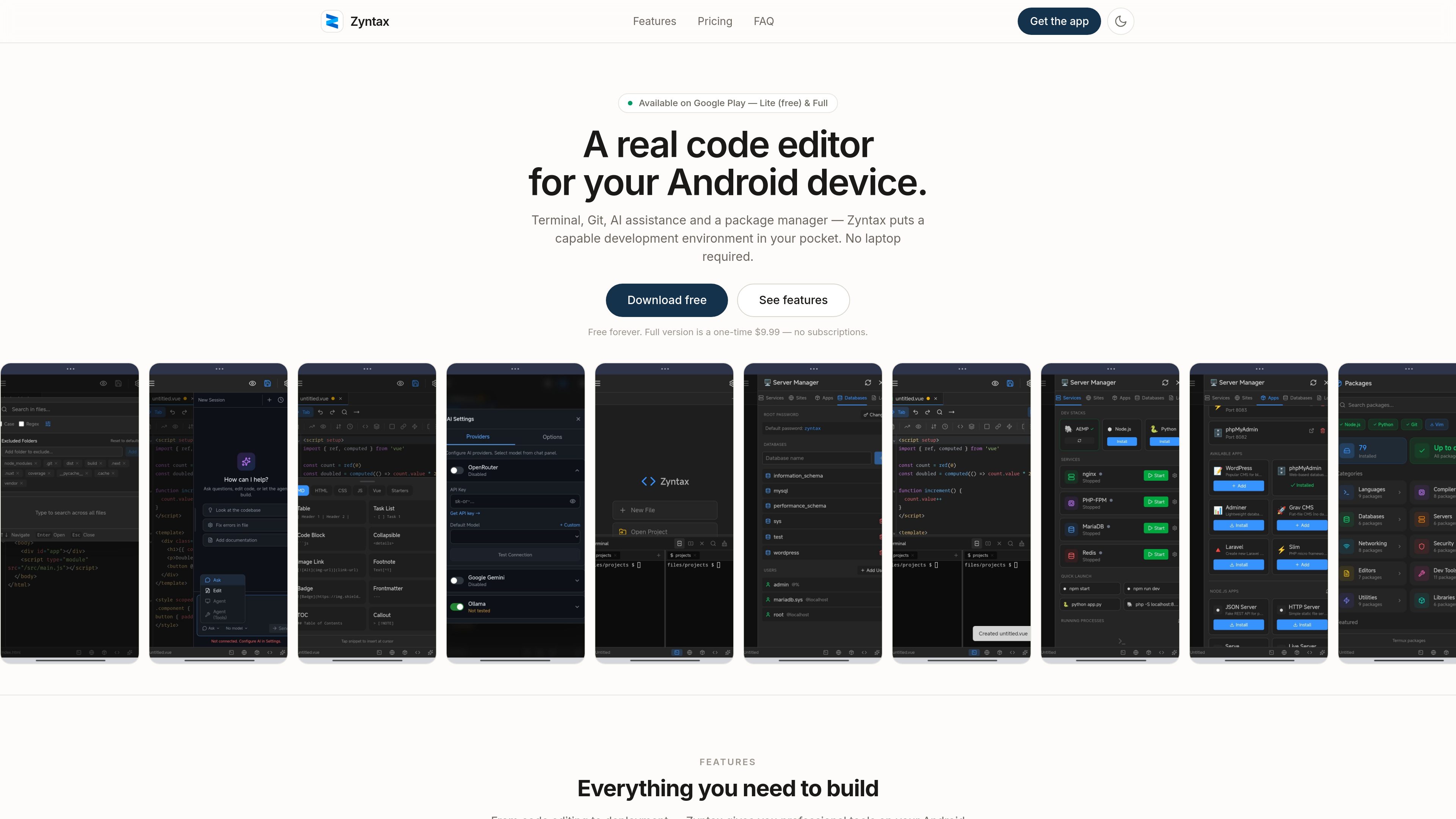
Code editor with developer-oriented editing tools
Includes syntax highlighting for 10+ languages, autocomplete, find and replace, multiple cursors, keyboard shortcuts, and a markdown editor.
Zyntax is an Android code editor with a built-in terminal, Git tools, AI assistance, and package management. It helps you code, test, and deploy from a phone or tablet without relying on a laptop.
Zyntax is a code editor for Android that combines editing, terminal access, Git operations, AI assistance, and package management in one app. The product is positioned as a complete development environment for phones and tablets, so users can write code, run commands, manage repositories, and install development tools on the device itself.
The app is offered in two versions: a free Lite edition and a paid Full edition. The source describes Zyntax as local-first, with code stored on the device rather than in the cloud, and it also states that users can work without a PC once their files and tools are installed.
Includes syntax highlighting for 10+ languages, autocomplete, find and replace, multiple cursors, keyboard shortcuts, and a markdown editor.
Provides a full PTY terminal with bash and zsh, plus split panes, Unix utilities, and command history for command-line workflows.
Offers a visual Git interface for cloning, committing, pushing, pulling, branching, and merging without leaving the app.
Supports AI assistance through user-provided API keys and works with OpenRouter, Google Gemini, and Ollama.
Installs tools such as Node.js, Python, PHP, Rust, Go, and other packages directly on the device.
Adds support for running nginx, PHP-FPM, MariaDB, and Redis, which can turn the phone into a portable dev server.
Useful for learners who want to run code immediately and practice without needing a laptop nearby.
Fits workflows where a developer pulls a repo, edits files, tests the change, and pushes it back from Android.
The Full version is suited to users who need packages such as Node.js, Python, PHP, Rust, or Go on the device.
The server manager can run services like nginx, PHP-FPM, MariaDB, and Redis for demos, testing, and local setup work.
Once project files and tools are already installed, users can continue coding offline; internet is only needed for AI features and package downloads.
No. The app is described as a complete development environment that runs on Android, so you can write, test, and deploy without a PC once your tools are installed.
Lite includes the code editor, real terminal, Git integration, AI assistant with a bring-your-own-key setup, file manager and global search, markdown editor, and other basic workflow tools. It is free with ads.
Full is a one-time purchase that adds the package manager, server manager, split terminal, support for tools like Node.js and Python, nginx, PHP-FPM, MariaDB, Redis, WordPress and phpMyAdmin setup, ad removal, priority support, and future updates.
Zyntax uses the AI provider and API key you provide. The sources mention support for OpenRouter, Google Gemini, and Ollama, and say the keys are stored locally on your device.
No. The privacy policy says Zyntax is local-first and does not store or transmit your personal data to its servers; your code and related files stay on your device.
Traffic data is for reference only.

fx.sh
fx is a tiny, open, native coding agent and CLI for working with code from the terminal. It is designed for research, embeddability, and use as part of larger systems, with support for local or cloud inference.

waveterm.dev
Open-source terminal with previews, editing, browsing, dashboards, and remote management.

heyeddie.ai
AI video editor for fast rough cuts, built for professionals and integrated with Premiere Pro, DaVinci Resolve, and Final Cut Pro.

crewtower.app
Crew Tower is a macOS utility for approving and tracking AI coding agents from the menu bar notch. Review permissions, answers, progress, and context without switching to the terminal.

toplify.app
Toplify tracks App Store rankings for iOS and Mac apps across 175 countries and alerts users to meaningful rank changes. It is built for app makers who want chart monitoring without App Store Connect access.

antibot.techieslab.app
Antibot is a Discord AI community manager bot that starts conversations, remembers member interests, and helps servers stay active. It is designed for server owners who want AI-assisted engagement, moderation, and summaries without relying on slash-command workflows.