
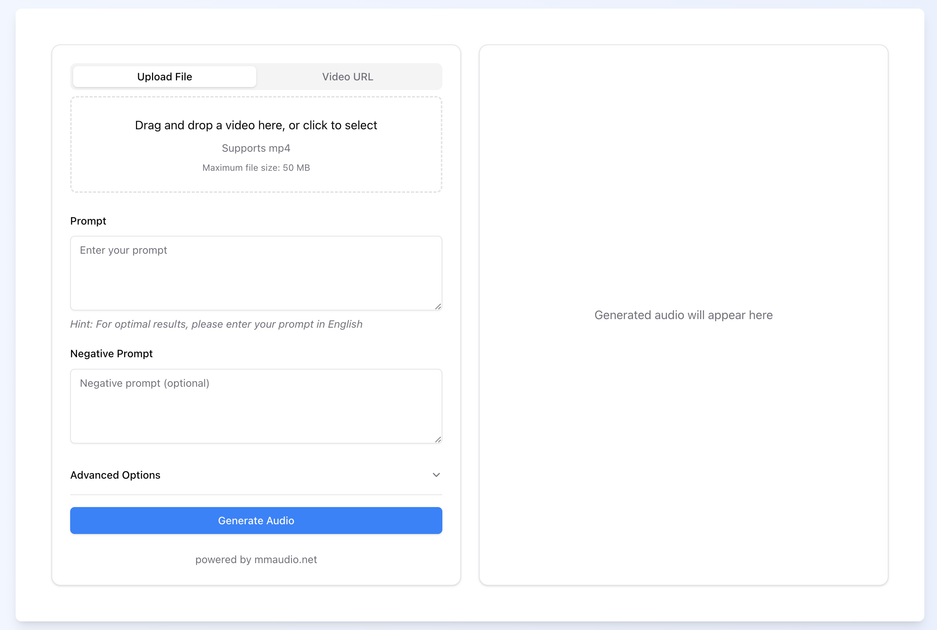
Video input workflow
Create audio from a video file or a video URL, which positions the product around turning existing visual content into sound.

AI voice generation for turning videos into audio
MMaudio is an AI voice generation tool that focuses on video-to-audio generation. The home page presents it as a way to transform silent videos into audio by analyzing the video context and producing matched sound.
The product interface supports uploading a file or using a video URL, then entering a prompt, an optional negative prompt, and a duration before generating audio. The pricing page shows both paid plans and a free plan with daily credits, so the service is structured around credit-based usage rather than unlimited generation.
Create audio from a video file or a video URL, which positions the product around turning existing visual content into sound.
Guide generation with a text prompt and optional negative prompt, helping narrow the style or content of the output.
Adjust the target duration in seconds before generation, which gives users a basic timing control over the result.
Use the site’s advanced options area to work with additional generation settings, as shown on the home page.
Generate audio through a credit-based model, with the interface indicating one credit per model generation on the home page and plan-specific credit allotments on pricing.
Work with video upload constraints that are spelled out on the pricing page, including file-size limits and plan-dependent format support.
Turn a silent clip into generated audio by uploading the video, adding a prompt, and adjusting duration before processing.
Use the video URL option when the source content already lives online and you want to generate audio without downloading and re-uploading the file.
Refine the output by pairing a prompt with a negative prompt and the advanced options area when you need more control over the result.
Start with the free plan to evaluate the workflow, then move to a paid tier if you need more credits, larger uploads, or broader format support.
Choose a higher plan when working with larger files or when you need support for all video formats and API key management.
You upload a video file or provide a video URL, then enter a prompt and optional negative prompt before generating audio. The home page shows a duration control and an advanced options area, while the pricing page indicates the service uses credits.
The pricing page lists a free plan with daily login rewards, no credit card required, and limited basic features.
Yes. The pricing page includes plan-specific support notes, and the FAQ on the home page asks whether generated audio can be used commercially, but it does not publish the license terms on the page text provided.
The home page shows an upload flow for videos and the pricing page lists support for MP4 on lower plans and all video formats on higher plans.
Traffic data is for reference only.
| Apr | 53917 |
|---|---|
| May | 49989 |
| Jun | 58802 |

audie.ai
AI audiobook creator turning manuscripts into narrated audio files with voice cloning and no monthly subscription.

dubbingx.com
AI audio platform for voice, singing, and music generation

murf.ai
Murf AI is an AI voice platform for text-to-speech voiceovers, dubbing, and voice APIs, serving creators, localization teams, and developers with multilingual audio workflows.

luvvoice.com
Luvvoice turns typed text and uploaded documents into spoken audio with 70+ languages, multiple voices, MP3 downloads, browser playback, API access, and voice cloning.

revocalize.ai
Web-based AI voice generation and cloning for creators, musicians, producers, and developers.

tad.ai
AI music and audio generation for songs, stems, and more