
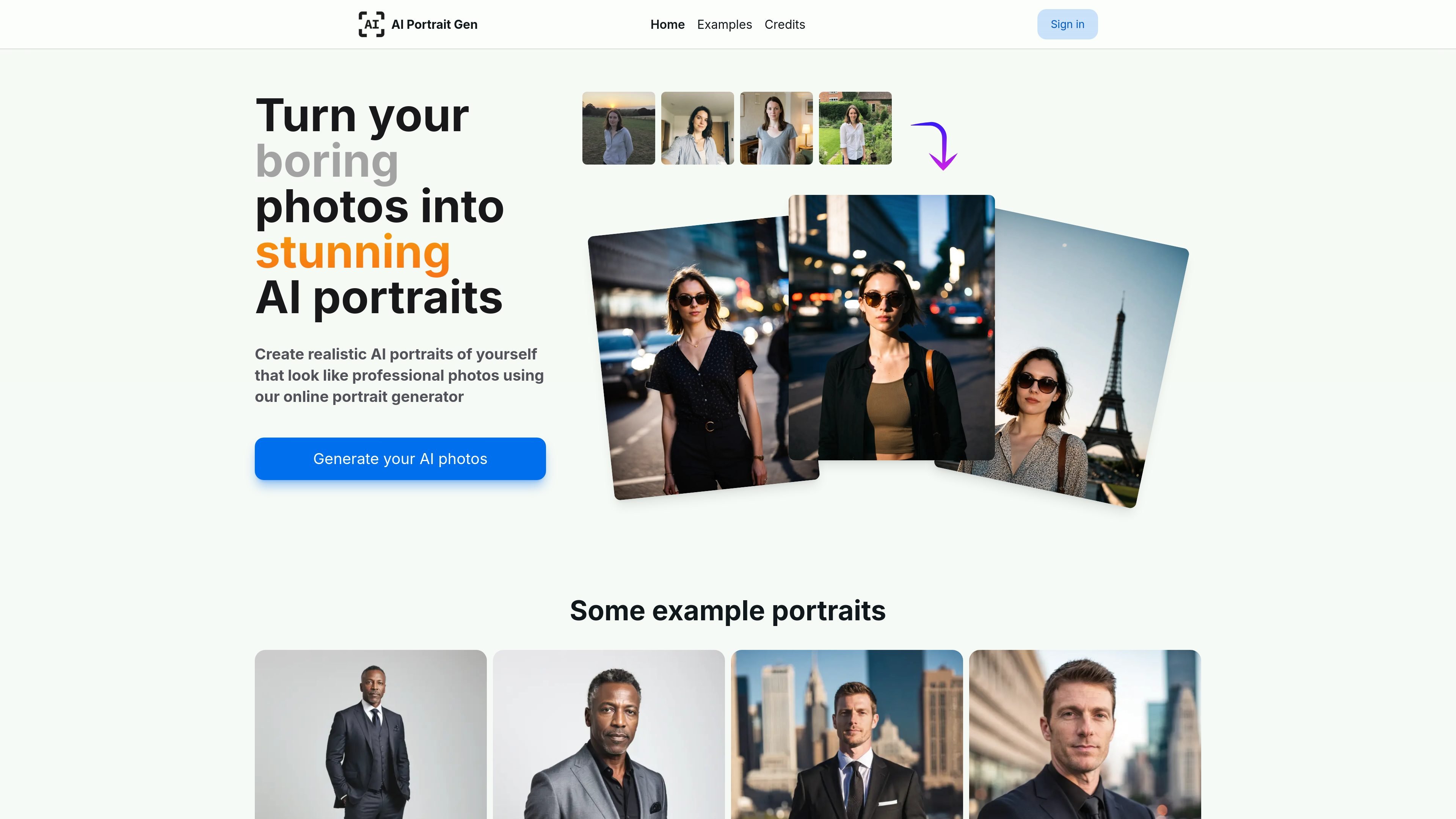
Model-based portrait generation
Create a model profile by uploading a few photos, then let the system learn the subject’s features for later portrait generation.

AI Portrait Gen creates realistic portraits from a few uploaded photos.
AI Portrait Gen is an online AI portrait generator that creates realistic photos of a person from a small set of uploaded images. The site positions it as a way to turn ordinary photos into portrait-style results that resemble professional photography.
The workflow is built around two steps: create a model profile from a few photos, then generate new portrait sets with either guided options or freeform prompts. The product is aimed at users who want profile pictures, LinkedIn-style headshots, business portraits, or other polished images without a traditional photo shoot.
Create a model profile by uploading a few photos, then let the system learn the subject’s features for later portrait generation.
Use simple mode to choose from preset locations and outfits, or randomize the selection when you want a faster setup.
Write your own prompts in creative mode, including negative prompts, for more specific outfit, setting, or style control.
Select the number of photos, size, and orientation for each photoshoot so the output matches the intended use.
Generate portraits for a range of looks, from corporate headshots and business photos to casual and stylized images.
Keep uploaded photos and personal information private; the site says it does not sell data or use it to train other AI systems.
Create profile pictures for LinkedIn, Instagram, or other social accounts when you want a polished portrait-style image instead of a casual selfie.
Generate headshots for resumes, CVs, business websites, or email signatures using a few uploaded photos and a chosen portrait setup.
Produce business portrait photos for people who want a corporate look without booking a studio session.
Experiment with different locations, outfits, and styles for casual or stylized AI portraits that can be shared with friends or used for personal projects.
Create multiple portrait versions from the same model profile so you can compare styles, orientations, and output counts for different needs.
No. The site describes a browser-based workflow where you create a model profile, upload a few photos, and generate portraits online.
The site says the model preparation step typically takes about 20 minutes, and each photo takes about 30 seconds to generate.
The site says you can upload a few photos to create a model profile, and that phone camera photos work well.
The product supports prompts in creative mode, including negative prompts, and offers simple mode for choosing settings such as location and outfit.
The site says personal information and photos are kept private, and that they are not sold or used to train other AI systems.
Traffic data is for reference only.

petbooth.app
Create AI generated portraits and photo realistic images of your cat or dog from uploaded photos.

betterpic.io
AI headshots from uploaded photos, with 4K quality and commercial licensing
pica-ai.com
Pica AI creates face swaps, AI headshots, and enhanced photos in your browser.

photopacks.ai
AI headshot generator creating professional portraits from 10 photos

photoaistudio.com
Photo AI Studio is an AI image and video generator for headshots, product photos, virtual try-ons, hairstyle previews, and prompt-based portraits. It supports selfie-, prompt-, and reference-based workflows, with paid plans for higher-resolution images and video tools.

tatship.com
Tatship previews tattoos on body photos, creates stencils, and generates AI-assisted designs.