
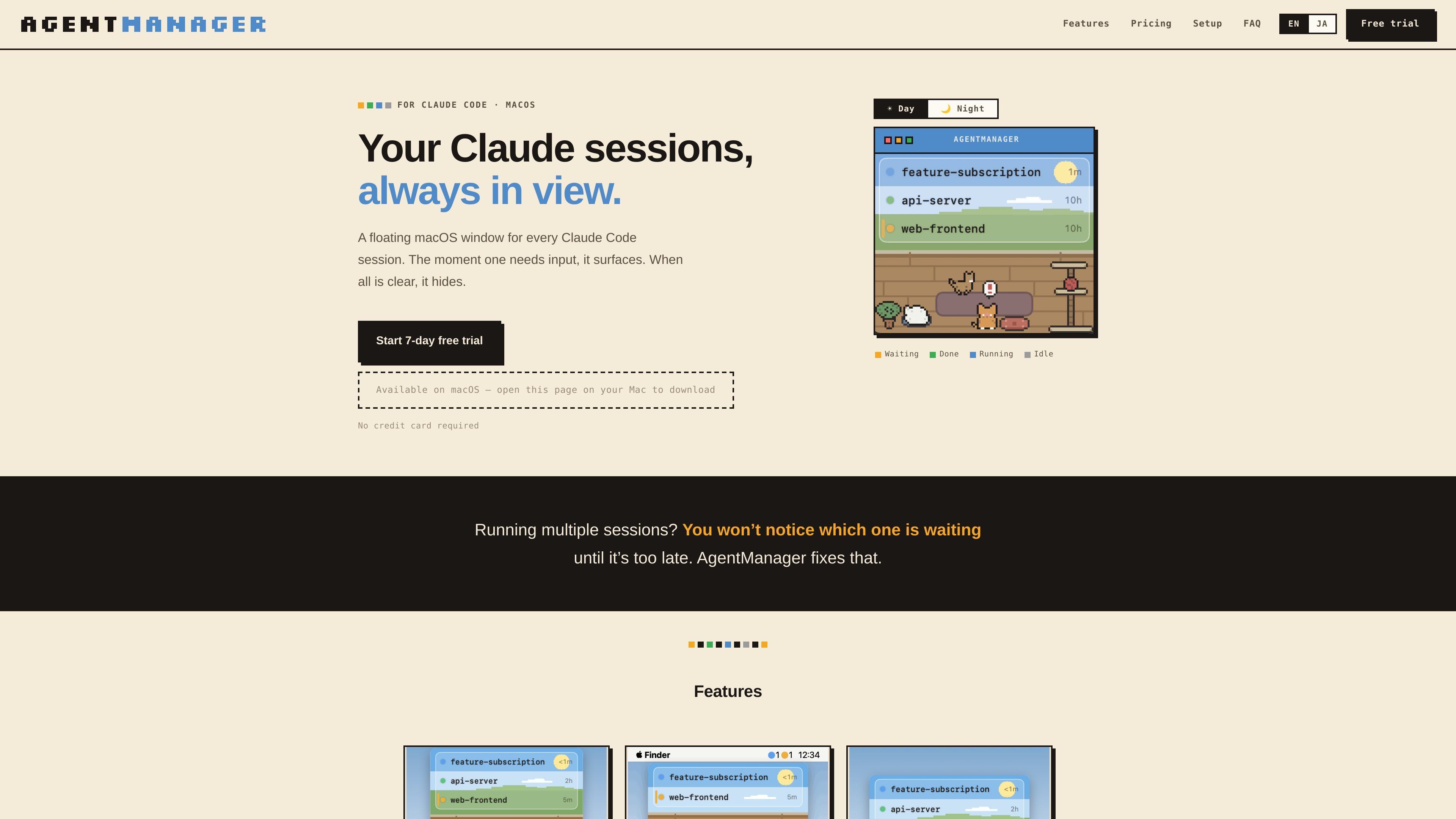
Status at a glance
Shows which sessions are running, waiting for input, done, or idle, plus how long each has been in that state.

AgentManager — приложение для macOS, которое позволяет отслеживать сеансы Claude Code в плавающем окне. Оно помогает понять, какой сеанс требует внимания, и вернуться к нужному терминалу или контексту IDE.
AgentManager is a macOS app for Claude Code sessions. It keeps a floating window for your sessions so you can see when one is waiting, running, or finished without constantly checking the terminal.
The app is built for people who run multiple Claude sessions and need a clearer way to notice when one requires input. It uses Claude Code hooks to detect sessions automatically, then shows a window, menu-bar status, and jump controls for moving back to the right terminal or IDE context.
Shows which sessions are running, waiting for input, done, or idle, plus how long each has been in that state.
Brings the window forward as soon as any Claude session needs input, then hides it again when everything is clear.
Lets you click a session row to jump to the right pane, tab, or project window depending on the host app.
Supports keyboard-first control with a configurable window toggle and navigation for switching between sessions.
Displays status counts as colored dots in the menu bar so you can check activity without opening the window.
Includes optional cat sound alerts, a day/night pixel-art cat room, and a simple mode that hides the illustration for a list-only view.
Useful when you keep several Claude sessions open and need to see which one is waiting for input without checking each terminal manually.
Helps when you step away from the keyboard: the window appears when a session needs input, and the cat alert can notify you even if you are not watching the screen.
Supports workflows where Claude Code is launched from a terminal or IDE and you want to jump back to the exact pane, tab, or project window quickly.
Works for users who prefer keyboard-driven control and want to toggle the window, navigate sessions, and jump without using the mouse.
AgentManager is designed for macOS 13 Ventura or later and requires Claude Code (the claude CLI) to be installed.
Detection works in any terminal because it uses Claude Code hooks. Jump behavior varies by app: it can jump precisely to panes or tabs in iTerm2, Terminal, and Ghostty, and it can jump to the project window in supported IDEs such as VS Code, Cursor, Android Studio, and JetBrains IDEs.
No special permissions are needed for session detection. Jumping may require Automation permission for iTerm2, Terminal, or Ghostty, and Accessibility permission for Android Studio and similar IDEs. Some apps, including VS Code, Cursor, Zed, Warp, kitty, WezTerm, and Alacritty, do not require additional permissions for jumping.
During onboarding, AgentManager registers a Claude Code hook in ~/.claude/settings.json and creates a .bak backup first. After that, every Claude session appears automatically in the list.
Yes. The app offers a 7-day free trial with all features unlocked and no credit card required. After the trial, pricing on the homepage shows monthly and annual paid plans.
Данные о трафике приведены только для справки.

evlat.kalaomer.com
Evlat is a quiet macOS status strip for monitoring Claude Code, Codex, and Antigravity sessions, plus long-running commands. It highlights sessions that need your response and shows activity from local or SSH-connected machines.

omlx.ai
oMLX — нативный сервер инференса LLM для macOS на базе MLX, запускающий совместимые языковые, визуально-языковые, embedding- и reranker-модели локально на Apple Silicon. Предназначен для рабочих процессов с кодовыми агентами и совместим с Claude Code, OpenClaw, Cursor и клиентами, поддерживающими OpenAI.

www.tryport22.com
port22 — приложение для iOS и агент macOS для мониторинга и управления сессиями coding-агентов, запущенными в терминале. Он передаёт расшифровки на iPhone, уведомляет о необходимости ввода и поддерживает Claude Code, Codex и OpenCode.

blackflare.dev
BlackFlare — приложение для строки меню macOS, предназначенное для Claude Code и Codex. Оно не даёт активным сессиям переходить в спящий режим, уведомляет о завершении или необходимости ввода и показывает статистику использования. Оповещения можно пересылать в Telegram или Slack, а настройки по умолчанию менять без ручного редактирования конфигурационных файлов.