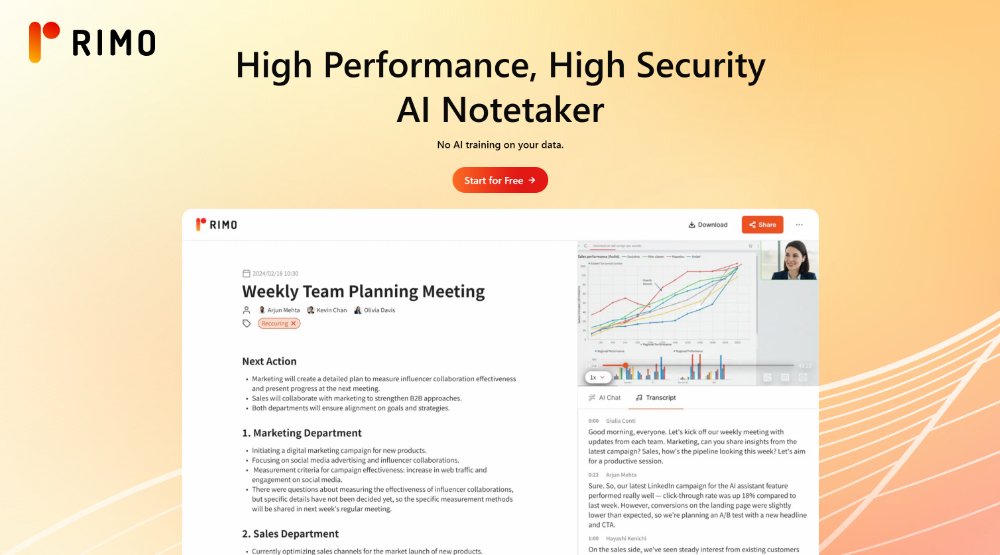
Rimo Voice is an AI meeting minutes tool that transcribes and summarizes in-person and online meetings for teams, with real-time minutes, multilingual support, and security-focused business use.

Rimo Voice preview

Overview

Rimo Voice is an AI meeting minutes tool that transcribes and summarizes in-person and online meetings. It is positioned for teams that want to reduce manual note-taking while keeping a structured record of what was discussed, decided, and assigned.

The product emphasizes high-accuracy transcription, real-time minute creation, and AI-assisted review. Source material also highlights multilingual support, speaker separation, summary generation, and issue or point extraction to help teams turn meetings into usable records more quickly.

Rimo presents itself as a security-conscious service for business use, with ISO/IEC 27001 and 27017 certification, data storage options in Japan or on request in the US/EU, and controls such as SSO and IP address restriction. Pricing is offered on Solo and Business plans, with a free trial or free testing option mentioned on the site.

Features and functionalities

High-precision transcription

Transcribe meetings in real time or from recorded video, with support for Japanese and multilingual meetings. The product also claims speaker separation and dictionary registration to improve accuracy in specialized terms.

AI summaries and point extraction

Generate concise summaries, extract key points, and customize the summary format to fit company or industry needs. The product also supports AI chat for reviewing decisions and missed items.

Collaborative editing and sharing

Work on minutes together with teammates and AI in real time, with edit history, permissions, and team or project-based management. This supports collaborative review without losing version control.

Meeting and workflow integrations

Connect with Microsoft Teams, Zoom, Google Meet, Webex, Google Calendar, Outlook Calendar, and CRM systems such as Salesforce and Microsoft Dynamics. This helps capture meetings and move information into existing workflows.

Clean output and flexible sharing

Remove filler words and noise, then share minutes through secure URLs, permissions, or internal team access. Exports are available in formats such as CSV, Excel, and PDF.

Security and admin controls

Use ISO/IEC 27001 and 27017-aligned controls, IP restrictions, SSO, audit logs, usage statements, and region options for data storage. The site also states that customer data is not used for AI training.

Use cases

  • Recurring internal meetings

    Record live meetings and produce minutes with transcription, summaries, and point extraction for teams that need a structured record right after the call ends.

  • Global and technical discussions

    Capture meetings with multilingual speakers, mixed accents, or specialized terminology using speaker separation, dictionary registration, and multilingual transcription.

  • Collaborative team documentation

    Share and co-edit minutes across a team or project, with permissions and edit history to manage collaboration on sensitive or high-volume work.

  • Client and deal follow-up

    Connect meeting records to CRM workflows so sales or customer-facing teams can capture discussion details and share them inside existing systems.

  • Research and compliance records

    Use case-study-style workflows such as audits, hearings, interviews, and user research, where accurate transcripts and searchable records reduce manual review work.

Pros and Cons

Pros

  • Covers both in-person and online meetings, including real-time transcription and summarized minutes.
  • Supports multilingual meetings and Japanese-focused transcription with speaker separation and dictionary registration.
  • Includes collaboration features such as shared editing, permissions, history, and team or project management.
  • Offers broad integrations with conferencing, calendar, and CRM tools.
  • Provides security and administration features aimed at business deployment, including SSO, audit logs, and data-region options.

Cons

  • The public pages do not spell out every pricing limit, so buyers may need to confirm exact plan boundaries before purchase.
  • Some capabilities are described only at a high level, especially around AI assistant behavior and workflow automation.

FAQ

Is there a free trial available?

The source shows a free trial / free testing option, but it does not specify the exact trial length or conditions.

Is pricing based on users or transcription time?

The pricing page shows Solo and Business plans, with pricing presented per account and monthly payment options. It does not clearly state a pure usage-based model for all plans.

Which meeting tools does Rimo support?

The site says Rimo integrates with Microsoft Teams, Zoom, Google Meet, Webex, and calendar tools such as Google Calendar and Outlook Calendar.

What does Rimo generate from meetings?

Rimo supports automatic transcription and summarization, plus speaker separation, noise and filler removal, real-time transcription, and AI chat for reviewing meeting content.

When are minutes created?

The source states that transcription and summarization can be completed about 5–10 minutes after the meeting ends, and some meetings can also be handled in real time.

Quick Facts

Category
AI meeting minutes
Primary use
Automatic transcription and summarization of meetings
Platform
Web-based service
Integrations
Teams, Zoom, Google Meet, Webex, Google Calendar, Outlook Calendar, Salesforce, Microsoft Dynamics
Security
ISO/IEC 27001 and 27017 certified; SSO and IP restriction supported
Website
rimo.app