
Mac Context Awareness
Alter reads the current Mac context, including screen and app state, so prompts can use what is already on screen instead of starting from scratch.

Alter is a native macOS AI assistant for voice workflows, app automation, meeting notes, and contextual help across files, websites, and apps.
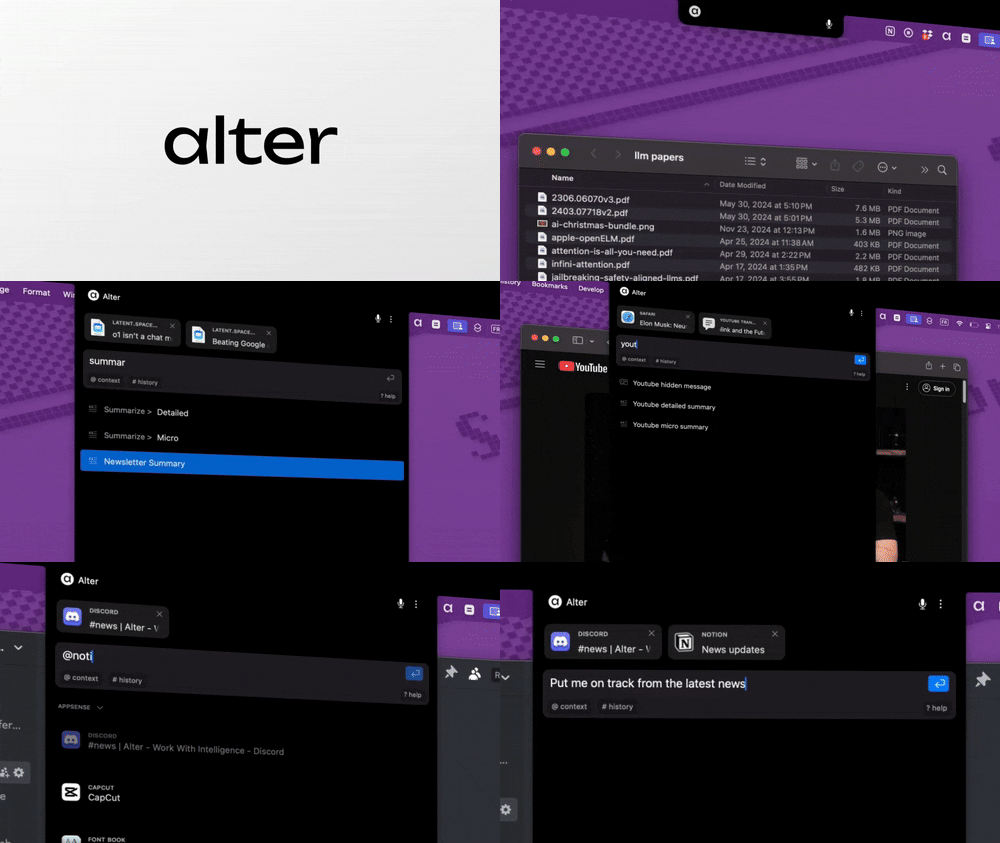
Alter is a native macOS AI assistant that is designed to work inside your existing workflow rather than as a separate chat surface. The product positions itself as “AI for your entire workday,” with features centered on system-wide context, voice actions, meetings, and app automation.
The site says Alter can understand screen and app context, insert actions into other applications, and work with files, folders, emails, screenshots, and websites. It also supports local models and your own API keys, which lets users choose between fully local setups and managed model access.
Pricing is structured around a free core app and optional paid plans. The free tier stays usable with your own providers or local models, while paid plans add managed access to 50+ cloud models, meeting intelligence, advanced voice models, and broader automation features.
Alter reads the current Mac context, including screen and app state, so prompts can use what is already on screen instead of starting from scratch.
The app can insert responses directly into other apps and control native macOS workflows, reducing copy-paste and app switching.
Voice commands and dictation are built in, with speech-to-text support for quick prompts and faster message drafting.
Meeting recordings can produce notes, summaries, and speaker identification, with local or cloud processing depending on the plan.
Alter can connect to 2,000+ tools and services, including examples such as Google Workspace, HubSpot, Notion, Gmail, and Linear.
The app provides access to 50+ AI models and routing options, plus support for local models and an OpenAI-compatible endpoint.
Use voice-first commands to draft replies, trigger actions, and move through tasks without switching between separate chat and app windows.
Record online meetings or in-person conversations, then generate speaker-aware notes and reports that you can revisit later.
Connect Alter to services such as Google Workspace, Notion, HubSpot, Gmail, and Linear to automate recurring multi-step tasks.
Work with files, folders, emails, screenshots, and webpages in a contextual way when you need AI help inside an active workflow.
Choose local models or bring your own API keys when you want to keep processing under your own control instead of using managed cloud access.
Alter offers a 7-day free trial with full access to its models. After that, you can keep using the free app with your own API keys or local models, or choose a paid plan for managed model access and extra features.
Yes. The pricing page says the app remains fully functional after the trial if you connect your own providers or run local models. Paid plans mainly remove upgrade prompts and provide access to managed AI models and other extras.
Alter can work with your own AI providers, local models through tools such as Ollama or LM Studio, and its own model routing plans. The pricing page also mentions an OpenAI-compatible endpoint for using Alter in other tools.
Alter is described as a native macOS AI assistant that supports macOS Ventura 13 and newer. The home page says it works with both Apple Silicon and Intel Macs.
The site says Alter is built for contextual, system-wide workflows on Mac, including meeting recordings, voice commands, app actions, file and folder work, and automations across many services.