
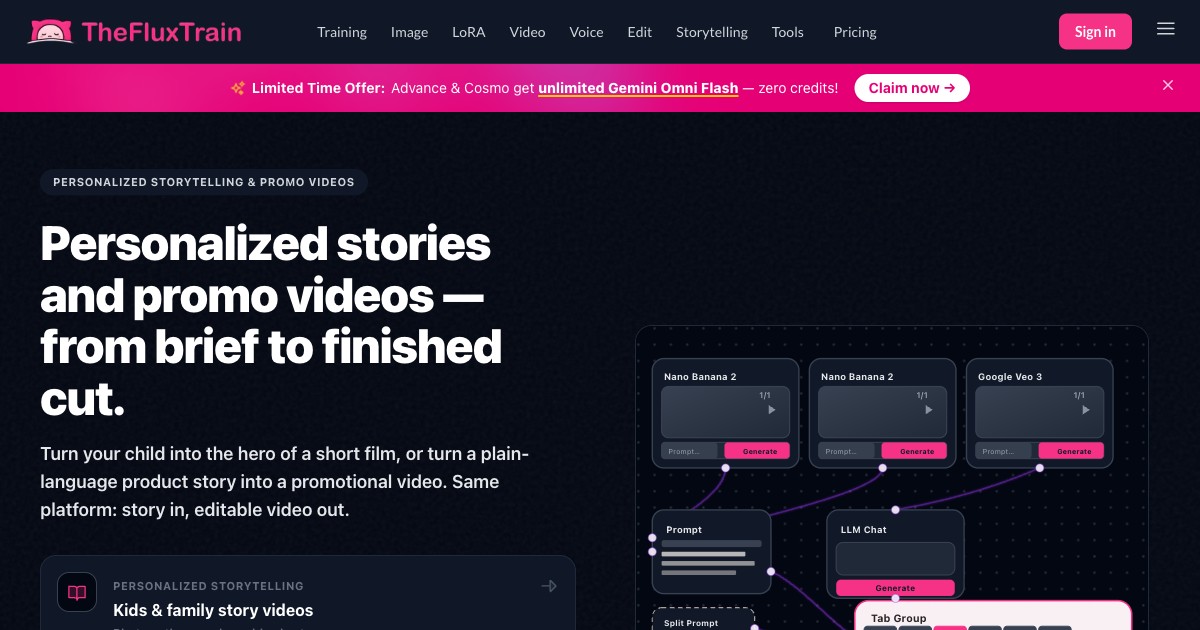
Visual workflow builder
Build generation pipelines in a visual canvas by chaining prompts, models, and outputs, then reuse them across projects instead of rebuilding the same steps each time.

Fluxos criativos de IA na web para criar pipelines visuais reutilizáveis
TheFluxTrain is a creative AI workflow platform for building reusable visual pipelines. Its Flow Studio lets users chain prompts, models, and outputs in a visual canvas, with templates for ads, infographics, film, reels, and other production tasks.
The product is aimed at creators and teams that want repeatable generation rather than one-off prompts. The site positions it around image, video, voice, LoRA, and editing workflows, plus custom training and an AI video editor for turning generated material into finished assets.
Build generation pipelines in a visual canvas by chaining prompts, models, and outputs, then reuse them across projects instead of rebuilding the same steps each time.
Start from Flow Studio templates for common creative tasks such as ads, infographics, and film-style workflows, then customize the flow to fit your brief.
Use the product across image, video, voice, LoRA, and editing workflows, including text-to-video, image-based generation, dubbing, voice change, and noise removal.
Create or refine still assets with image tools such as inpainting, editing, reference guidance, custom LoRA work, and several image models listed on the pricing page.
Run video workflows that include multi-shot generation, interpolation, motion transfer, actor replacement, video extend, and an AI video editor with timeline and social export.
Train custom models for faces, products, characters, influencers, and styles, with pricing tied to training credits across the paid plans.
Build production-ready ad pipelines that can be reused for multiple campaigns, with templates intended for branded creative output at scale.
Create consistent characters, influencers, or stylized personas using custom training, LoRA-guided editing, and workflow templates that keep visual output aligned across generations.
Assemble infographics, product posters, and social-ready visual layouts by chaining image generation, editing, and layout-oriented templates.
Produce motion-first content such as multishot clips, motion transfer, actor replacement, and background replacement for short-form film or social video workflows.
Generate custom workflows for specialized creative tasks, then save and reuse them through Flow Studio rather than rebuilding the process each time.
It is a creative workflow platform for building repeatable AI generation pipelines. The source pages describe Flow Studio for chaining prompts, models, and outputs into visual workflows for ads, infographics, films, reels, and related creative tasks.
The source shows subscriptions and one-off credits. Pricing is organized into Starter, Pro, Advance, and Cosmo plans, and the site says no credit card is required to get started.
Yes. The pricing page lists Flow Studio, image generation, video generation, voice tools, custom training, an AI video editor, storybooks, shareable links, folders, CLI, and API, all within the same workspace.
The explore page describes templates and click-by-click flows, and the Flow Studio page says you can create and manage flows from a visual canvas. That suggests users can open a template, customize it, and chain models together rather than starting from scratch.
The source pages do not provide a full technical export spec. They do show output-oriented tools such as video generation, image generation, voice processing, shareable links, and AI video editing with subtitles and social export.
Os dados de tráfego são apenas para referência.

dreamcut.ai
Editor de vídeo e gravador de ecrã com IA para Mac, ideal para criar tutoriais, demonstrações e vídeos partilháveis.

clipzap.ai
Editor web de fluxos de trabalho de vídeo com IA para criar e automatizar conteúdos de vídeo, imagem e áudio

openmotion.design
OpenMotion é uma ferramenta de motion design orientada por prompts para criar cenas editáveis, vídeos de lançamento, vídeos explicativos e clipes para redes sociais. Combina planejamento de cenas com IA, canvas, linha do tempo e controles de som, e permite exportar para vídeo, WebM com transparência e HTML independente.

riverside.com
Riverside é um estúdio online para gravar, editar, reutilizar e publicar podcasts e conteúdos de vídeo. Permite sessões remotas, pós-produção assistida por AI e fluxos de alojamento ou transmissão ao vivo conforme o plano.

capsule.video
Editor de vídeo com IA para criar conteúdo de marca em escala

nemovideo.com
NemoVideo é um agente de edição de vídeo com IA que permite descrever edições em linguagem natural, criar roteiros, analisar tendências e gerar vídeos, com plano gratuito e níveis pagos baseados em créditos.