
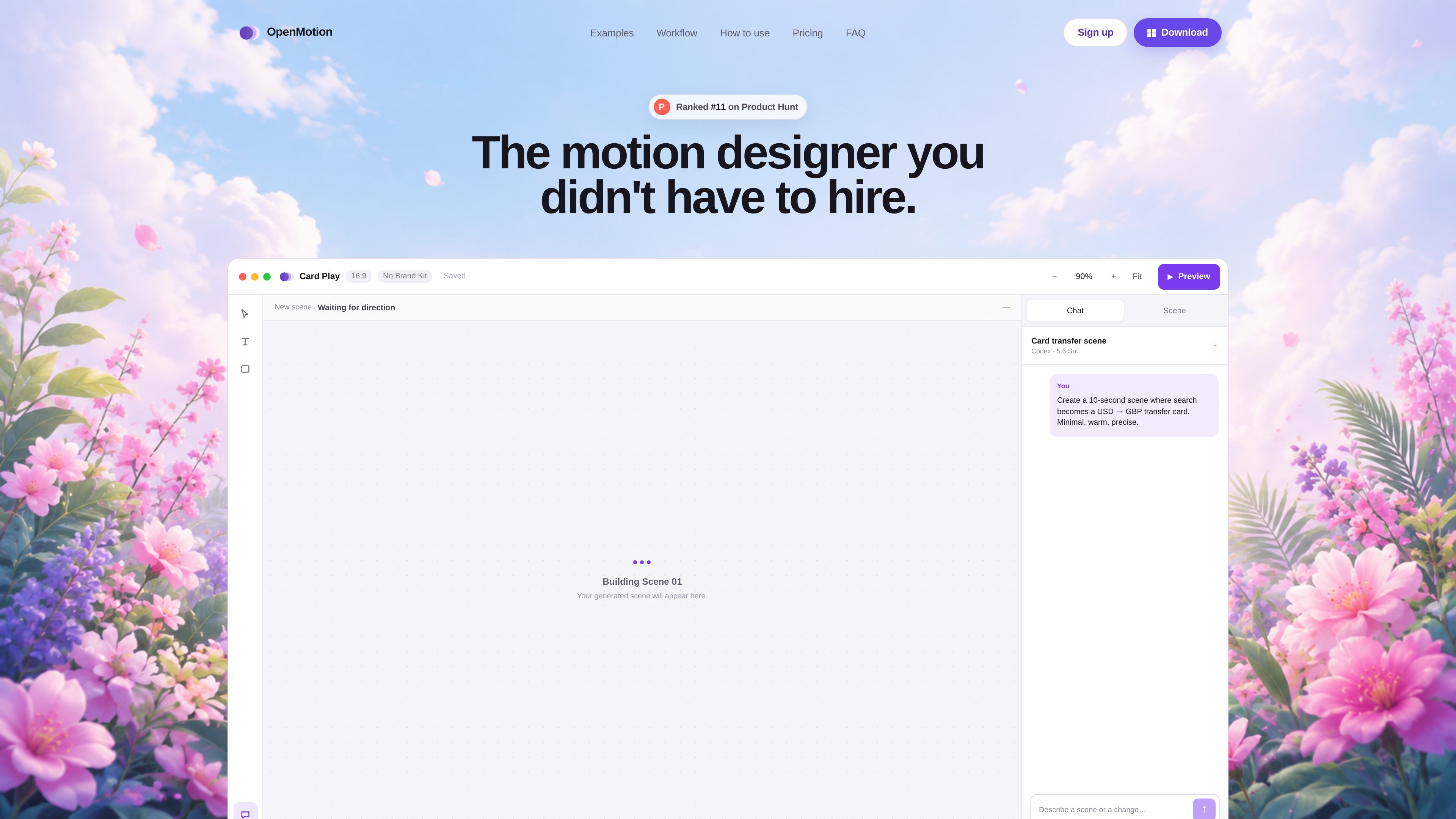
Prompt-based scene planning
Describe the intended story, timing, visual character, and final message; OpenMotion uses that direction to plan an initial sequence.

OpenMotion é uma ferramenta de motion design orientada por prompts para criar cenas editáveis, vídeos de lançamento, vídeos explicativos e clipes para redes sociais. Combina planejamento de cenas com IA, canvas, linha do tempo e controles de som, e permite exportar para vídeo, WebM com transparência e HTML independente.
OpenMotion is a desktop motion design tool that turns a written creative direction into an editable sequence of scenes. Instead of producing only a locked video, it creates a scene plan that can be revised through chat and adjusted on a canvas and timeline.
The workflow is intended for product videos, launch teasers, explainers, social clips, logo motion, and other scene-based animations. Users can describe the story, duration, format, visual style, and closing message, then refine composition, timing, easing, typography, color, assets, and sound before exporting.
Describe the intended story, timing, visual character, and final message; OpenMotion uses that direction to plan an initial sequence.
Select and revise individual scenes while keeping the project structure editable rather than rebuilding a finished render elsewhere.
Adjust the timing and arrangement of visual elements and sound on a timeline designed for scene-level control.
Revise a scene in chat, then continue shaping the result manually on the canvas and timeline.
Keep brand-related elements available for motion projects, as shown in the product workspace.
Export standard video, transparent WebM for overlays, or self-contained HTML for web motion.
Build launch videos and product reveals by moving from a written product story to a timed sequence of scenes.
Organize a problem, demonstration, and outcome into a scene-based animation with deliberate pacing.
Produce short motion pieces for social publishing, with video exports and controls for timing and presentation.
Create logo motion, interface demonstrations, title sequences, and brand moments using editable visual scenes.
Export self-contained HTML when the finished motion needs to run as interactive web content rather than as a conventional video.
The site lists product videos, launch teasers, explainers, social clips, logo motion, and other scene-based animations as supported creation types.
The documented setup supports Codex CLI and Claude Code. OpenMotion can detect an installed CLI and open the provider’s sign-in flow when a connection is needed. The site says users do not need to manage separate API keys for this workflow.
Start by describing the story, duration, format, visual style, and final message. After the first cut is generated, revise scenes in chat, move elements on the canvas, and tune timing, easing, type, color, and sound on the timeline. The project remains editable after export.
OpenMotion supports video for launches and social work, transparent WebM for overlays, and self-contained HTML for web motion.
The site currently describes one free plan while OpenMotion is being built. It says advanced features may be placed in paid plans in the future, but no prices or plan limits are provided.
Os dados de tráfego são apenas para referência.

devmotion.app
DevMotion é uma plataforma de criação e edição de vídeos com IA no navegador, voltada a lançamentos de produtos, demonstrações, anúncios e comunicados de recursos. Transforma prompts ou URLs de produtos em projetos de vídeo HTML editáveis com animação, narração, música, legendas e controles de linha do tempo.

openchatcut.com
OpenChatCut é um editor de vídeo gratuito, open source e local-first para edição conversacional com assistência de IA em uma linha do tempo multifaixa real. Transforme prompts em cortes editáveis mantendo o controle sobre projetos, exportações e alterações na linha do tempo.

animiz.cn
万彩动画大师 é um software para desktop que cria vídeos animados e microcursos com linha do tempo, biblioteca de recursos, importação de PPT e assistência de AI.

movavi.com
Movavi Video Editor é um editor de vídeo para desktop que permite cortar, recortar e aprimorar clipes com ferramentas de linha do tempo e recursos assistidos por AI. Oferece download gratuito, amplo suporte a formatos e requisitos do Windows documentados.

nemovideo.com
NemoVideo é um agente de edição de vídeo com IA que permite descrever edições em linguagem natural, criar roteiros, analisar tendências e gerar vídeos, com plano gratuito e níveis pagos baseados em créditos.

podfyai.com
Ferramenta de vídeo com IA no navegador para criar vídeos curtos com texto, áudio e música.