
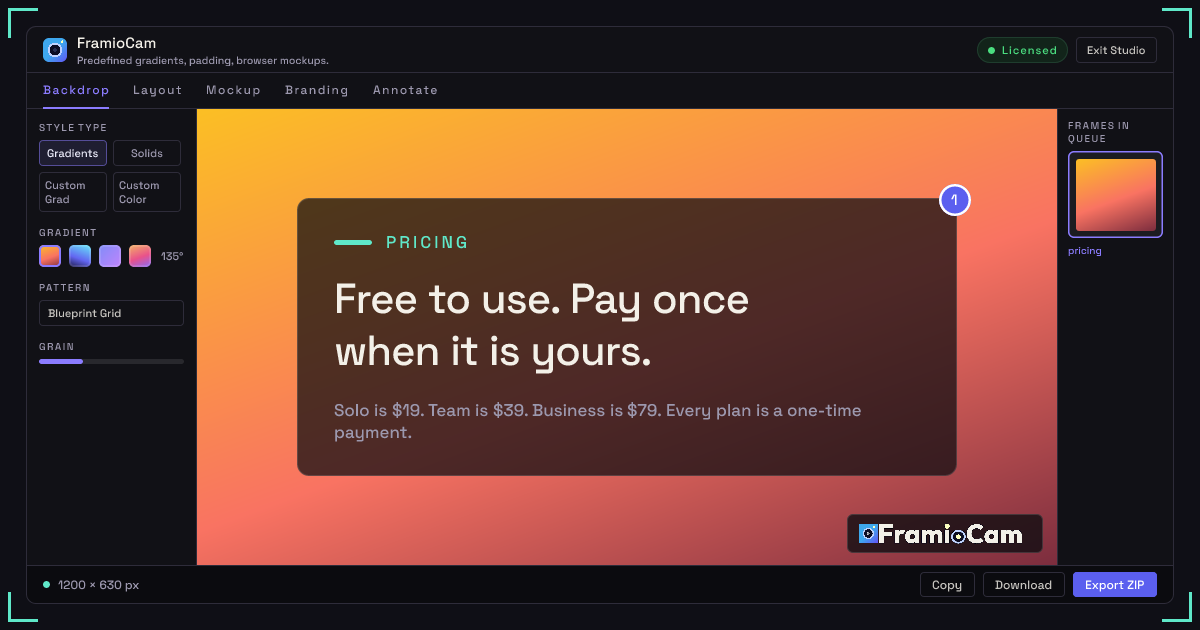
Flexible screenshot capture
Capture the visible area, a full scrolling webpage, or a precisely selected region. Full-page captures are automatically scrolled and stitched into a single PNG.
Capture screenshots and record, style, and edit screen content in Chrome with local processing and optional Google Drive sync.
FramioCam is a Chrome extension that combines screenshot capture, screen recording, image styling, and video editing in one browser-based workspace. It can capture a visible area, a full scrolling webpage, or a selected region, and can record a browser tab, application window, or entire display with microphone and system audio options.
Its screenshot studio adds backdrops, window frames, annotations, and watermarks to captures or imported images, while the video editor provides a multi-lane timeline for trimming, splitting, zooming, text, annotations, and cursor emphasis. Capture and editing are performed in Chrome, with media kept in browser storage on the user’s machine; Team and Business users can optionally sync files to their own Google Drive.
Capture the visible area, a full scrolling webpage, or a precisely selected region. Full-page captures are automatically scrolled and stitched into a single PNG.
Apply gradients, solid or custom colors, textures, grain, lighting, padding, canvas shapes, rounded corners, borders, and tilt effects to screenshots or imported images.
Add macOS or Windows window frames, titles, address bars, shadows, and glass reflections to present screenshots in a chosen visual context.
Record the current tab, an application window, or the entire screen, with system sound, microphone input, or both selected before recording. Automatic click highlights help viewers follow the cursor.
Trim and split clips on a multi-lane timeline, zoom and pan around clicks, add text and annotations, highlight the cursor, and work with audio-related lanes before export.
Capture, edit, and export inside Chrome. Media remains in browser storage on the user’s machine; Team and Business users can optionally send files to their own Google Drive and sync projects across devices.
Product teams can record a feature demonstration, cut it into a short clip on the timeline, and prepare it for an internal update or presentation.
Support and QA staff can capture a precise region or record a reproducible issue, then add annotations or cursor emphasis instead of relying only on written descriptions.
Course creators can record lessons, divide longer material into edited sections, and add text or annotations without opening a separate video editor.
Sales and customer-success teams can create a screen-recorded walkthrough tailored to a particular account or workflow and share the resulting media.
Teams can add a backdrop, device frame, watermark, and chosen canvas shape to a capture or imported image for documentation, presentations, or product communication.
No account is needed for the first 50 screenshots, and recording and editing can also be tried without an account. Video export requires a free account, which also removes the 50-screenshot limit.
Captures, recordings, and edits stay in the browser’s storage on the user’s machine. FramioCam says nothing is uploaded to its servers; Team and Business users can optionally send files directly from the browser to their own Google Drive.
The extension can record the current browser tab, an application window, or the entire screen. Before recording, users can choose system audio, microphone audio, or both.
The free tier includes unlimited screenshots, recordings, and exports, with exports up to 1080p. Exported video carries a FramioCam watermark. A free account is required for video export.
A device is counted as a browser. Team and Business devices are shared across the people on the plan, and a browser seat can be released from the account so another browser can use it.

www.supercut.cc
Supercut is a private AI video editor that runs in a browser or desktop app, letting creators describe edits such as trimming, reframing, captioning, color grading, and audio cleanup in plain English. It also includes a multitrack timeline and screen recorder for local video workflows.

screencursor.com
ScreenCursor is a Chrome screen recorder that automatically turns clicks, drags, and keystrokes into timed zoom effects. It is designed for people who want to produce focused MP4 demos without manually placing camera moves or uploading recordings.

openchatcut.com
OpenChatCut é um editor de vídeo gratuito, open source e local-first para edição conversacional com assistência de IA em uma linha do tempo multifaixa real. Transforme prompts em cortes editáveis mantendo o controle sobre projetos, exportações e alterações na linha do tempo.