
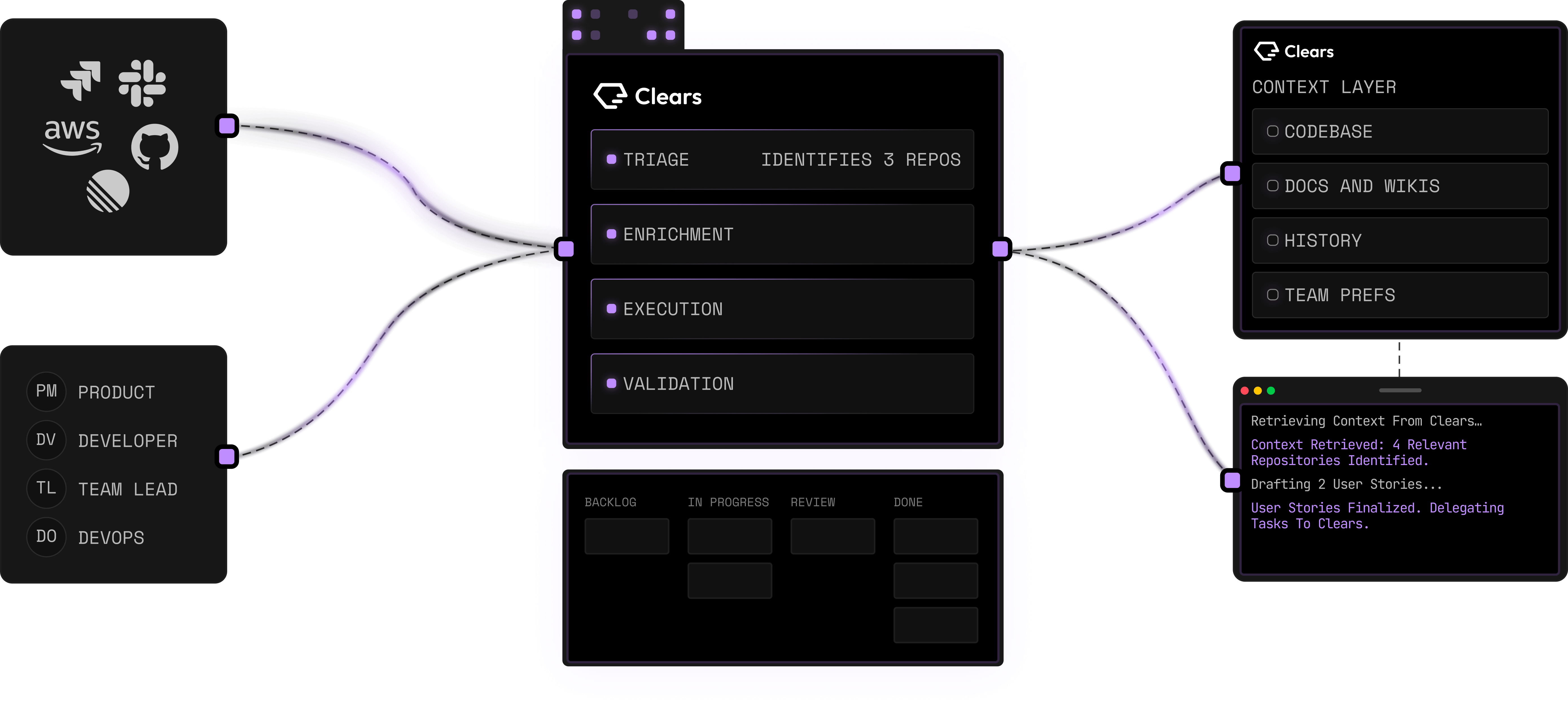
Agentic workflow orchestration
Clears coordinates fleets of AI agents across engineering systems, making it possible to assign, run, observe, and manage software tasks through a single workflow layer.

Clears é uma plataforma de orquestração de IA para equipes de engenharia que coordena agentes, ferramentas, tickets e fluxos desde os requisitos até pull requests revisados, com análise em segundo plano, execução paralela, contexto compartilhado e integrações.
Clears is an orchestration layer for agentic software delivery. It coordinates AI agents, engineering tools, and workflow steps across the software development lifecycle, turning requirements and stories into tracked work and reviewed pull requests across repositories.
The platform is designed for engineering teams that want to run software tasks in parallel while retaining visibility and control. It provides shared context for agent runs, background analysis for incoming work, and a task board that connects each ticket to its active agent session and resulting pull request.
Clears coordinates fleets of AI agents across engineering systems, making it possible to assign, run, observe, and manage software tasks through a single workflow layer.
The platform can continuously analyze tickets to help with root-cause investigation, scope definition, risk assessment, and feasibility review. Work can be handled automatically or escalated to an engineering team when needed.
Clears provides shared memory to agents across runs, reducing the need to reconstruct context whenever a task starts and helping agents work from the same project information.
Each ticket is connected to its live agent session in a central board. Teams can monitor progress from requirement to pull request, steer work when it drifts, run tasks in parallel, and resume work later.
Through MCP, a coding agent can use Clears to access context, shape requirements, and start, track, and document background tasks. Engineers can also bring an individual task back into the terminal at any stage.
The Pro plan lists integrations with Jira, GitHub, Bitbucket, GitLab, and Slack, along with a shared workspace for team use.
Engineering teams can use background analysis to investigate and scope large volumes of raw tickets, assess feasibility and risk, and route items for autonomous handling or human escalation.
Teams with several independent items can use the task board to launch parallel agent sessions, monitor each task, and keep progress visible in one place rather than managing isolated runs.
Product and engineering workflows can use Clears to connect a story or requirement with implementation activity and the resulting reviewed pull request across connected repositories.
Developers who prefer terminal-based workflows can use MCP to provide context, start tasks, inspect their progress, and take control of a running task without leaving the terminal.
Teams working across issue tracking, source control, and communication tools can use the listed Jira, GitHub, Bitbucket, GitLab, and Slack integrations as part of a shared delivery workflow.
Clears coordinates AI agents, engineering tools, and workflows from requirements through software delivery. Its stated output is reviewed pull requests across connected repositories.
Engineers can monitor and steer work from the task board, run items in parallel, resume tasks where they left off, or access individual tasks through MCP from the terminal.
The Pro pricing plan lists Jira, GitHub, Bitbucket, GitLab, and Slack integrations.
Yes. The pricing page offers a free trial with full access and says that no credit card is required to start.
The Enterprise plan lists custom workflows, dedicated customer engineering, priority support with SLA commitments, large-scale codebase analysis, deployment in a customer-owned VPC, and tailored onboarding and implementation.
Os dados de tráfego são apenas para referência.

clicks.page
clicks.page é uma ferramenta de análise de sites sem cookies para fundadores e indie hackers. Acompanha visitantes, fontes de tráfego, conversões e atribuição de receita, com fluxos feitos para agentes de IA.

reignat.com
Reignat é uma plataforma de análise web com foco em privacidade que combina tráfego em tempo real, atribuição de receita, jornadas dos visitantes, funis e acompanhamento de desempenho para equipes de produto e marketing que buscam uma alternativa mais simples ao Google Analytics, com configuração sem cookies por padrão.

agentbarn.dev
Agent Barn é um plano de controle auto-hospedado para criar, configurar, executar e monitorar agentes de IA no Slack, Microsoft Teams e Telegram, mantendo visíveis conversas, atividades das ferramentas e custos.

tableau.com
Plataforma de inteligência empresarial e análise visual para explorar, visualizar e compartilhar dados

datafa.st
DataFast é uma ferramenta de análise web para empreendedores e equipes pequenas, conectando tráfego a receita, pagamentos, metas e jornadas dos visitantes, com rastreamento por cookies ou cookieless.

icon.com
Icon é um serviço de anúncios UGC e uma plataforma de operações criativas conduzidos por pessoas. Produz 6 anúncios editados e cuida da seleção de criadores, roteiros, envio, orientação e edição. Também inclui o Admaker 2.0 para pesquisa de concorrentes, reutilização de ativos, análise e lançamento de anúncios.