
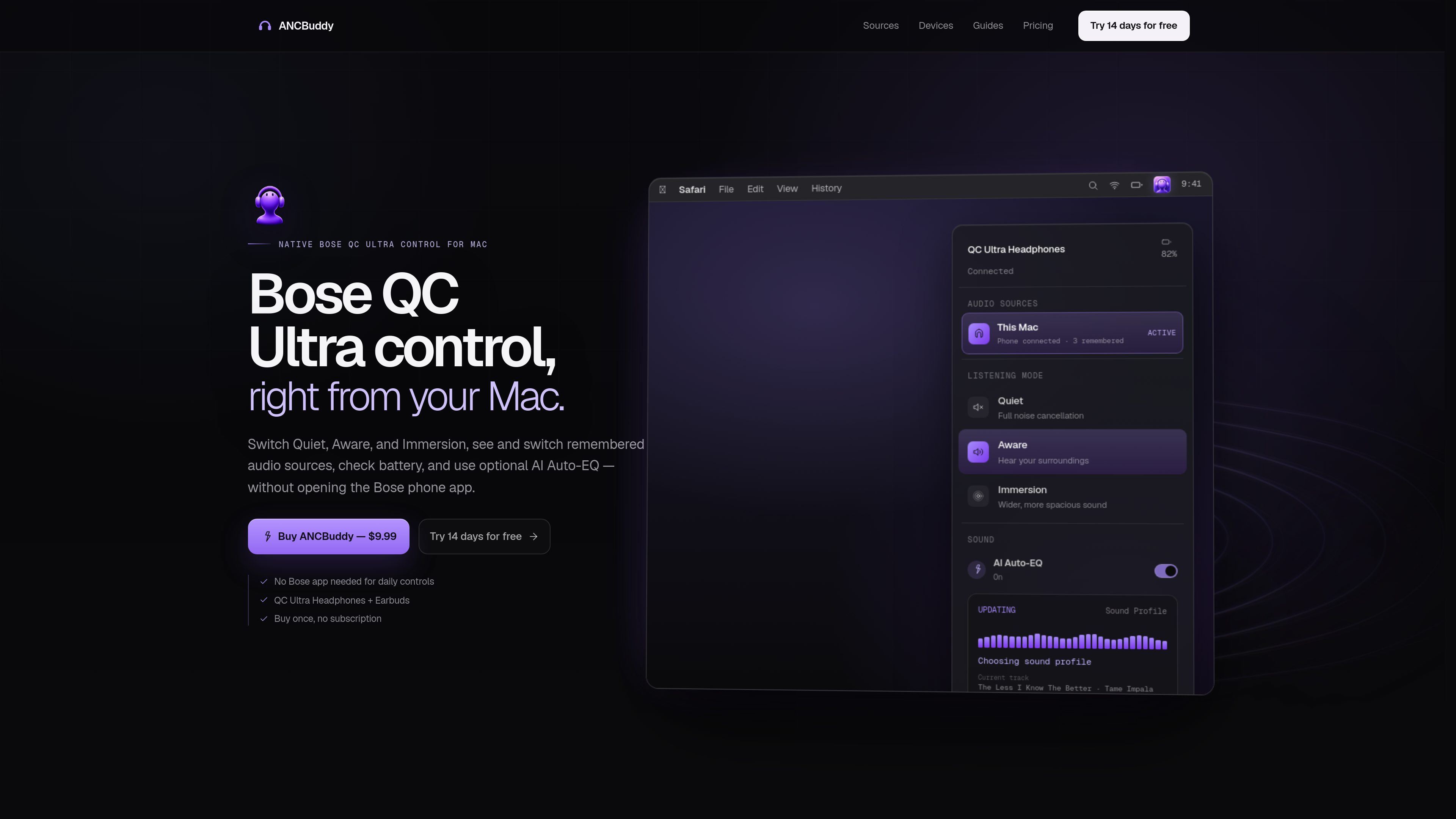
Listening-mode controls
Switch between Quiet, Aware, and Immersion from the Mac menu bar. On compatible headphones, Still and Motion are also available within Immersion.

ANCBuddy is a macOS menu-bar utility for controlling compatible Bose QC Ultra headphones and earbuds. It provides listening-mode, audio-source, battery, and connection controls without requiring the Bose phone app for daily use.
ANCBuddy is a macOS menu-bar utility for compatible Bose QC Ultra headphones and earbuds. It provides direct access to Quiet, Aware, and Immersion listening modes, battery and connection status, and the Bose device’s remembered audio sources without requiring the Bose phone app for everyday controls.
The app distinguishes between the active audio source, other connected sources, and remembered devices. From its Audio Sources panel, users can switch to a remembered device or start and cancel Bose pairing. If the Mac is connected to the headphones but audio is routed elsewhere, ANCBuddy can offer a recovery flow to reconnect and select the Bose audio output when macOS exposes it.
ANCBuddy also supports Still and Motion within Immersion on compatible headphones, optional AI Auto-EQ, Launch at Login, and update checks. AI Auto-EQ is opt-in and sends current artist, title, and album metadata to its AI service only while enabled to generate a three-band profile.
The utility supports macOS 12 Monterey and newer on Apple Silicon and Intel Macs. Compatible hardware listed by the product includes Bose QuietComfort Ultra Headphones Gen 1, Bose QuietComfort Ultra Headphones Gen 2, and Bose QuietComfort Ultra Earbuds 2nd Gen. The Bose app remains useful for initial setup, firmware updates, and settings outside ANCBuddy’s scope.
Switch between Quiet, Aware, and Immersion from the Mac menu bar. On compatible headphones, Still and Motion are also available within Immersion.
See which device is actively streaming, which other source is connected, and which devices the QC Ultra remembers. Select a remembered source from the Audio Sources panel.
Start or cancel pairing for the QC Ultra from ANCBuddy, then complete the new connection through the relevant phone, tablet, computer, or macOS Bluetooth controls.
Check battery level, connection state, listening mode, and source state from the menu-bar panel.
When enabled, ANCBuddy uses the current artist, title, and album to generate a three-band Bass/Mid/Treble profile. The feature is opt-in and separate from the app’s local daily controls.
Launch ANCBuddy automatically at login, check for updates, and use a recovery flow when the Bose control connection works but macOS has not selected the Bose audio output.
Open the menu-bar panel to move between Quiet, Aware, and Immersion without leaving the Mac workflow or opening the Bose phone app.
Use the source list to identify the active device, review other connected sources, and switch the QC Ultra to a remembered phone, tablet, or computer.
When Bose controls respond but Mac audio is still routed elsewhere, use the offered recovery to reconnect and select the Bose output, or continue in Bluetooth Settings if macOS does not expose the profile.
Start pairing from ANCBuddy, then finish the connection using the Bluetooth controls on the new device. This is useful when adding a source without opening the Bose mobile app.
Enable AI Auto-EQ when music is playing if a generated Bass/Mid/Treble profile is wanted; leave it disabled for the app’s regular local controls.
ANCBuddy supports macOS 12 Monterey and newer on Apple Silicon and Intel Macs. Listed compatible hardware includes Bose QuietComfort Ultra Headphones Gen 1, Bose QuietComfort Ultra Headphones Gen 2, and Bose QuietComfort Ultra Earbuds 2nd Gen.
No. ANCBuddy connects to an already-paired QC Ultra over Bluetooth for listening modes and everyday source control. The Bose app is still useful for initial setup, firmware updates, shortcuts, and settings ANCBuddy does not manage.
ANCBuddy can show the active source and another connected source, but it does not provide a Multipoint on/off toggle. It manages the source list exposed by compatible QC Ultra hardware rather than arbitrary nearby Bluetooth devices.
AI Auto-EQ is opt-in. While it is enabled, ANCBuddy sends the current artist, title, and album to its AI service to generate a three-band EQ profile. Results are cached using a hashed track key, and raw song names are not stored.
A 14-day trial is available. The permanent license is listed as a $9.99 one-time purchase with no subscription, and the product states that updates are included.
Os dados de tráfego são apenas para referência.

smartpause.yasinozmeen.me
SmartPause is a free, open-source macOS menu bar app that routes the play/pause key to the application currently producing sound. It helps people switch between media apps without relying on macOS’s sometimes-stale Now Playing selection.

yudaotor.github.io
Lyrimuse is an open-source macOS desktop lyrics app that synchronizes lyrics word by word for supported music players and browser-based web players. It provides multiple display modes, translation and romanization, plus optional Last.fm listening history and scrobbling.

ghost-deck.app
GhostDeck is an offline music player for macOS that combines a classic modular deck with animated low-poly scenes that respond to playback. It plays music files from folders without accounts, tracking, or network access.